Stok ve Depo Takibi: Ürün Nerede, Kaç Adet Var, Hangi Aşamada?
Stok takibi yalnızca depoda kaç adet ürün kaldığını görmek değildir. Delbig CRM’de ürün, depo, rezervasyon, stok hareketi, alış faturası, sayım, barkod/QR etiket ve sevkiyat çıkışı aynı operasyon akışında izlenebilir; satış ekibi de depo ekibi de aynı stok bilgisinden çalışır.

Stok görünümü tek rakam değil, operasyon cevabı verir
Bir ürünün depoda bulunması her zaman satılabilir olduğu anlamına gelmez. Ürünün bir kısmı açık sipariş için rezerve edilmiş olabilir, bir kısmı sevkiyat alanına ayrılmış olabilir, bir kısmı tedarikçiden yeni gelmiş olabilir veya sayım farkı nedeniyle kontrol bekliyor olabilir. Bu yüzden stok takibi, yalnızca “stokta kaç var?” sorusunu değil, “müsait mi, ayrıldı mı, sevke çıktı mı?” sorularını da cevaplamalıdır.
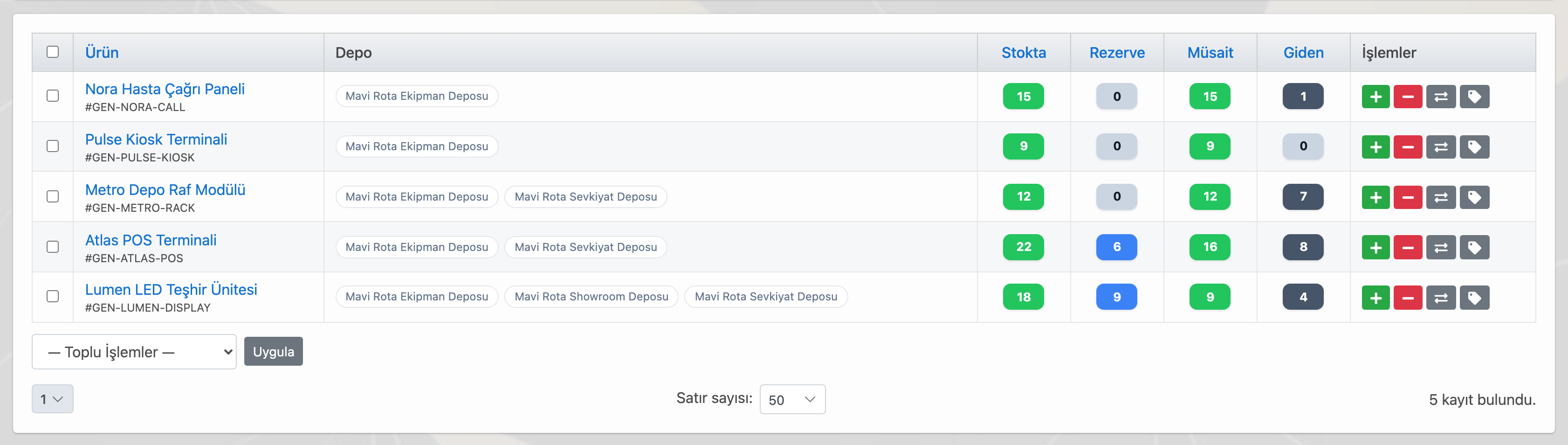
Delbig CRM stok görünümünde ürün, depo, stokta, rezerve, müsait ve giden miktarlar aynı tabloda izlenir. Satış ekibi müşteriye söz vermeden önce müsait miktarı görür; depo ekibi ise hangi ürünün hangi depoda, hangi işlemden dolayı beklediğini daha net takip eder.

Birden fazla depo ve lokasyon ayrı takip edilir
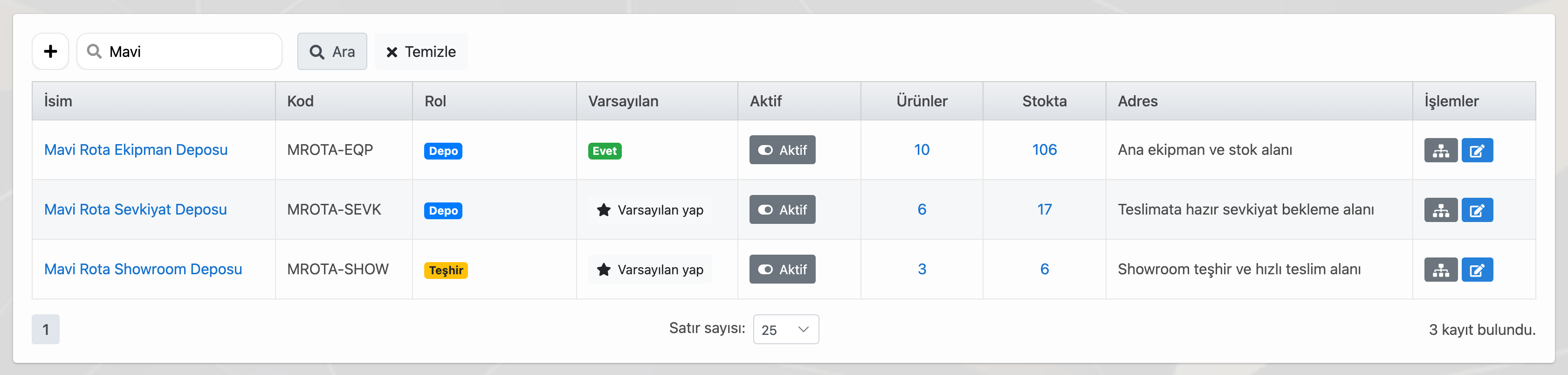
Her firma tek depoyla çalışmaz. Ana depo, mağaza deposu, showroom alanı, sevkiyat deposu, iade alanı veya malzeme deposu ayrı ayrı izlenebilir. Delbig’de depoların rolü ve kodu tanımlandığında ürünün sadece toplam stoğu değil, hangi lokasyonda bulunduğu da görünür hale gelir.
Bu yapı özellikle ürün satışı, tedarik, sevkiyat ve sayım ekiplerinin aynı anda çalıştığı firmalarda karışıklığı azaltır. Ürün ana depodan sevkiyat deposuna transfer edildiğinde hareket kaydı oluşur; sevkiyat tamamlandığında stok düşümü de bu hareket zincirine bağlanır.

Sipariş sevk edildiğinde stoktan düşüm hareket olarak kaydedilir
Stok takibinin en kritik noktalarından biri, müşteriye teslim edilen ürünün sistemde hâlâ satılabilir görünmemesidir. Delbig’de sipariş sevk edildiğinde ürün stoktan düşer ve bu düşüm stok hareketi olarak kaydedilir. Böylece satış ekibi, depoda olmayan ürünü yanlışlıkla tekrar satmaya çalışmaz.
Stok hareketleri yalnızca çıkışları göstermez. Alış faturasıyla stoğa giriş, depolar arası transfer, sayım farkı düzeltmesi ve sevkiyat çıkışı gibi işlemler aynı geçmiş içinde görülebilir. Yönetici daha sonra bir ürünün hangi tarihte neden arttığını veya azaldığını hareket kaydından izleyebilir.

Rezervasyon satış ve depo arasında aynı ürünü korur
Bir ürün müşteri için ayrıldığında satış ekibi bunu notla veya mesajla takip etmek zorunda kalmamalıdır. Delbig’de ürün rezervasyonu yapıldığında stok miktarı içinden ayrılan adet görünür; müsait miktar buna göre hesaplanır. Sipariş sevkiyata döndüğünde rezervasyon tamamlanmış olur, iptal gerektiğinde ise ayrılan miktar tekrar müsait stoğa döner.
Bu akış satış ekibi ile depo ekibinin aynı ürünü farklı varsayımlarla yönetmesini engeller. Müşteriye ayrılmış ürün açık şekilde görünür; hangi ürünün beklediği, hangisinin sevkiyata dönüştüğü ve hangisinin iptal edildiği kayıt altında kalır.

Alış faturası stoğa girişin kaynağı olabilir
Depoya gelen ürünlerin stoğa işlenmesi sadece manuel girişle sınırlı kalmamalıdır. Delbig’de alış faturası manuel oluşturulabilir, PDF olarak içeri alınabilir veya fotoğraf tarama kaynağıyla ürün satırlarına dönüştürülebilir. Faturadaki ürünler sistemdeki ürün kartlarıyla eşleştiğinde ekip hangi satırların stoğa işleneceğini kontrol edebilir.
Bu sayede tedarikçiden gelen ürün, alış faturası ve depo stok girişi ayrı ayrı kopuk kayıtlar gibi ilerlemez. Fatura kaydı stok hareketinin kaynağı olur; sonradan hangi ürünün hangi faturayla stoğa girdiği daha kolay izlenir.

Sayım barkod cihazı veya cep telefonu ile hızlanır
Stok sayımı kağıda yazılan listelerle yapıldığında farkların sisteme aktarılması ve kontrol edilmesi zaman alır. Delbig’de sayım satırları ürün, depo, beklenen miktar ve sayılan miktar üzerinden hazırlanabilir. Barkod okuyucu, el terminali veya cep telefonu ile ürün kodu/QR okutularak sayım süreci daha pratik hale getirilebilir.
Sayım tamamlandığında beklenen ve sayılan miktar arasındaki fark görünür. Onaylanan farklar stok hareketine dönüştürülebilir; böylece sayım sonucu yalnızca rapor olarak kalmaz, stok miktarını düzelten kontrollü bir işlem haline gelir.

Etiket ve QR ürünün sahadaki dilidir
Depoda ve sevkiyat alanında ürünün doğru anlaşılması için yalnızca ürün adı yeterli olmayabilir. Delbig’de malzeme deposu, sevkiyat deposu veya ürün gruplarına özel etiket tasarımları hazırlanabilir. Barkod ve QR alanları ürün kodunu, stok kaydını, sipariş bağlantısını veya süreç aşamasını sahada hızlıca bulmaya yardımcı olur.
Bu özellikle çok ürünlü depo, sevkiyat hazırlığı, saha teslimatı veya mobil sayım süreçlerinde önemlidir. Ürünün hangi aşamada olduğu etiketteki QR üzerinden kontrol edilebilir; ekip aynı ürünü farklı isimlerle aramak yerine sistemdeki ortak kayıt üzerinden ilerler.

| İhtiyaç | Delbig’de karşılığı | Sonuç |
|---|---|---|
| Müsait stok görmek | Stokta, rezerve, müsait ve giden miktarlar birlikte hesaplanır. | Satış ekibi müşteriye daha doğru stok bilgisi verir. |
| Birden fazla depo yönetmek | Depo, rol, kod, lokasyon ve transfer hareketleri ayrı izlenir. | Ürünün hangi depoda olduğu netleşir. |
| Siparişe ürün ayırmak | Rezervasyon açık, tamamlanan veya iptal edilen durumlarla takip edilir. | Ayrılan ürün yanlışlıkla tekrar satılmaz. |
| Sevkiyat sonrası stok düşmek | Sipariş sevk çıkışı stok hareketi olarak kaydedilir. | Teslim edilen ürün stokta görünmeye devam etmez. |
| Alış faturasından stok girişi | Fatura satırları ürünle eşleşir ve stoğa işlenebilir. | Tedarikten depoya giriş kayıtlı ilerler. |
| Barkod/QR ile sayım | Sayım satırları beklenen, sayılan ve fark miktarıyla yönetilir. | Sayım farkları kontrollü stok hareketine dönüşür. |
Sık sorulan sorular
Stok ve depo takibi yalnızca adet sayımı mıdır?
Hayır. Adet bilgisi önemlidir; ancak doğru stok takibi ürünün hangi depoda durduğunu, ne kadarının rezerve edildiğini, hangisinin sevkiyata çıktığını, hangi alış faturasıyla geldiğini ve sayım farkının nasıl işlendiğini de göstermelidir.
Sipariş sevk edilince stok otomatik düşer mi?
Sevkiyat akışı stok hareketiyle bağlandığında sipariş sevk çıkışı ürün stoktan düşer. Böylece teslim edilen ürün açık stok içinde görünmeye devam etmez.
Alış faturası fotoğrafla içeri alınıp stoğa bağlanabilir mi?
Evet. Uygun akışta alış faturası fotoğraf veya PDF kaynağından ürün satırlarına dönüştürülebilir. Ürün satırları eşleştirildikten sonra stoğa işleme kaydı oluşturulabilir.
Barkod veya QR ile stok sayımı yapılabilir mi?
Evet. Barkod okuyucu, el terminali veya cep telefonu ile ürün kodu/QR okutularak sayım ve ürün kontrol süreçleri hızlandırılabilir. Etiket şablonları da ürün ve depo ihtiyacına göre hazırlanabilir.
Stok ve depo takibinizi Delbig ile görünür hale getirin
Ürün, depo, sayım, etiket, alış faturası, rezervasyon ve sevkiyat stok hareketlerini aynı CRM akışında yönetin.
Inventory and Warehouse Tracking: Know What Is Available, Reserved and Ready to Ship
Inventory tracking is not only about how many units are left in a warehouse. In Delbig CRM, products, warehouses, reservations, stock movements, purchase invoices, stock counts, barcode/QR labels and shipment outbound steps can be tracked in one operational workflow, so sales and warehouse teams work from the same stock data.

The inventory view answers more than one quantity question
A product being present in a warehouse does not always mean it is available to sell. Part of the quantity may be reserved for an open order, part may be waiting in the shipment area, part may have just arrived from a supplier, or a count difference may still require review. Inventory tracking should answer not only “how many are in stock?” but also “is it available, reserved or already moving out?”
In the Delbig CRM inventory view, product, warehouse, on-hand, reserved, available and outbound quantities are shown together. The sales team checks available quantity before making a promise to the customer; the warehouse team sees which product is waiting in which warehouse and why.

Multiple warehouses and locations are tracked separately
Most companies do not work with a single storage area. Main warehouse, store warehouse, showroom area, shipment warehouse, return area or material warehouse can be tracked separately. When warehouse role and code are defined in Delbig, the team sees not only total stock but also the location of the product.
This reduces confusion when sales, procurement, shipping and counting teams work at the same time. When a product is transferred from the main warehouse to the shipping warehouse, a stock movement is created; when shipment is completed, stock deduction is connected to the same movement history.

When an order is shipped, stock is deducted as a movement
One of the most critical inventory risks is a delivered product continuing to appear as sellable stock. In Delbig, when an order is shipped, the product can be deducted from stock and the deduction is recorded as a stock movement. This prevents the sales team from promising an item that is no longer available.
Stock movements are not limited to outbound records. Purchase invoice receiving, warehouse transfer, count reconciliation and shipment outbound events can be reviewed in the same history. Later, a manager can see why a product quantity increased or decreased on a certain date.

Reservation protects the same product between sales and warehouse teams
When a product is set aside for a customer, the sales team should not have to manage it through notes or messages. In Delbig, a reservation makes the allocated quantity visible and available quantity is calculated accordingly. When the order becomes a shipment, the reservation is completed; when it is cancelled, the quantity returns to available stock.
This prevents sales and warehouse teams from managing the same product with different assumptions. Reserved products are visible, converted shipments are traceable and cancelled reservations stay in the record history.

A purchase invoice can become the source of stock receiving
Receiving products into the warehouse should not depend only on manual stock entry. In Delbig, a purchase invoice can be created manually, imported from a PDF or converted into product lines through a photo scan source. When invoice lines are matched with product cards, the team can control which lines will be posted to stock.
This keeps supplier receiving, purchase invoice and warehouse stock entry connected. The invoice becomes the source of the stock movement, so the team can later see which invoice brought which products into stock.

Stock counting is faster with barcode scanners or mobile phones
When counting is done on paper, moving differences back into the system takes time. In Delbig, count lines can be prepared with product, warehouse, expected quantity and counted quantity. A barcode scanner, handheld terminal or mobile phone can scan product code or QR information to make counting more practical.
After the count is completed, the difference between expected and counted quantity is visible. Approved differences can be posted as stock movements, so the count result becomes a controlled inventory adjustment rather than only a report.

Labels and QR codes become the field language of the product
In warehouses and shipment areas, product name alone may not be enough. In Delbig, label designs can be prepared for material warehouses, shipment warehouses or product groups. Barcode and QR fields help the team quickly find product code, stock record, order link or process stage in the field.
This matters in high-volume warehouses, shipment preparation, field delivery and mobile counting workflows. The product stage can be checked through the QR code on the label; the team works from the shared system record instead of searching for the same product under different names.

| Need | How Delbig handles it | Result |
|---|---|---|
| See available stock | On-hand, reserved, available and outbound quantities are calculated together. | The sales team gives customers more accurate stock information. |
| Manage multiple warehouses | Warehouse, role, code, location and transfer movements are tracked separately. | The team knows where each product is located. |
| Reserve products for orders | Reservations are tracked as active, completed or cancelled. | Allocated products are not sold twice by mistake. |
| Deduct stock after shipment | Order shipment outbound is recorded as a stock movement. | Delivered products do not remain in open stock. |
| Receive stock from purchase invoice | Invoice rows are matched with products and can be posted to stock. | Supplier receiving moves into warehouse inventory with traceability. |
| Count with barcode or QR | Count lines are managed with expected, counted and difference quantities. | Count differences become controlled stock movements. |
Frequently asked questions
Is inventory and warehouse tracking only about counting quantities?
No. Quantity is important, but accurate inventory tracking should also show which warehouse holds the product, how much is reserved, what has moved to shipment, which purchase invoice received it and how count differences were posted.
Does stock decrease when an order is shipped?
When the shipment workflow is connected with stock movement, order shipment outbound deducts the product from stock. This prevents delivered products from remaining in available stock.
Can a purchase invoice be captured from a photo and connected to stock?
Yes. In the suitable workflow, a purchase invoice can be converted from a photo or PDF source into product lines. After lines are matched with products, stock posting can be created.
Can barcode or QR codes be used for stock counts?
Yes. A barcode scanner, handheld terminal or mobile phone can scan product code or QR information to speed up stock count and product control workflows. Label templates can also be prepared for product and warehouse needs.
Make inventory and warehouse tracking visible with Delbig
Manage products, warehouses, counts, labels, purchase invoices, reservations and shipment stock movements in one CRM workflow.