
İhracat ve Proforma Süreçleri: CBM, Ağırlık, Paket ve Konteyner Hesabını Tek Belgede Toplayın
İhracat müşterisine gönderilen proforma yalnızca fiyat listesi değildir. Alıcı firma ürünleri, para birimini, teslim koşullarını, ödeme planını, metreküp bilgisini, brüt ağırlığı, paket adedini, konteyner doluluk hesabını ve gerektiğinde yükleme listesini aynı dosyada görmek ister. Delbig CRM, bu bilgileri teklif/proforma kaydı içinde düzenli şekilde yönetir.
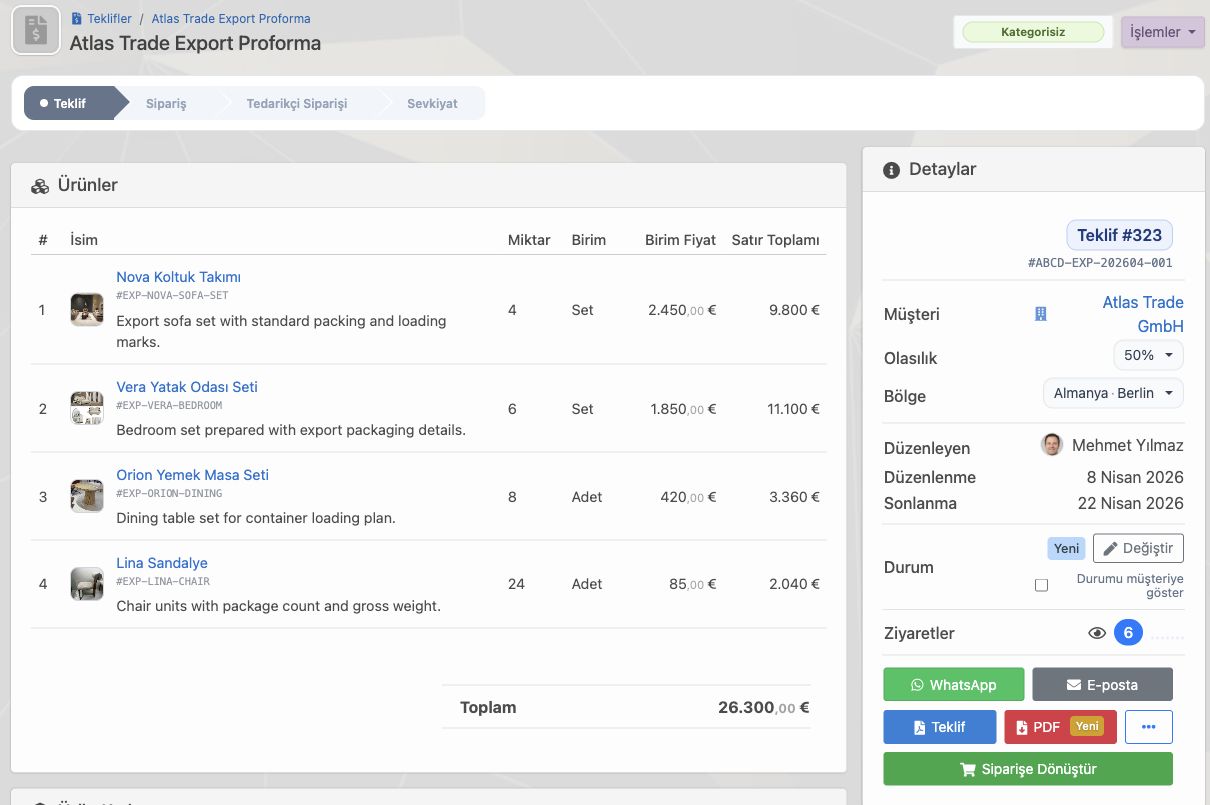
İhracat proforması yalnızca fiyat satırı değildir
İhracat tarafında proforma, müşterinin satın alma kararına ek olarak lojistik, finans, ithalat, gümrük ve iç onay süreçlerinde kullandığı ana dokümandır. Bu yüzden belge üzerinde ürünlerin açık adı, ürün kodu, miktar, birim fiyat, toplam, para birimi, geçerlilik tarihi, alıcı/satıcı bilgileri, Incoterms, ödeme şartı ve teslim hazırlığı net görünmelidir.
Delbig CRM ile satış ekibi proformayı CRM içindeki ürün kartlarından ve müşteri kaydından besler. Böylece aynı belge hem müşteriyle paylaşılabilir bir PDF/proforma görünümüne dönüşür hem de içeride teklif durumu, ziyaret sayısı, ödeme ve siparişe dönüşüm takibiyle yaşamaya devam eder.
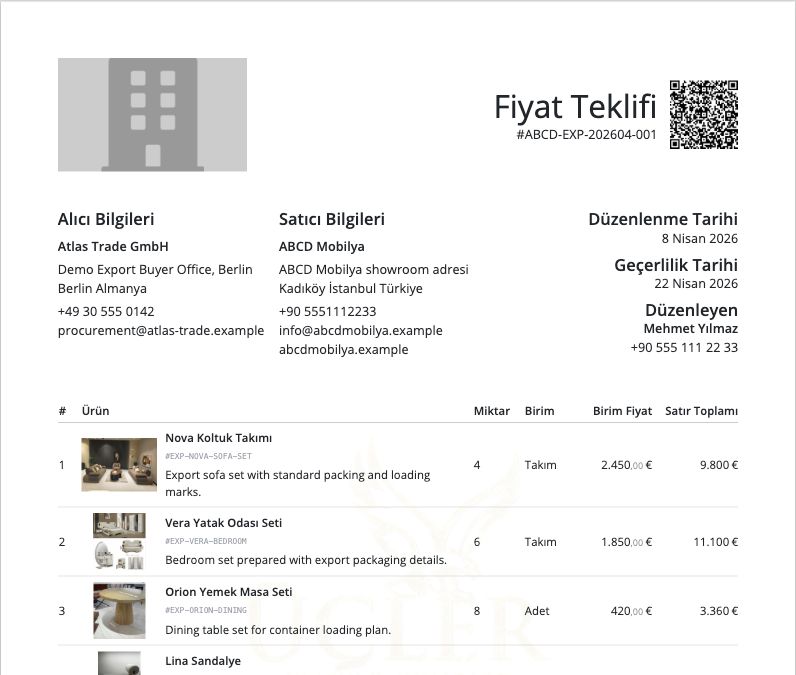
CBM, ağırlık ve paket bilgisi proforma içinde görünür olmalı
İhracat müşterilerinin en sık sorduğu konular ürünün kaç metreküp yer kapladığı, toplam brüt ağırlığın ne olduğu ve kaç paket hazırlanacağıdır. Bu bilgiler ayrı bir Excel dosyasında tutulursa hem satış ekibi hem lojistik ekibi aynı veriyi tekrar tekrar kontrol etmek zorunda kalır.
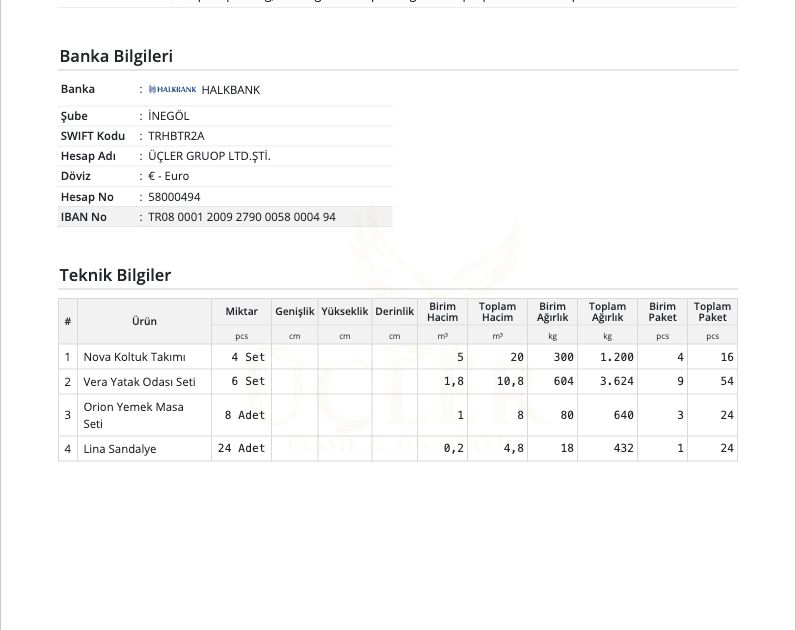
Delbig CRM ürün kartlarında hacim, ağırlık ve paket bilgisi tutulduğunda proforma teknik bilgiler tablosu satır bazında hesaplanır. Nova koltuk takımı, Vera yatak odası seti, Orion yemek masa seti veya Lina sandalye gibi farklı ürünler aynı proformada yer aldığında toplam m³, toplam kg ve toplam paket adedi otomatik okunabilir hale gelir.
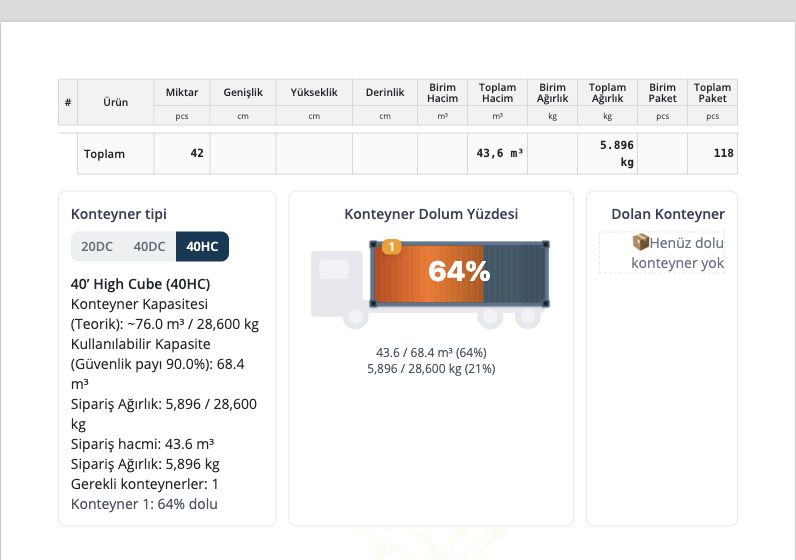
Konteyner hesabı müşteriye karar güveni verir
Proforma müşteriye yalnızca “bu ürünler şu kadar tutar” dememelidir; ürünlerin konteynere nasıl sığacağı konusunda da satış ekibine netlik sağlamalıdır. Delbig CRM içinde 20DC, 40DC ve 40HC seçenekleriyle teorik kapasite, güvenlik payı, sipariş hacmi, sipariş ağırlığı ve doluluk oranı aynı ekranda görülebilir.
Bu ekran özellikle ihracat satışında güçlüdür. Müşteri proformayı incelerken toplam 43,6 m³ hacmin ve 5.896 kg ağırlığın 40HC konteynerde yaklaşık hangi dolulukla ilerlediğini görebilir. Satış ekibi de sevkiyat veya navlun konuşmasına başlamadan önce ürünlerin konteyner açısından ne durumda olduğunu somut veriyle açıklar.
Yükleme listesi, çeki listesi ve Excel çıktıları aynı kayıttan alınır
İhracat ekibi için belge hazırlama proforma PDF ile bitmez. Müşteri veya lojistik ekibi çoğu zaman Excel çıktısı, fiyatlı veya fiyatsız ürün listesi, özel Excel, packing list, üretim Exceli, yükleme listesi veya çeki listesi formatında dosya ister.
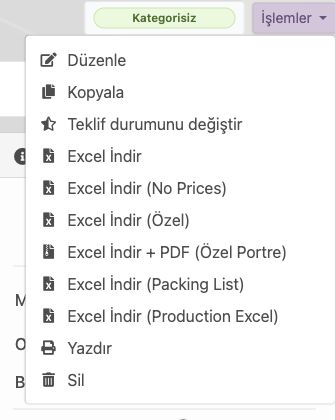
Delbig CRM işlem menüsünde bu çıktılar aynı teklif/proforma kaydına bağlanır. Ekip hangi belgenin son versiyon olduğunu karıştırmadan Excel indirebilir, özel Excel alabilir, Packing List çıktısı hazırlayabilir, Production Excel dosyasını indirebilir ve aynı kaydı yazdırabilir.
- Fiyatlı veya fiyatsız Excel çıktısı alınabilir.
- Packing List ve üretim Exceli proforma kaydından üretilebilir.
- PDF, yazdırma ve özel Excel seçenekleri aynı menüde kalır.
- Satış, üretim ve lojistik ekipleri aynı güncel belgeye bakar.
Paylaşılan proformanın kaç kez incelendiği görülebilir
İhracat satışında müşteri yanıtı bazen birkaç gün veya birkaç hafta sürebilir. Bu bekleme döneminde satış temsilcisi için en değerli sinyallerden biri proformanın gerçekten açılıp açılmadığıdır. Delbig CRM teklif/proforma detayında ziyaret sayısı görünür; ekip müşterinin belgeyi kaç kez incelediğini takip sürecinde kullanabilir.
Bu bilgi satış takibini daha profesyonel hale getirir. Müşteri belgeyi birkaç kez açtıysa temsilci doğru zamanda dönüş yapabilir, revizyon gerekiyorsa aynı kayıtta güncelleyebilir, kabul edilen proformayı siparişe taşıyabilir ve sonraki operasyon adımını başlatabilir.
| Müşterinin sorduğu konu | Proformada görünmesi gereken bilgi | Delbig CRM ile etkisi |
|---|---|---|
| Kaç m³ yer kaplar? | Ürün bazlı ve toplam CBM/metreküp değeri. | Satış ve lojistik aynı teknik toplam üzerinden konuşur. |
| Toplam ağırlık nedir? | Birim ağırlık, toplam ağırlık ve sipariş ağırlığı. | Navlun, taşıma ve yükleme hazırlığı daha erken netleşir. |
| Kaç paket hazırlanacak? | Birim paket ve toplam paket adedi. | Packing list ve depo hazırlığı proforma ile uyumlu ilerler. |
| Konteynere sığar mı? | 20DC, 40DC ve 40HC doluluk hesabı. | Müşteriye karar öncesi somut konteyner görünümü sunulur. |
| Belge incelendi mi? | Ziyaret sayısı, görüntüleme ve paylaşım takibi. | Satış temsilcisi takip zamanlamasını tahminle değil veriyle yapar. |
İlgili çözüm sayfaları
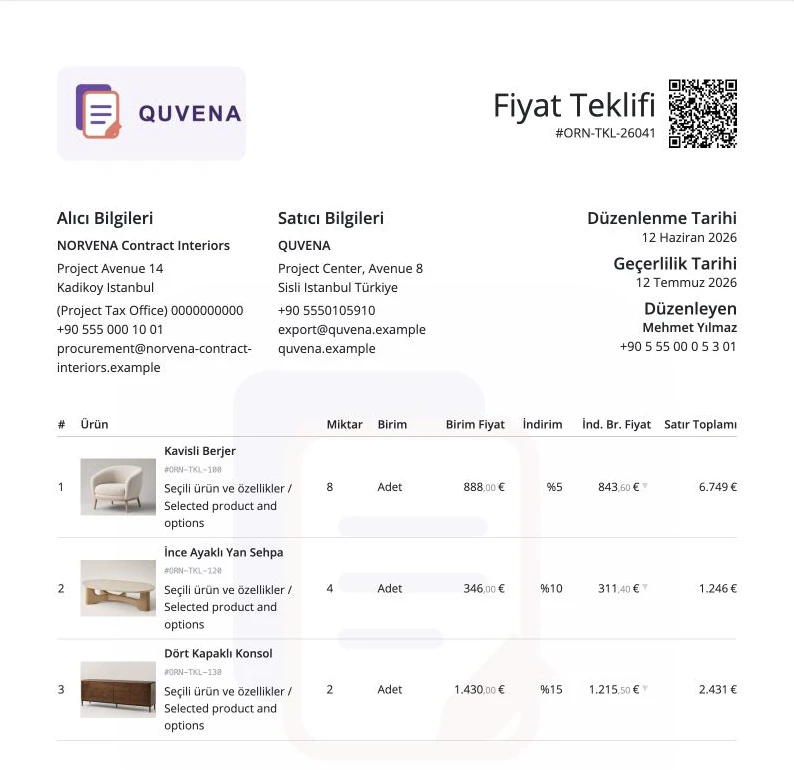
Teklif ve Proforma Yönetimi
Ürün, fiyat, indirim, PDF, WhatsApp paylaşımı ve teklif ziyaret takibini aynı satış kaydında yönetin.
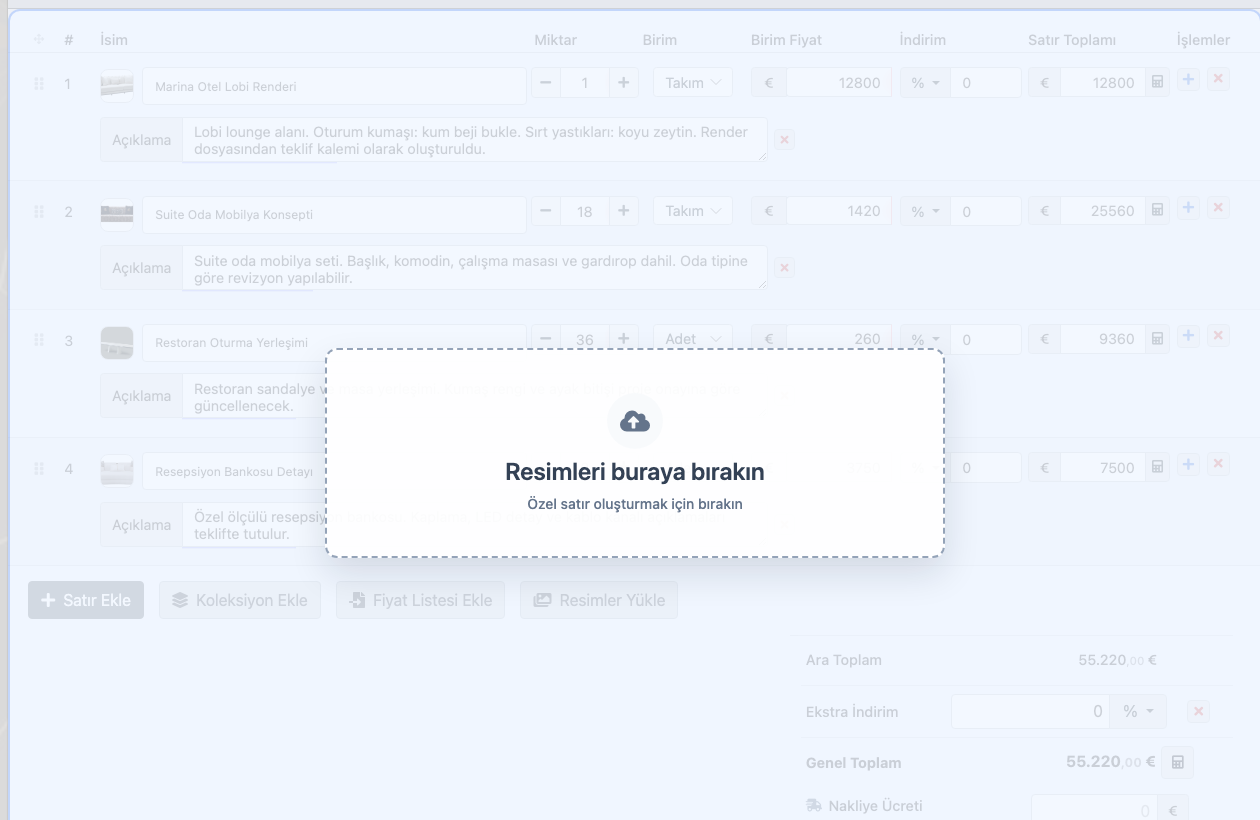
Proje Bazlı Satış Yapan Firmalar
Render ve görsellerden teklif satırı oluşturun; teknik bilgi, ek dosya ve müşteri revizyonunu tek kayıtta yönetin.
Sık sorulan sorular
Proformada metreküp, ağırlık ve paket adedi gösterilebilir mi?
Evet. Ürün kartlarında hacim, ağırlık ve paket bilgisi tutulduğunda proforma teknik bilgiler alanında satır bazlı ve toplam değerler gösterilebilir.
Konteyner hesabı proforma içinde kullanılabilir mi?
Evet. Delbig CRM 20DC, 40DC ve 40HC için teorik kapasite, kullanılabilir kapasite, sipariş hacmi, sipariş ağırlığı, doluluk oranı ve gerekli konteyner bilgisini gösterebilir.
Packing List veya çeki listesi alınabilir mi?
Evet. Proforma kaydından Excel, özel Excel, Packing List, Production Excel, PDF ve yazdırma seçenekleri alınabilir. Böylece satış, üretim ve lojistik aynı kayıttan beslenir.
Müşteri proformaya baktığında takip edilebilir mi?
Evet. Paylaşılan teklif/proforma bağlantısının ziyaret sayısı ve görüntüleme bilgileri satış takibi için kullanılabilir. Bu bilgi temsilcinin doğru zamanda dönüş yapmasını kolaylaştırır.
Bu akışı Delbig üzerinde birlikte değerlendirelim
Satış, teklif, stok veya operasyon sürecinizi paylaşın; kısa bir görüşmede ekibiniz için doğru Delbig kurulumunu haritalandıralım.