Prepare Visual Furniture Quotes in Minutes
In furniture companies, preparing a quote often means finding product images, checking the price list again, recalculating discounts and totals, then turning everything into a PDF or message. Delbig CRM turns this into a structured workflow where products are selected visually, priced on the same screen and sent to the customer.
Why do Excel and order forms slow down quote preparation?
When a customer is waiting in a showroom, at a fair or on the phone, the biggest problem is not the quote itself but bringing scattered information together. Product images are in another folder, prices are in another list, current currency or discount is calculated manually, and descriptions are rewritten each time.
A quote prepared this way becomes slower and dependent on the individual salesperson. When the representative changes, it is often hard to track which image was sent, which price was used or how many times the customer opened the quote link.
What happens in the classic quote process
- Product images, prices and descriptions are collected from separate files.
- Totals are recalculated in Excel or an order form.
- PDFs, WhatsApp messages and email text are prepared separately.
- The sales team cannot see whether the customer opened the quote.
How the workflow changes with Delbig
- Products are selected with images and become quote lines.
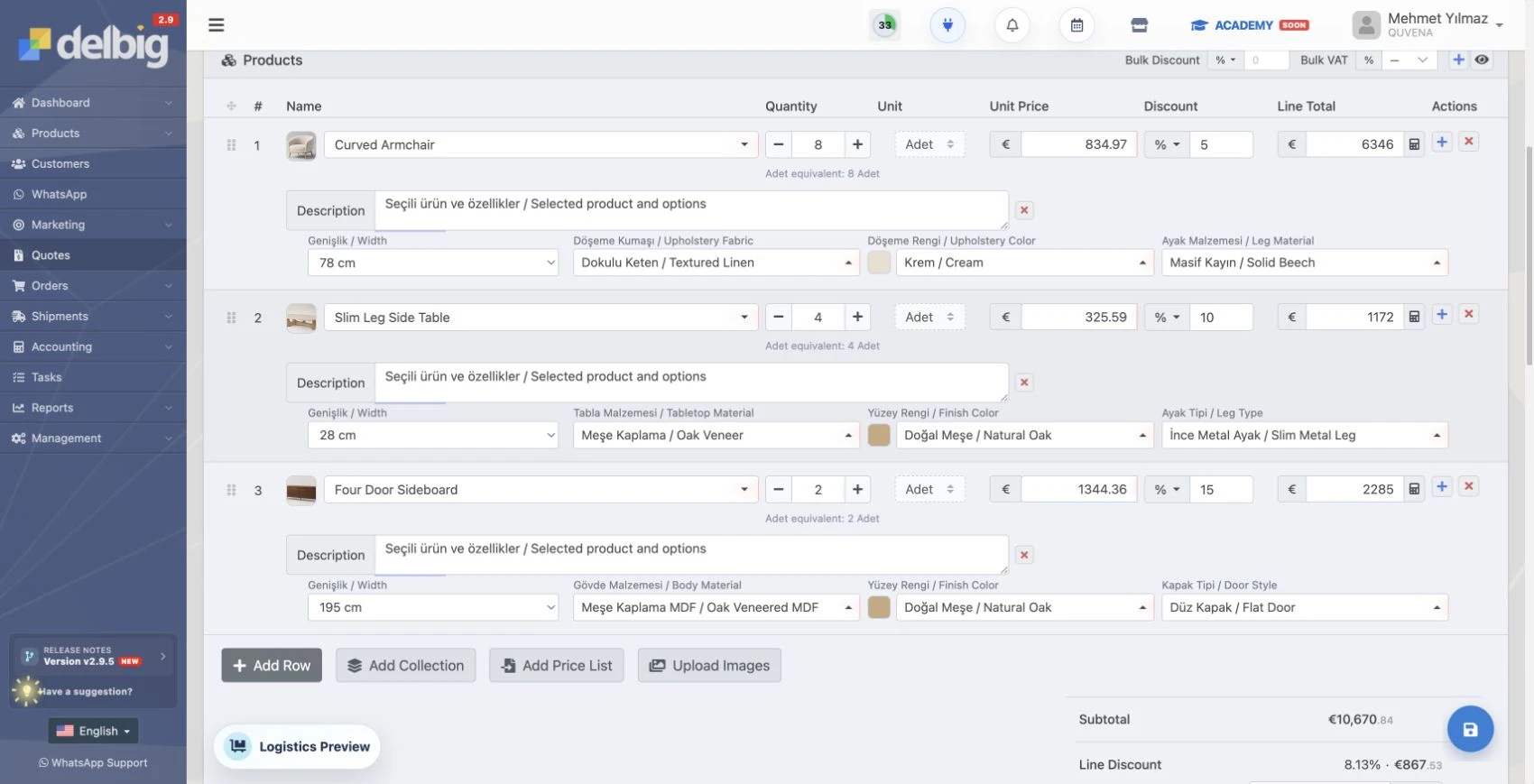
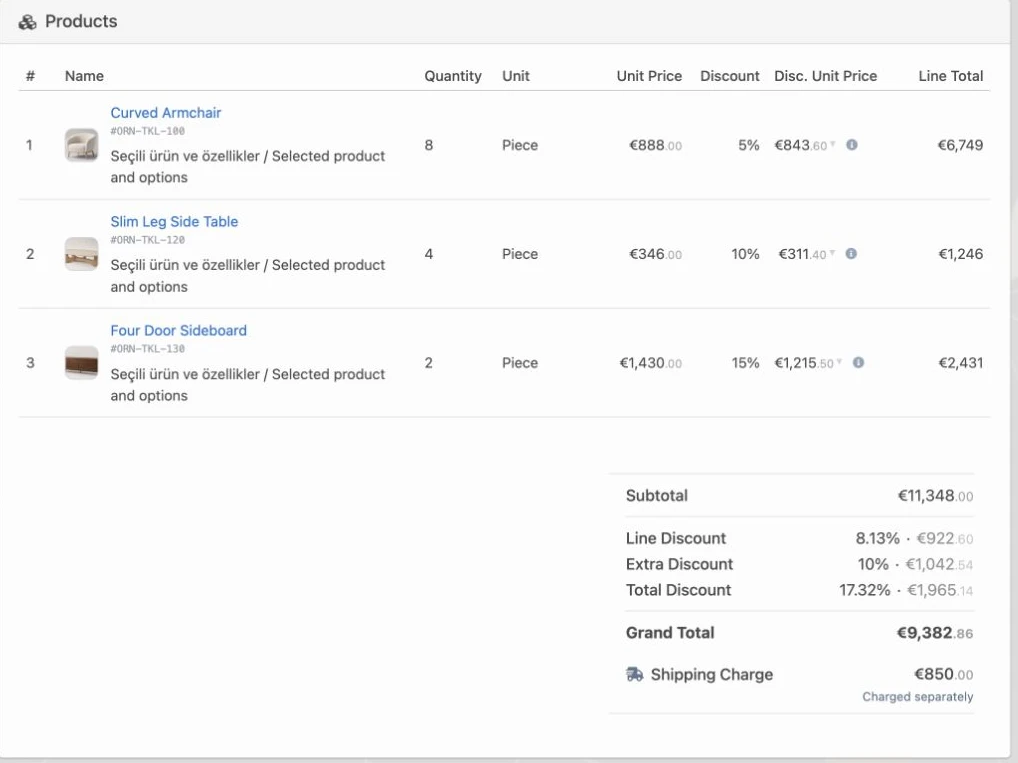
- Quantity, discount, currency and total are updated on the same screen.
- Quote link, PDF, Excel, WhatsApp and email options are used together.
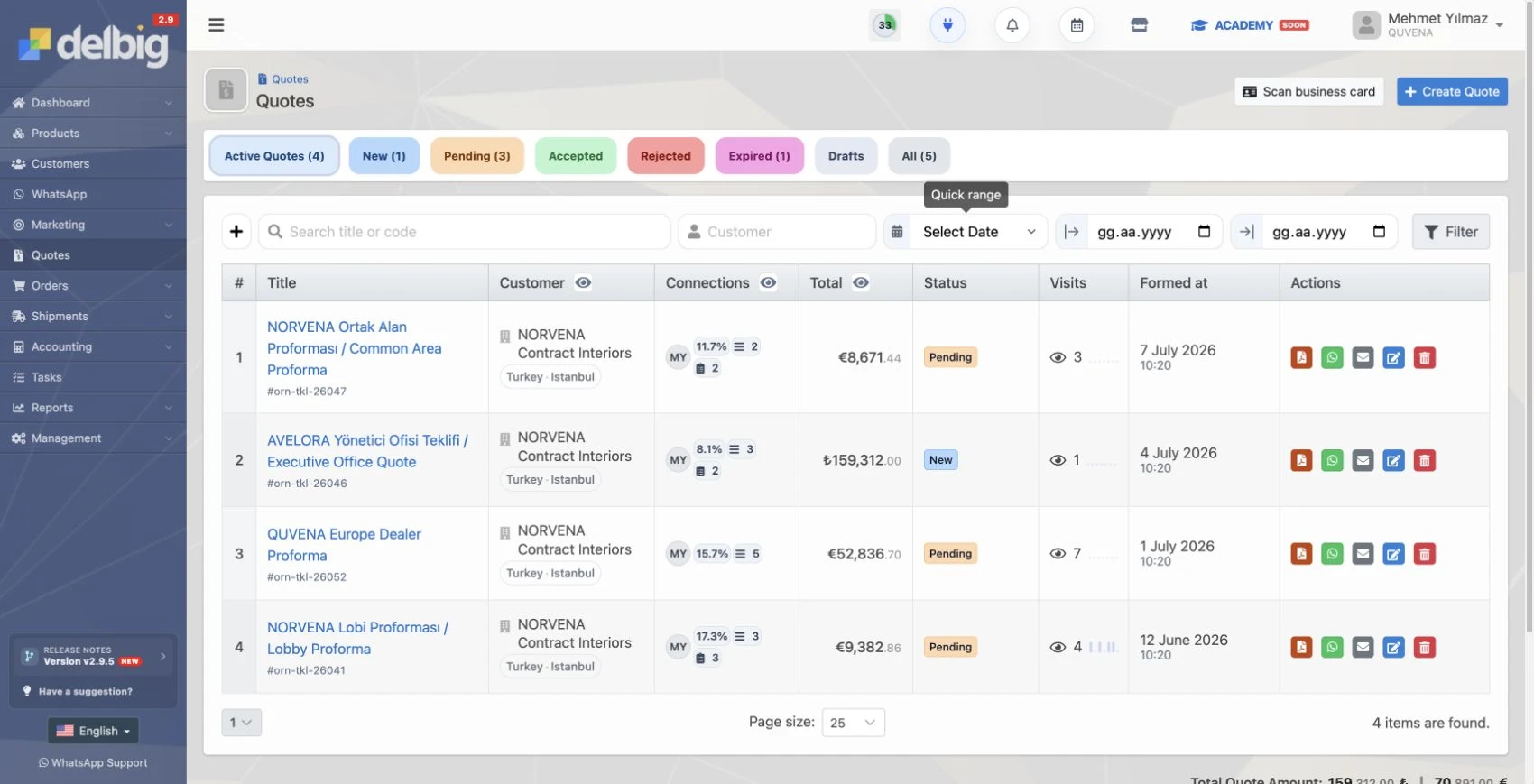
- Visits, quote status and customer history are tracked in the same record.


In Delbig, product selection turns into quote lines
In Delbig, product cards are kept ready with images, stock codes, descriptions and prices. While creating a quote, the salesperson selects products from the list and edits quantity, unit, price, discount and description on the same screen. A standard showroom or fair quote can therefore be prepared in a few steps without opening files again and again.
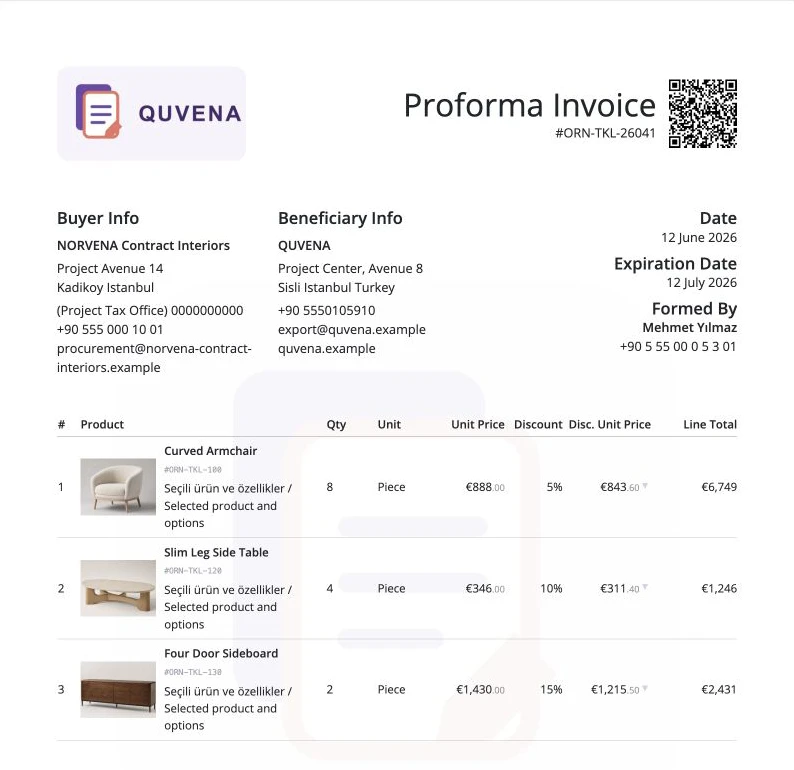
This workflow is especially important in furniture because customers usually look at the image before the product name. When the quote shows product photo, model name, description, quantity and total amount together, the customer can decide more easily.
Details clarified on each quote line
- Product image and model name
- Stock code, description and dimension notes
- Quantity, unit, unit price and line total
- Bulk discount, VAT and currency details
Impact on the sales team
- Quotes are prepared faster while the customer is waiting.
- The risk of wrong pricing or missing product images is reduced.
- The same product information is used by the whole team.
- Standard quotes can be shared in minutes in most scenarios.


Send the quote from the same screen via WhatsApp, email, PDF or Excel
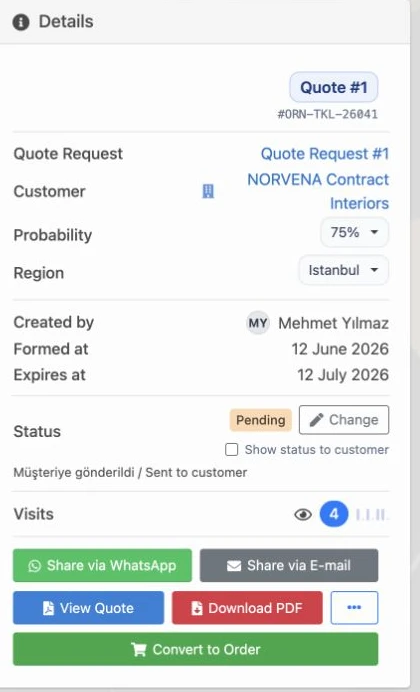
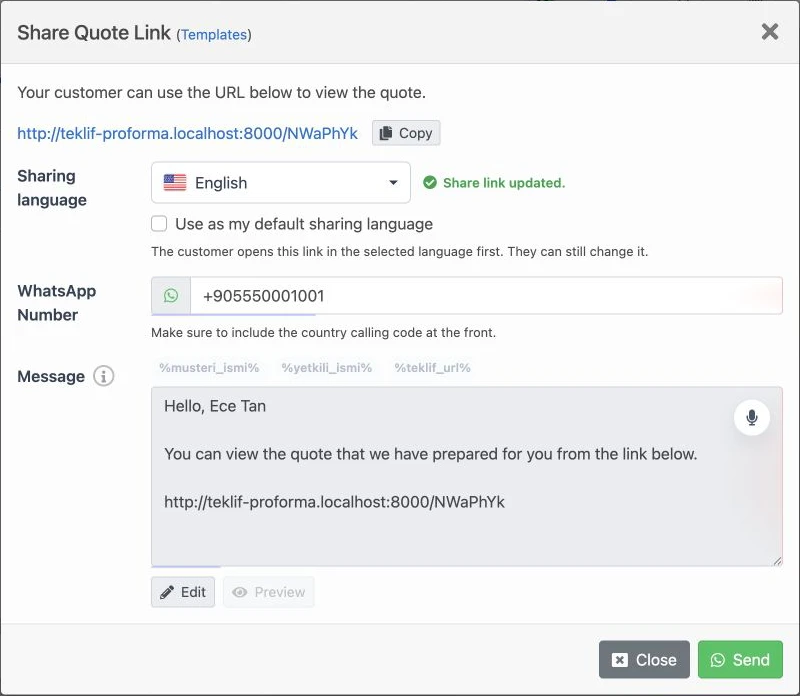
After the quote is prepared, the salesperson does not need to switch to another program. Delbig keeps WhatsApp sharing, email sending, quote link creation, PDF download and Excel export options on the same record.
Email sending can be configured through the company’s own mail settings, so the customer receives the quote from a familiar corporate address. On WhatsApp, the quote link is placed into a ready message that the representative can edit and send.


Do not lose track of the quote after it is sent
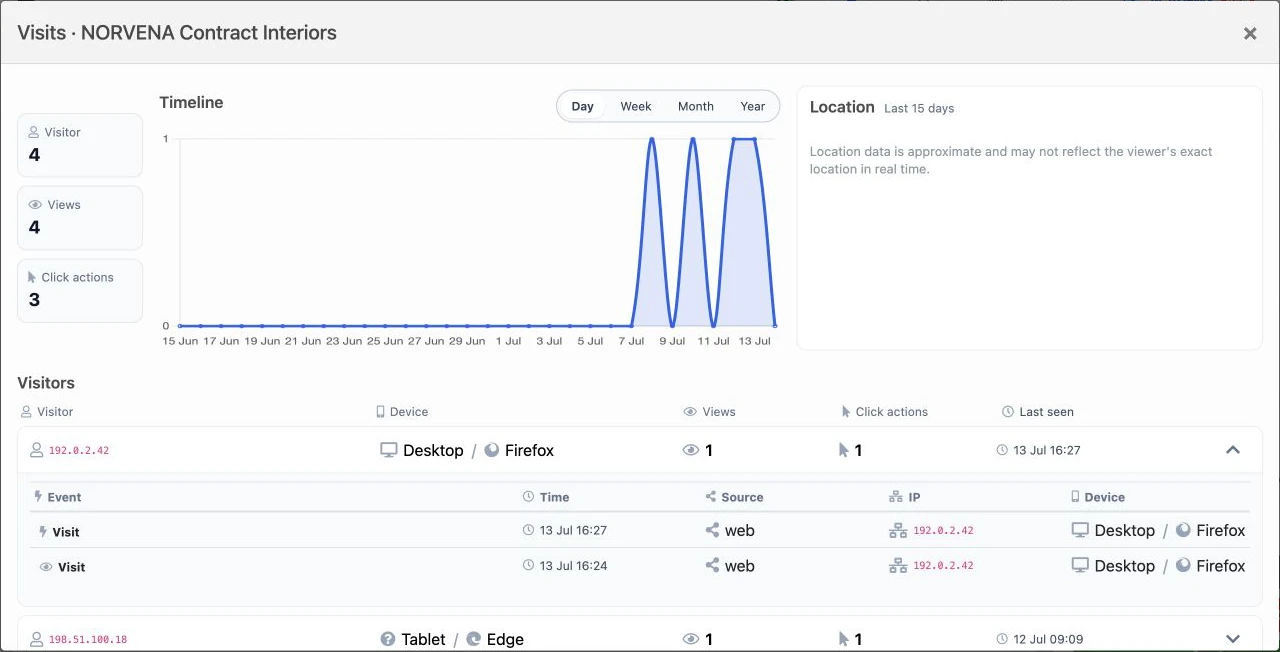
With classic quotes, questions like whether the customer opened the PDF, viewed the link or reviewed it again are usually answered by guesswork. In Delbig, quote visits are recorded. The sales team can track how many times the quote was viewed, which device was used, the last seen time and click actions.
This information makes sales follow-up more accurate. For example, if the customer opens the quote several times, the representative can call at the right time. Updating the quote status as “New”, “Pending” or “Accepted” also helps managers see the sales pipeline more clearly.


Practical value for showroom, fair and export teams
In the showroom, a visual quote can be prepared while the customer reviews products. After a fair meeting, the quote link can be shared the same day via WhatsApp or email. For export teams, product images, quantities, currency, PDF and Excel outputs create a more professional quote file.
The real benefit is not only gaining speed on one screen; after the quote is prepared, customer history, quote status, sharing channel and visit data continue to live on the same record. This helps the sales team avoid the question: “we sent the quote, but what happened next?”
Frequently asked questions
Why is preparing furniture quotes with visuals more effective?
Furniture customers decide by seeing the product’s shape, fabric, dimensions and use case. A quote with visuals is clearer and more professional than sending only a price list.
Can the quote be sent via WhatsApp?
Yes. In Delbig, the quote link can be added to a WhatsApp message. The representative can edit the message and send it to the customer.
Can PDF and Excel outputs be downloaded?
Yes. The quote can be downloaded as a PDF; Excel output or custom Excel options can also be used. This is especially useful for teams preparing price comparisons, internal approvals or export documents.
Can we see when the customer views the quote?
The quote visit report shows view and click information. This lets the salesperson track customer interest more concretely.
Move your furniture quotes out of Excel
Prepare showroom, fair and export quotes with product images, then send them quickly as a PDF or link.