Proje Bazlı Satış Yapan Firmalar: Görselden Teklife Hızlı Akış

Proje bazlı satış yapan mobilya, dekorasyon, ihracat ve taahhüt ekiplerinde her ürün önceden katalogda hazır olmayabilir. Delbig CRM, render, ürün fotoğrafı veya proje görselinden teklif satırı oluşturmayı; açıklama, metreküp, ağırlık, paket, ek dosya ve müşteri revizyonunu aynı satış kaydında yönetir.

Delbig CRM proje teklifinde render ve proje görsellerini sürükle bırak ile özel teklif satırına dönüştürme ekranı
Görselden teklif satırı oluşturma ekranını büyüt

Proje satışı her zaman hazır ürün kataloğuyla başlamaz

Proje bazlı çalışan firmalarda teklif bazen bir otel odası renderı, bazen özel ölçülü resepsiyon bankosu, bazen restoran oturma yerleşimi, bazen de müşteriden gelen referans görsellerle başlar. Bu satış türünde ürün kartlarını tek tek önceden açmak çoğu zaman süreci yavaşlatır.

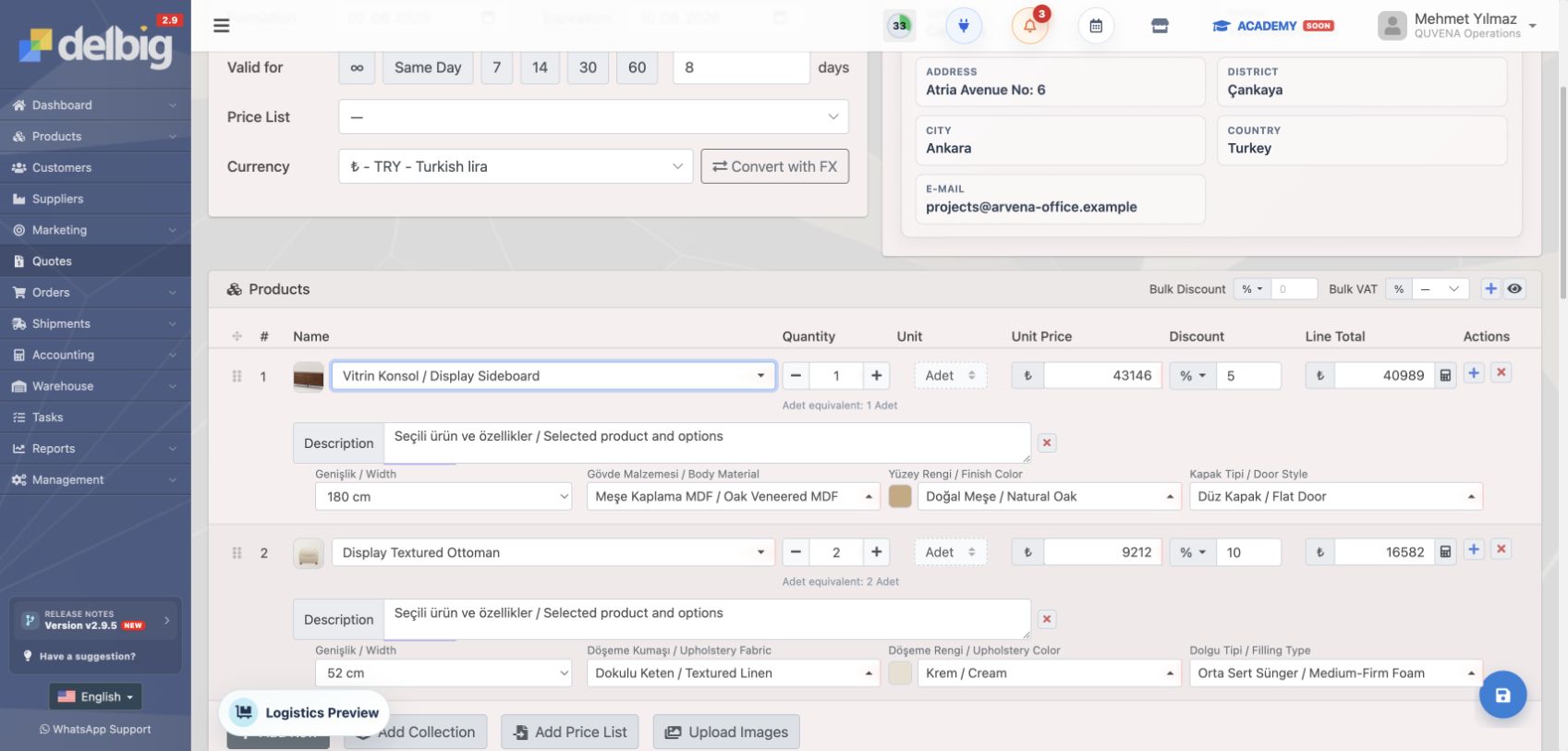
Delbig CRM’de satış ekibi teklif veya sipariş hazırlarken görsel yükleyerek özel satır oluşturabilir. Satır açıldıktan sonra ürün adı, açıklama, miktar, birim, fiyat, indirim, ölçü, metreküp, ağırlık ve paket bilgileri aynı teklif üzerinde tamamlanır. İstenirse bu özel satır daha sonra ürün kartına dönüştürülerek kalıcı ürün havuzuna da alınabilir.

Satış ekibi için hız

  • Render, fotoğraf veya proje görselinden saniyeler içinde teklif satırı başlatılır.
  • Ürün katalogda yoksa bile müşteri görüşmesi beklemeden fiyat çalışması yapılır.
  • Açıklama, teknik bilgi, ek dosya ve müşteri revizyonu teklif kaydında birlikte tutulur.

Operasyon için düzen

  • Özel satırdaki ölçü, hacim, ağırlık ve paket bilgisi proforma ve sevkiyat tarafına daha temiz aktarılır.
  • Müşterinin revize istediği satırlar, eski e-posta veya WhatsApp mesajlarında kaybolmaz.
  • Kabul edilen proje teklifi siparişe döndüğünde ürün ve dosya hafızası korunur.

Görsellerden özel teklif satırı oluşturulur

Proje satışında en kritik ihtiyaçlardan biri, eldeki görsellerle hızlı teklif hazırlamaktır. Delbig CRM’de teklif ürün alanına görseller bırakıldığında sistem bu görsellerden özel satırlar oluşturur. Satış temsilcisi bu satırları müşteriye gösterilecek ürün adıyla düzenler, açıklamasını yazar, miktar ve fiyatını belirler.

Bu akış özellikle otel, villa, restoran, ofis, mağaza, showroom veya ihracat projesi çalışan firmalarda pratiklik sağlar. Henüz koleksiyona alınmamış bir render üzerinden teklif verilebilir; müşteri kabul ettiğinde aynı satır daha sonra ürün olarak kaydedilebilir ya da yalnızca o projeye özel teklif kalemi olarak kalabilir.

Delbig CRM teklif ekranında proje görsellerini bırakınca özel satır oluşturma alanı
Görseller teklif ürün alanına bırakıldığında özel satırlar oluşturulabilir; satır adı, açıklama, miktar ve fiyat teklifte düzenlenir.

Teknik bilgiler teklifin içinde kalır

Proje ve ihracat tekliflerinde yalnızca ürün adı ve fiyat yeterli değildir. Müşteri metreküp, ağırlık, paket adedi, ölçü, ürün adedi ve gerektiğinde konteyner hesabı görmek ister. Bu bilgiler ayrı Excel dosyalarında tutulduğunda teklif revize oldukça teknik tablo da eskiyebilir.

Delbig CRM’de teklif satırındaki teknik bilgiler paylaşılan teklif ekranında okunabilir tabloya dönüşür. Böylece müşteri yalnızca görsel ve fiyatı değil; ürünün genişlik, yükseklik, derinlik, birim hacim, toplam hacim, birim ağırlık, toplam ağırlık ve paket bilgisini de tek belge içinde görür.

Delbig CRM proje teklifinde metreküp, ağırlık, paket, ölçü ve miktar tablosu
Paylaşılan proje teklifinde metreküp, ağırlık, paket, ölçü ve miktar bilgileri teknik bilgi tablosunda gösterilir.

Render, PDF ve destek dosyaları teklife eklenir

Proje teklifinde bazen tek ürün görseli yeterli olmaz. Render dosyaları, plan görselleri, teknik PDF, kumaş paftası, renk kartelası veya uygulama notları teklifin karar sürecini etkiler. Bu dosyalar mail eklerinde ayrı ayrı durduğunda, teklifin en güncel haliyle hangi dosyanın eşleştiği karışabilir.

Delbig CRM teklif ekranındaki ekler alanı, görsel ve PDF dosyalarını teklif kaydına bağlar. Dosyalar sürükle bırak ile eklenebilir, sıralanabilir ve müşteriye sunulacak teklif hafızasının parçası haline gelir. Böylece satış ekibi fiyatı, proje görselini ve destek dokümanını aynı kayıtta tutar.

Delbig CRM proje teklifine render, görsel ve PDF dosyası ekleme alanı
Render, PDF ve destek görselleri teklifin ekler alanında tutulur; proje teklifi yalnızca fiyat satırlarından oluşmaz.

Müşteri teklife revizyon talebiyle dönebilir

Proje tekliflerinde müşteri çoğu zaman “kabul” veya “ret” dışında bir cevap verir. Belirli satırlar için revize fiyat ister, bazı kalemleri aynı bırakır, bazı ürünlerde açıklama talep eder. Delbig CRM paylaşılan teklif ekranında müşteri revizyon talebi oluşturabilir ve yalnızca revize etmek istediği kalemlerin karşısına kendi rakamını yazabilir.

Bu yapı pazarlık sürecini daha okunabilir hale getirir. Satış temsilcisi müşterinin hangi satır için ne istediğini tek tek mesajlardan toplamak zorunda kalmaz; revize talebi doğrulama koduyla kayda alınır ve teklifin içerideki revizyon kartına düşer.

  • Müşteri isim, e-posta ve telefon bilgisiyle revizyon talebi gönderir.
  • Satır bazında talep edilen fiyat girilebilir.
  • Revizyon yalnızca değişmesi istenen kalemleri kapsayabilir.
  • Teklif yeniden paylaşılana kadar içeride revizyon aşamasında izlenir.
Delbig CRM paylaşılan teklifte müşterinin revize fiyat yazdığı revizyon talebi paneli
Paylaşılan teklif ekranında müşteri revize etmek istediği satırlara kendi talep ettiği fiyatı yazabilir.

Revizyon içeride satır satır yönetilir

Müşteriden gelen revizyon talebi satış ekibi tarafında ayrı bir kart olarak görünür. Hangi müşteri, hangi e-posta, hangi telefon, hangi tarihte revizyon istedi; hangi satırın mevcut fiyatı neydi, müşterinin istediği fiyat ne oldu ve fark ne kadar oluştu, aynı ekranda izlenir.

Satış ekibi bu ekrandan talep edilen fiyatları onaylayabilir veya düzenleme ekranına geçip teklif üzerinde kontrollü değişiklik yapabilir. Bu sayede revizyon süreci “son konuşmada ne demiştik?” belirsizliğine dönüşmez; teklif geçmişi ve müşteri cevabı sistemde okunabilir kalır.

Delbig CRM içinde müşteriden gelen proje teklif revizyonu, talep edilen fiyatlar ve farklar
Revizyon kartında müşteri notu, mevcut fiyat, talep edilen fiyat, fark ve talep edilen fiyatları onaylama aksiyonu birlikte görünür.

Proje bazlı satış yapan firmalar için hangi işleri toparlar?

Need Delbig CRM’de karşılığı Sonuç
Katalogda olmayan ürünle teklif vermek Görselden özel teklif satırı, satır açıklaması ve sonradan ürün olarak kaydetme. Render veya müşteri görseliyle satış beklemeden başlar.
Teknik bilgiyi kaybetmemek Ölçü, metreküp, ağırlık, paket ve miktar alanları. Proforma, sevkiyat ve müşteri kontrolü aynı veriye bakar.
Projeye dosya eklemek Render, görsel, PDF ve destek dokümanlarını teklif eklerinde tutma. Teklifin fiyatı ve görsel hafızası aynı kayıt üzerinde kalır.
Müşteri revizyonunu yönetmek Paylaşılan teklif revizyon paneli ve içeride revizyon kartı. Müşterinin istediği satır fiyatları tek ekranda görülür.
Kabul edilen projeyi siparişe almak Tekliften siparişe dönüşüm, ürün satırı ve dosya bilgisinin korunması. Satıştan operasyona geçiş daha kontrollü yapılır.

Frequently asked questions

Ürünleri önceden tek tek kaydetmeden teklif oluşturabilir miyiz?

Evet. Delbig CRM’de teklif veya sipariş hazırlarken görselden özel satır oluşturabilir, bu satırı proje teklifinde kullanabilir ve gerekirse sonradan ürün olarak kaydedebilirsiniz.

Render veya PDF dosyaları teklife eklenebilir mi?

Evet. Teklif ekleri alanına görsel ve PDF dosyaları eklenebilir. Bu dosyalar teklif kaydının parçası olarak tutulur.

Müşteri teklif satırlarına kendi revize fiyatını yazabilir mi?

Evet. Paylaşılan teklif ekranında müşteri revizyon talebi açabilir ve revize etmek istediği satırlara talep ettiği fiyatı yazabilir.

Metreküp, ağırlık ve paket bilgisi müşteriye gösterilebilir mi?

Evet. Teklifte ölçü, hacim, ağırlık ve paket bilgileri tutulduğunda paylaşılan teklif ekranında teknik bilgi tablosu olarak gösterilebilir.

Proje tekliflerinizi görsellerle daha hızlı hazırlayın

Render, özel ölçü, teknik bilgi, ek dosya ve müşteri revizyonunu Delbig CRM üzerinde tek proje teklif kaydında yönetin.

Request a meeting View pricing

Project-Based Sales Teams: Fast Workflow from Visuals to Quote

For project-based furniture, decoration, export and contract sales teams, every item may not already exist in a catalog. Delbig CRM helps teams create quote lines from renders, product photos or project visuals, then manage descriptions, CBM, weight, packages, attachments and customer revision requests on the same sales record.

Delbig CRM English project quote screen converting renders and project images into custom quote lines by drag and drop
Enlarge custom quote lines from images

Project sales do not always start from a ready catalog

For project-based companies, a quote may start from a hotel room render, a custom reception desk, a restaurant seating plan or reference images sent by the customer. In this sales style, creating every product card in advance can slow the team down.

In Delbig CRM, the sales team can create custom lines while preparing a quote or order by uploading visuals. After the line is created, the team completes the product name, description, quantity, unit, price, discount, dimensions, CBM, weight and package details on the same quote. If needed, that custom line can later be saved as a product card.

Speed for sales teams

  • Start quote lines from renders, photos or project images in seconds.
  • Prepare pricing without waiting for a product to exist in the catalog.
  • Keep descriptions, technical details, attachments and customer revision in one quote record.

Structure for operations

  • Dimensions, CBM, weight and package details move more cleanly into proforma and shipment workflows.
  • Customer-requested revisions do not get lost in old e-mails or messaging threads.
  • When an accepted project quote becomes an order, the product and file history stays attached.

Create custom quote lines from visuals

One of the most important needs in project sales is preparing a quote quickly from available visuals. In Delbig CRM, images dropped into the quote product area can become custom quote lines. The sales representative edits the customer-facing product name, writes the description, and sets quantity and price.

This is practical for hotel, villa, restaurant, office, store, showroom and export projects. A render that is not yet part of a collection can still be quoted; if the customer accepts it, the same line can later become a saved product or remain a project-specific quote line.

Delbig CRM English quote screen with drop area for creating custom lines from project visuals
Project visuals can be dropped into the quote product area to create custom lines; name, description, quantity and price are edited on the quote.

Technical details stay inside the quote

In project and export quotes, product name and price are not enough. Customers often ask for CBM, cubic meters, weight, package count, dimensions, quantity and sometimes container calculations. If these details live in separate spreadsheets, they can become outdated every time the quote is revised.

In Delbig CRM, technical details on quote lines turn into a readable table on the shared quote. The customer sees not only visuals and prices, but also width, height, depth, unit volume, total volume, unit weight, total weight and package information in one document.

Delbig CRM English project quote table with CBM, weight, packages, dimensions and quantities
The shared project quote can show CBM, weight, package, dimension and quantity data in a technical information table.

Renders, PDFs and supporting files are attached to the quote

In project quotes, a single product visual is often not enough. Renders, plan images, technical PDFs, fabric boards, color charts or application notes can all affect the decision. When those files stay in separate e-mail attachments, it becomes unclear which file belongs to the latest quote.

The attachments area in Delbig CRM connects images and PDF files to the quote record. Files can be added by drag and drop, reordered and kept as part of the quote memory presented to the customer. The sales team keeps the price, project visuals and supporting documents on the same record.

Delbig CRM English project quote attachment area for renders, images and PDF files
Renders, PDFs and supporting visuals stay in the quote attachments area, so a project quote is more than price rows.

The customer can return with a revision request

In project quotes, the customer often gives an answer beyond simple approval or rejection. They may request a revised price for selected lines, keep some items unchanged and ask for clarification on others. On the shared Delbig CRM quote, the customer can create a revision request and enter requested prices only for the lines they want to revise.

This makes negotiation easier to read. The sales representative does not need to collect line-by-line feedback from messages. The revision request is verified and saved, then appears as an internal revision card on the quote.

  • The customer sends a revision request with name, e-mail and phone.
  • Requested prices can be entered per line.
  • The revision can include only the items the customer wants to change.
  • The quote stays in revision until the team shares it again.
Delbig CRM English shared quote revision panel where the customer enters requested line prices
On the shared quote, the customer can write requested prices for the lines they want to revise.

Revision requests are managed line by line inside CRM

The customer revision request appears internally as a separate card. The team sees who requested the revision, which e-mail and phone were used, when the request arrived, the current price of each line, the requested price and the difference.

From this screen, the team can apply requested prices or open the quote edit screen and make controlled changes. Revision no longer turns into uncertainty about the last conversation; the quote history and customer response remain readable in the system.

Delbig CRM English project quote revision request with requested prices and differences
The revision card shows customer note, current price, requested price, difference and apply requested prices action together.

What does this organize for project-based sales teams?

Need Delbig CRM equivalent Result
Quote items that are not in the catalog Custom quote lines from visuals, line descriptions and later save-as-product option. Sales can start from a render or customer image without waiting.
Keep technical details accurate Dimensions, CBM, weight, package and quantity fields. Proforma, shipment and customer review use the same data.
Add project files Keep renders, images, PDFs and supporting documents in quote attachments. The quote price and visual memory stay on the same record.
Manage customer revisions Shared quote revision panel and internal revision request card. Requested line prices are visible in one place.
Move accepted projects into orders Quote-to-order conversion while keeping line and file details. The handoff from sales to operations is more controlled.

Frequently asked questions

Can we create a quote without saving every product first?

Yes. In Delbig CRM, you can create custom lines from visuals while preparing a quote or order, use those lines in the project quote and save them as products later if needed.

Can renders or PDF files be attached to the quote?

Yes. Images and PDF files can be added to quote attachments. They stay as part of the quote record.

Can the customer enter requested prices for quote lines?

Yes. On the shared quote, the customer can open a revision request and enter requested prices for the lines they want to revise.

Can CBM, weight and package information be shown to the customer?

Yes. When dimensions, volume, weight and package data are kept on the quote, they can be shown as a technical information table on the shared quote.

Prepare project quotes faster with visuals

Manage renders, custom dimensions, technical details, attachments and customer revisions on one Delbig CRM project quote record.

Request a meeting View pricing