
Add-on Module
Connect WhatsApp to Your CRM and Let Delbig Handle Follow-up
Connect your company WhatsApp Business number to Delbig through Meta, manage customer conversations inside CRM, send professional template messages and use AI-supported end-of-day follow-up signals so no customer action is missed.
190 USD / yr + VAT
Added to the main package
Short Answer
What is the Delbig WhatsApp module?
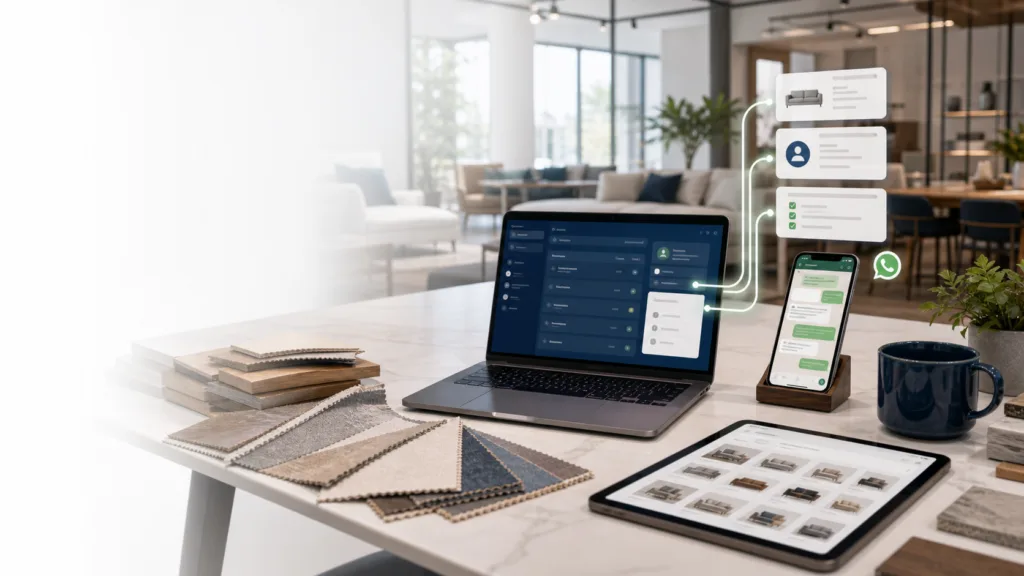
The Delbig WhatsApp module connects your company WhatsApp Business number to CRM through Meta. The goal is not simple WhatsApp sharing; it is turning customer conversations into a managed CRM workflow around customers, opportunities, quotes, orders and tasks.
Meta number connection
Your company WhatsApp line is connected to CRM so customer communication does not stay scattered on personal phones.
Messaging inside CRM
Teams can read WhatsApp conversations with customer, opportunity, quote or order context.
Corporate templates
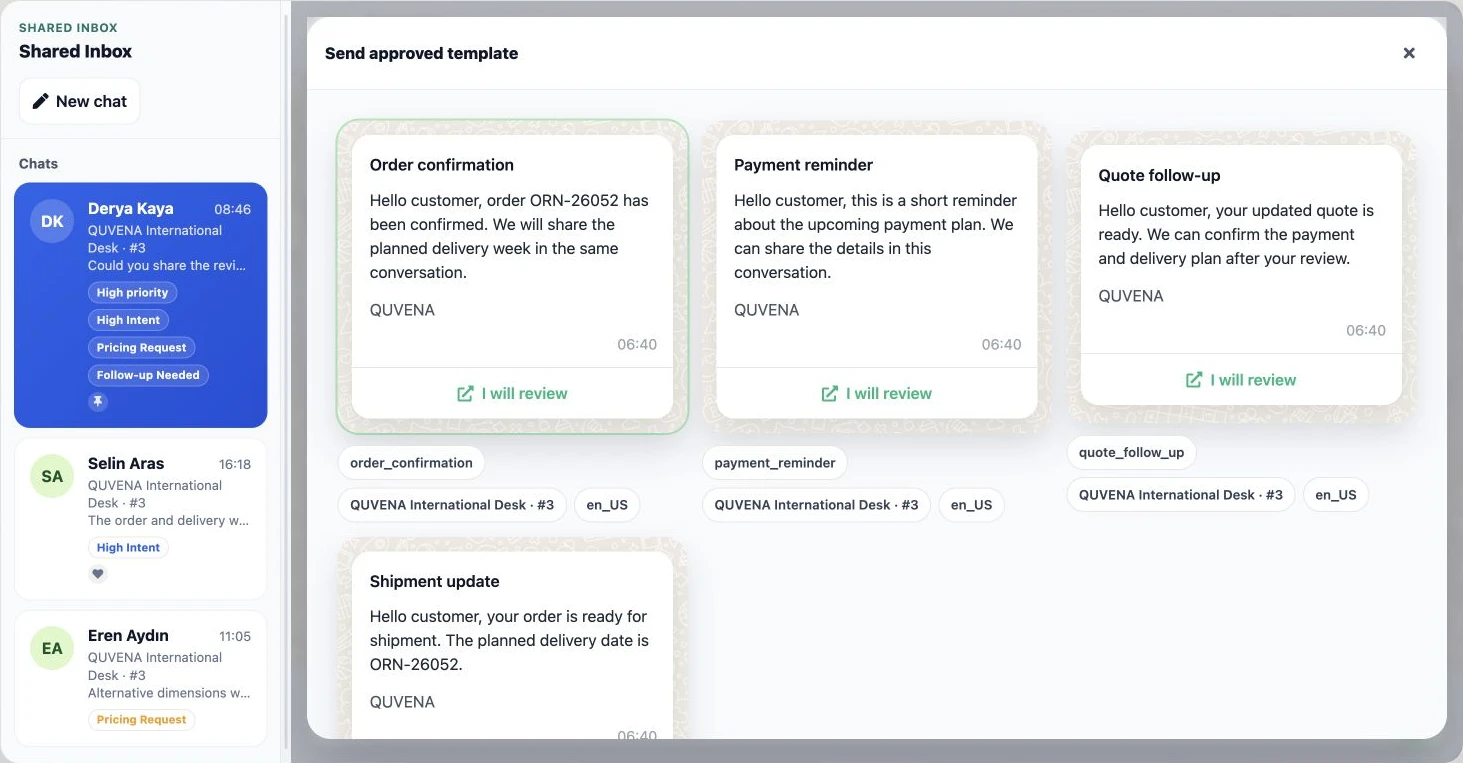
Approved templates help teams send professional messages for follow-up, payment, delivery and service updates.
AI follow-up signals
End-of-day AI summaries can surface tasks, warm leads and follow-up needs from conversations.
Connection and Cost
How is WhatsApp connected to Delbig and how is the total cost formed?
The connection is not presented as QR pairing with a personal phone. The verified workflow uses a Meta Business account and Meta Cloud API; Delbig software pricing and Meta usage charges remain separate items.
- Prepare the Meta Business account. Verify the company WhatsApp Business number and permissions.
- Connect the Meta Cloud API channel. Define the channel account in Delbig WhatsApp settings.
- Set up CRM context. Link conversations with customers, opportunities, quotes, orders and tasks.
- Enable the team workflow. Activate permissions, approved templates and AI-supported follow-up signals.
Delbig WhatsApp module
The current annual software fee is 190 USD / yr + VAT. It is added to the main plan and updates automatically from the central price source.
Meta and custom connection fees
Meta messaging/usage fees and company-specific integration, setup or data transfer are not included in the module fee; they are clarified separately according to scope.
Meta WhatsApp Connection
When customers write on WhatsApp, keep the conversation inside CRM
In sales teams, customers often return through WhatsApp about product details, payment plans, delivery dates or changes. If these messages stay on personal phones, team follow-up becomes weak; when connected to CRM, they become sales memory.
- Quote link sharing already exists in main packages; this module connects the WhatsApp number to CRM.
- Meta connection, channel account, templates and conversation records are managed in one structure.
- AI-supported analysis helps reveal task and follow-up signals at the end of the day.
Short Answer
A customer conversation on a personal phone does not become team memory
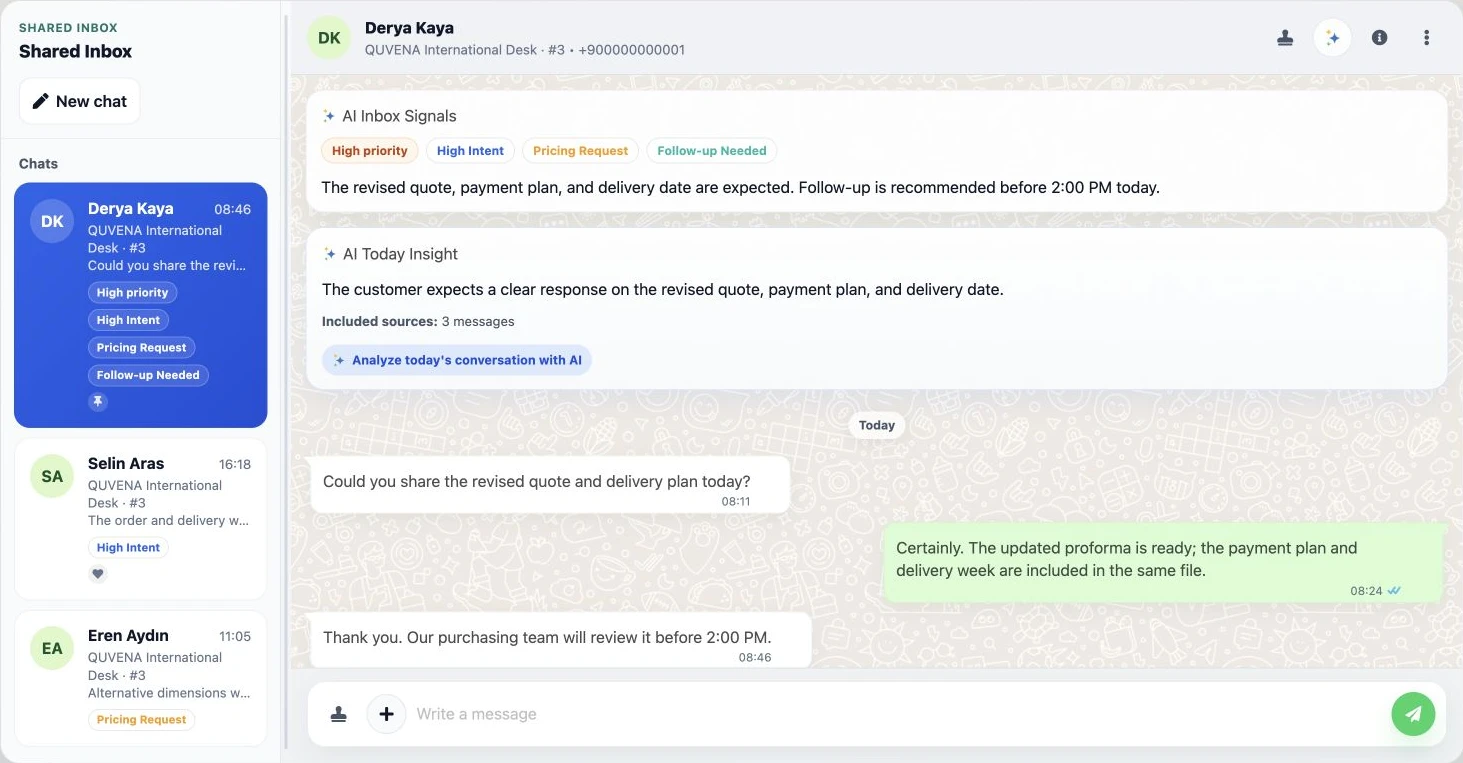
A customer may ask for a price, request another product, discuss payment or mention delivery urgency on WhatsApp. If this information is not connected with CRM, managers cannot see which customer is warm, which conversation needs action or which task should be assigned.
The module links conversations from the Meta-connected WhatsApp line with customer, opportunity, quote, order and task context so the team can work from the same communication history.
Module Scope
What is included in the WhatsApp module?
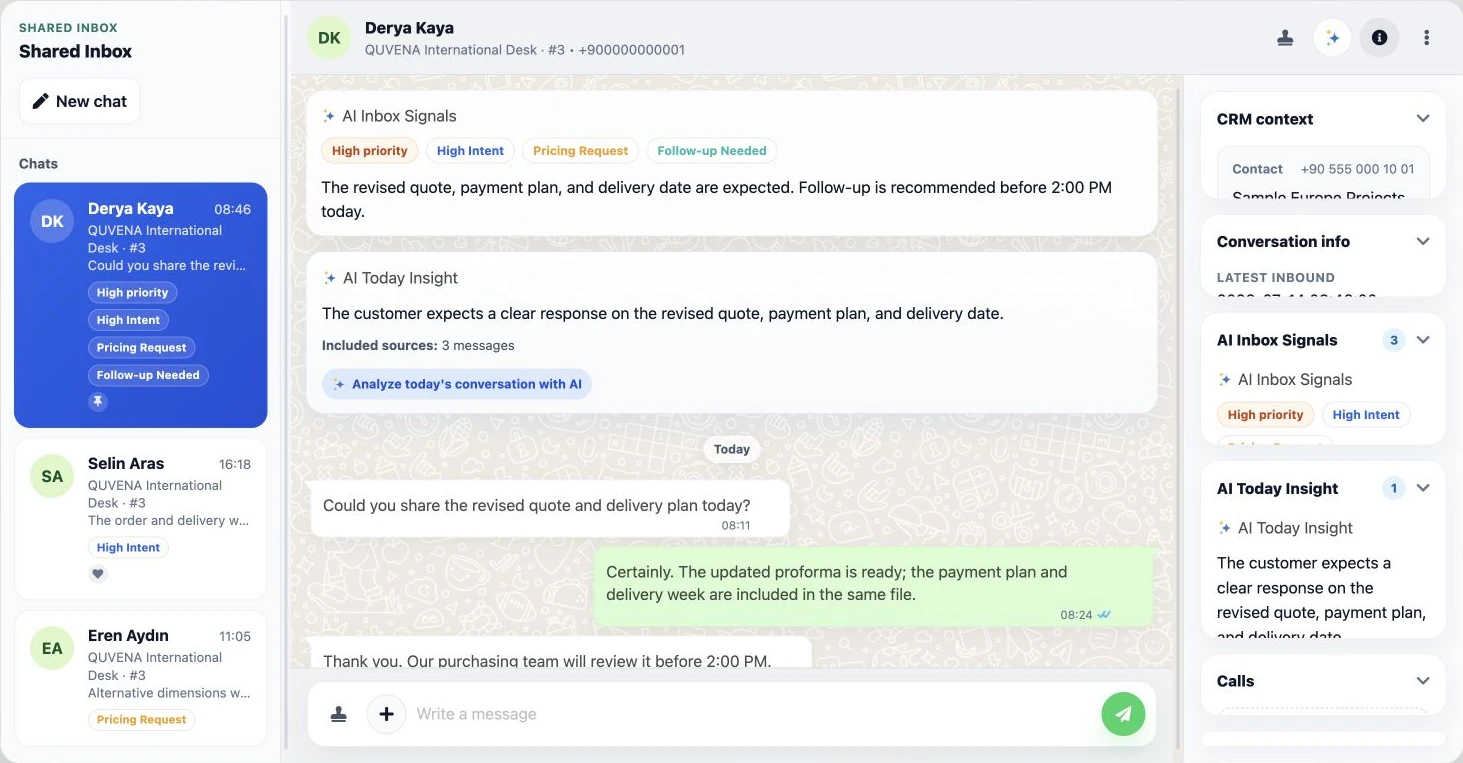
The module is built around Meta connection, WhatsApp panel inside CRM, channel account management, customer identity, conversation records, message templates, CRM links and AI-supported follow-up analysis.
WhatsApp panel inside CRM
Teams can view conversations inside Delbig and follow selected conversations with customer context.
Meta connection
WhatsApp Business / Meta number and channel connection, status and reconnect needs can be managed.
Template messages
Corporate templates and approval statuses can be tracked for follow-up, payment, appointment, delivery and sales updates.
CRM field tokens
Customer name, company name or quote number can be used as variables in template messages.
Conversation links
Messages or calls can be linked with customer, company, opportunity, quote or other business records.
AI analysis and end-of-day follow-up
Follow-up need, price request, urgency, task suggestion or support topic signals can be extracted.
List and priority tracking
High intent, price request, urgent or follow-up-needed lists make conversations more readable.
Permission and channel management
Channel accounts, reply rights and template sending can be arranged by team role.
Workflow Proof
WhatsApp communication should be considered with customer, opportunity and task screens
The value comes from connecting the conversation to the right customer, sales record, quote, order and task, not from seeing messages alone.
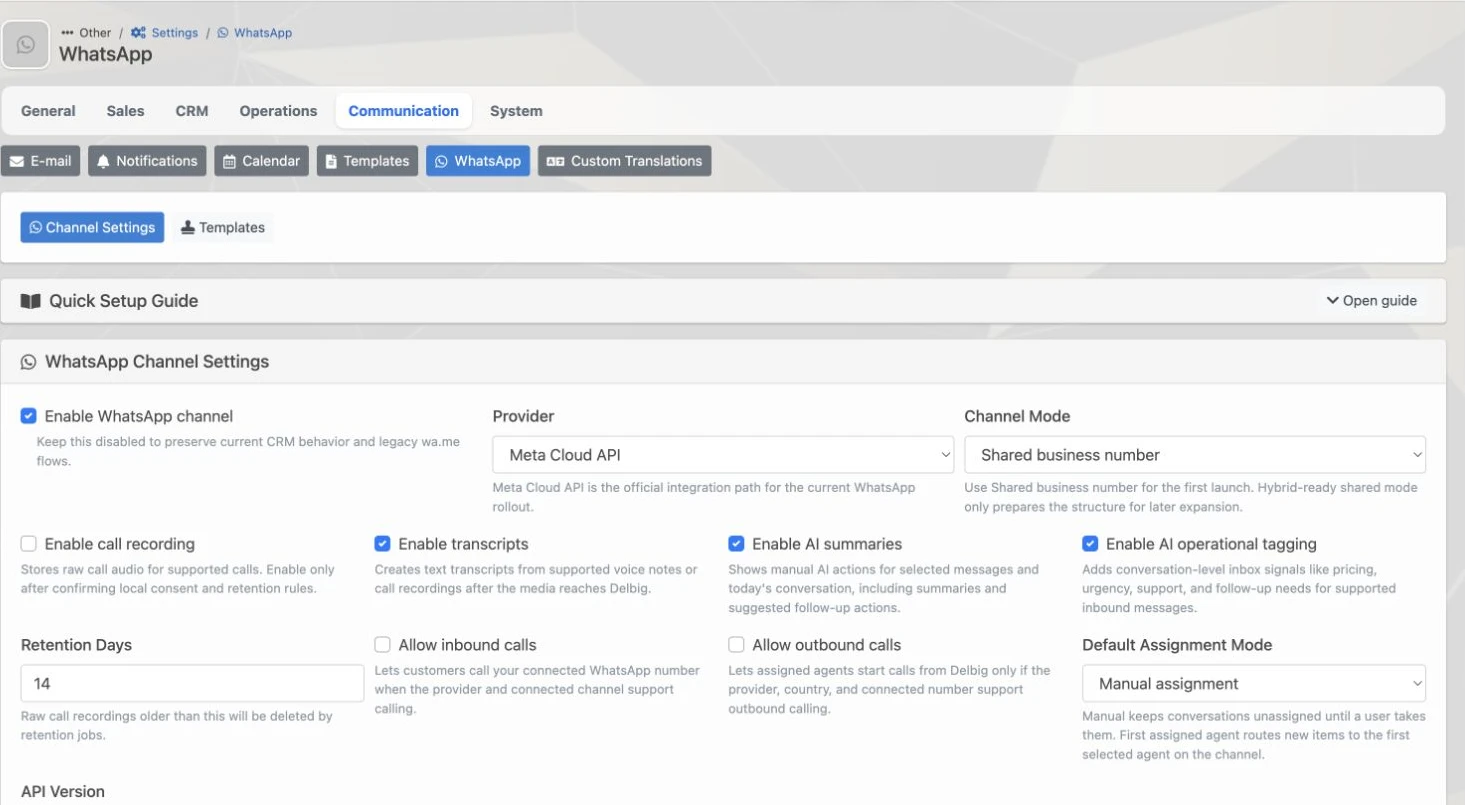
Meta connection and channel account
The company WhatsApp line is connected to CRM through Meta Cloud API and channel account settings.
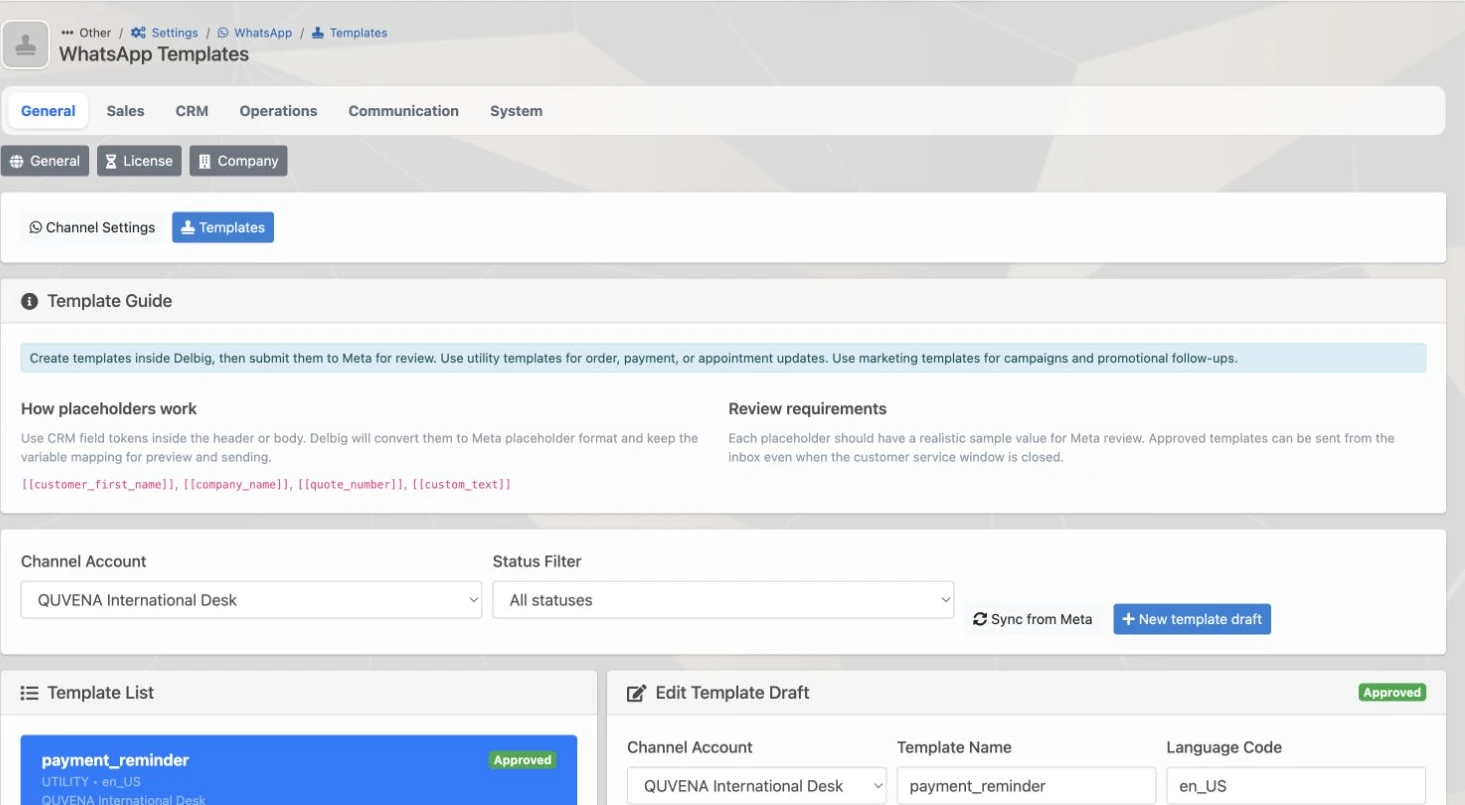
Template message management
Approved templates, CRM field tokens and review samples are prepared in the same management screen.
AI follow-up workflow
End-of-day analysis helps the team identify tasks, follow-ups and warm customer signals from conversations.
Example Flow
How does a WhatsApp conversation move in Delbig?
- The WhatsApp line is connected through Meta. Your company number becomes part of the Delbig CRM communication flow.
- The customer conversation appears in CRM. The customer responds about product, delivery, payment or follow-up through WhatsApp.
- Conversation is linked to CRM. The conversation connects with customer, opportunity, quote or order.
- Template or free message is used. Approved templates or service-window messages are used when appropriate.
- End-of-day follow-up becomes visible. AI analysis extracts task, follow-up and priority signals from the conversation.
- The sales action is completed. Call, task, quote revision, order conversion or delivery update is followed in CRM.
Positioning
Using WhatsApp Business is not the same as the Delbig WhatsApp module
WhatsApp Business alone lets you talk to the customer. Delbig WhatsApp aims to use the Meta-connected number inside CRM, connect conversations with customers and sales records, manage templates and create AI-supported follow-up signals.
It is not a replacement for a main package; it is added on top of packages where communication traffic is high.
Only WhatsApp Business
Messaging happens, but customer history, team follow-up, tasks, manager visibility and AI signals usually stay separate.
Delbig WhatsApp module
The WhatsApp number is connected to CRM; conversations work with customer files, sales records, tasks, templates and AI analysis.
Related Pages
Which packages and modules should be reviewed with WhatsApp?
WhatsApp is added on top of main packages with intensive customer communication. It does not replace finance or quote needs.
Dealer Portal
If dealers also communicate through WhatsApp while managing orders and accounts, review Dealer Portal.
API / Integration
If WhatsApp flow must connect with web forms or external systems, plan integration.
Production / MRP
If production or delivery updates should trigger customer communication, review Production / MRP.
Pricing configurator
Select the module on the pricing page and see the yearly total.
Module Fee
WhatsApp module price
190 USD / yr + VAT is shown as the current annual fee. This module is added on top of the selected main package when needed.
The price is not hardcoded on this page; when the WooCommerce product price changes, this amount is updated automatically.
Help
Frequently asked questions
Who is the WhatsApp module suitable for?
Sales, manufacturing, export and operations teams that communicate heavily with customers through WhatsApp.
Is WhatsApp included in the main package?
No. It is an add-on module because not every company needs WhatsApp CRM workflow.
Does it work without WhatsApp Business?
No. The core idea is connecting a WhatsApp Business number to CRM through Meta. Setup scope and technical requirements are clarified by company account.
Can templates be used?
Yes. Template drafts, language codes, categories, variables, statuses and Meta synchronization records are part of the infrastructure.
What does AI-supported end-of-day follow-up do?
It helps make price requests, urgency, task suggestions, support topics and follow-up signals easier to read.
Is it only for stores?
No. It can fit any manufacturer, exporter, dealer-network company or sales team with intense post-quote communication.
Is WhatsApp connected by QR code?
The verified setup described here is not personal-phone QR pairing. The company number connects to Delbig through a Meta Business and Meta Cloud API channel account.
Are Meta messaging fees included in the module price?
No. The dynamic amount shown on this page is the annual Delbig WhatsApp software fee. Meta usage or messaging charges are evaluated separately.
Do not leave WhatsApp conversations scattered on personal phones
If you want to connect your WhatsApp number to CRM through Meta, link conversations with customer records, use templates and see AI-supported follow-up signals, select WhatsApp on the pricing page.