Sevkiyat ve Teslimat Planlama: Siparişten Müşteri Teslimine Kontrollü Akış

Sipariş tamamlandıktan sonra iş bitmiş sayılmaz; ürünün hangi depodan çıkacağı, hangi müşteriye ne zaman teslim edileceği, hangi miktarın sevke hazır olduğu ve teslimat bilgisinin sipariş geçmişine nasıl döneceği takip edilmelidir. Delbig CRM’de sevkiyat planlama bu süreci satış, depo ve operasyon ekibi için sade ve izlenebilir hale getirir.

Sevkiyat ve teslimat planlama için depo, paket hazırlığı, rota ve CRM teslimat takip görseli
Sevkiyat ve teslimat planlama görselini büyüt

Sevkiyat planı siparişten kopuk ilerlemez

Mağaza, showroom, saha satış veya proje teslimatı yapan firmalarda en zor takip edilen konulardan biri, sipariş hazır olduktan sonra “kim neyi ne zaman teslim edecek?” sorusudur. Sipariş listesi ayrı, depo notu ayrı, sevkiyat planı ayrı ve müşteri bilgilendirmesi ayrı ilerlediğinde ekip aynı teslimat için farklı bilgiyle çalışır.

Delbig CRM sevkiyat ekranı sipariş satırlarını planlama ekranına taşır. Ürün depoda hazırsa, tedarikçiden geldiyse veya sevke uygun hale geldiyse planlanan sevk tarihi, sevke hazır bilgisi, teslim edilen oran ve durum aynı akışta görünür. Böylece satış ekibi müşteriye net tarih verirken, depo ekibi de hangi işin öncelikli olduğunu görebilir.

Delbig CRM sevkiyat ekranında planlanmamış, planlanmış, sevke hazır, teslim edildi ve şehir yoğunluğu alanları
Sevkiyat ekranında planlanmamış, planlanmış, sevke hazır ve teslim edilmiş kayıtlar ayrı durumlarla izlenir; şehir yoğunluğu teslimat planını daha görünür yapar.

Sevkiyat listesi ekibe günlük teslimat görünürlüğü verir

Sevkiyat planlama yalnızca tarih yazılan bir liste değildir. Aynı ekranda sipariş, müşteri, ürün sayısı, toplam miktar, planlanan sevk oranı, sevke hazır oranı, teslim edilen oran ve durum bilgisi birlikte görülmelidir. Bu yapı özellikle birden fazla siparişin aynı hafta içinde farklı müşterilere çıkacağı dönemlerde büyük kolaylık sağlar.

Delbig’de ekip teslimata hazırlanırken bekleyen işleri, planlanmış işleri, sevke hazır kayıtları ve teslim edilmişleri ayırabilir. Filtreler ve durum rozetleri sayesinde depo sorumlusu hangi siparişin çıkış beklediğini, satış temsilcisi hangi müşteriye dönüş yapacağını, yönetici de sevkiyat hacminin nerede yoğunlaştığını daha hızlı okur.

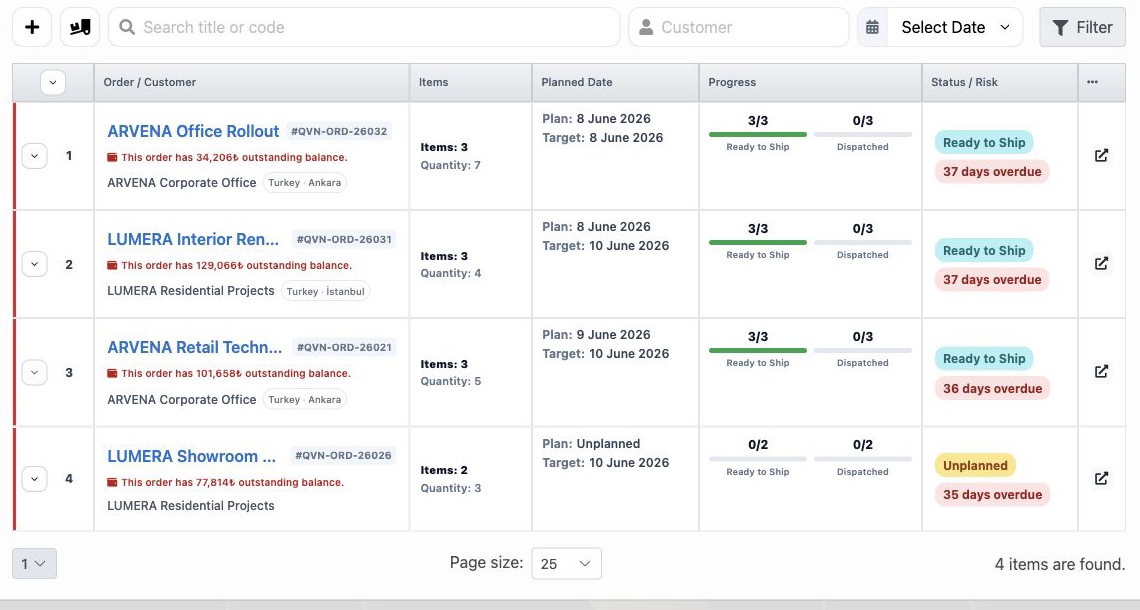
Delbig CRM sevkiyat listesinde sipariş, müşteri, ürün, miktar, planlanan sevk, sevke hazır ve teslim edilen oranları
Sevkiyat listesinde sipariş, müşteri, ürün sayısı, miktar, planlanan sevk, sevke hazır ve teslim edilen oranları tablo üzerinde takip edilir.

Ürün bazında sevke hazır, sevk edildi ve teslim bilgisi ayrışır

Bir siparişteki bütün ürünler aynı anda çıkmak zorunda değildir. Bir ürün depodan çıkmış, başka bir ürün sevke hazır bekliyor, üçüncü ürün için de planlanan sevk tarihi belirlenmiş olabilir. Bu ayrım yapılmazsa ekip siparişin tamamını bekliyor zanneder veya müşteriye eksik teslimat bilgisi geç döner.

Delbig sevkiyat detayında ürün satırları ayrı ayrı izlenir. Her satırda miktar, durum, tahmini teslimat veya planlanan sevk tarihi, sevke hazır işareti ve sevk edildi/çıkışı yapıldı bilgisi görünür. Bu yapı parçalı sevkiyat, kısmi teslimat ve depo çıkışı kontrolünü aynı sipariş kaydında tutar.

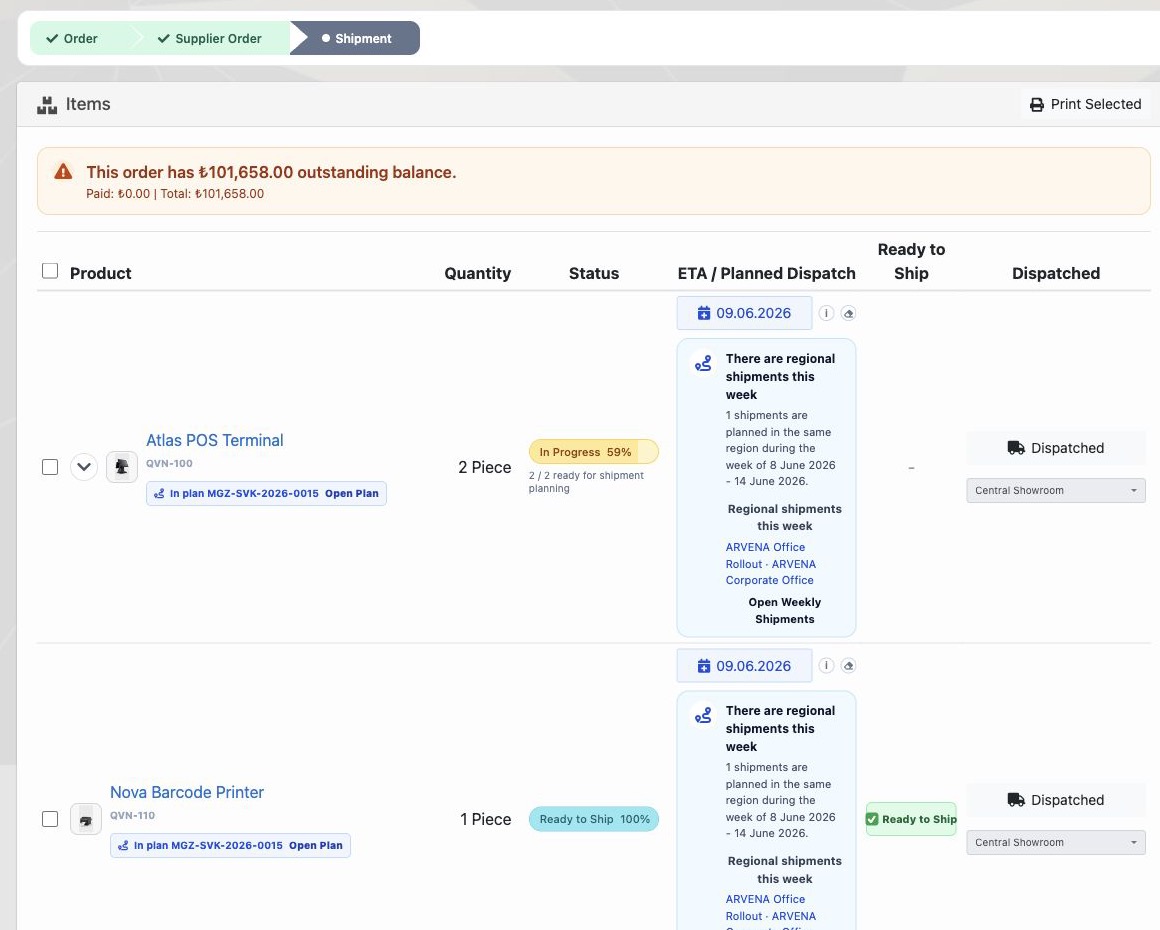
Delbig CRM sevkiyat detayında ürün, miktar, durum, planlanan sevk, sevke hazır ve sevk edildi alanları
Sevkiyat detayındaki ürün tablosu her ürün satırının plan, sevke hazır ve sevk edildi bilgisini ayrı ayrı gösterir.

Teslimat adresi ve bölgesel plan aynı kayda bağlıdır

Sevkiyat planının doğru çalışması için yalnızca ürünün hazır olması yetmez; teslimat ili, ilçesi, adresi ve müşteriye ait iletişim bilgisi de net olmalıdır. Delbig teslimat adresini sipariş ve müşteri kaydıyla birlikte tuttuğu için bölgesel planlama aynı kayıttan beslenir.

Mağaza ve showroom yapılarında bu özellikle önemlidir. Aynı gün aynı şehirde veya yakın bölgede yapılacak teslimatlar birlikte değerlendirilebilir; teslimat bölgesi eksik olan kayıtlar da planlama ekranında uyarı olarak görünür. Böylece teslimat planı telefon notlarıyla değil, siparişin kendi verisiyle yapılır.

  • Teslimat ili, ilçesi ve adresi sevkiyat detayında kontrol edilir.
  • Planlanan sevk tarihi haftalık yoğunluk ve bölge takibine bağlanır.
  • Eksik teslimat bölgesi olan kayıtlar ayrıca uyarılır.
  • Müşteri aradığında satış ve depo aynı teslimat bilgisinden konuşur.
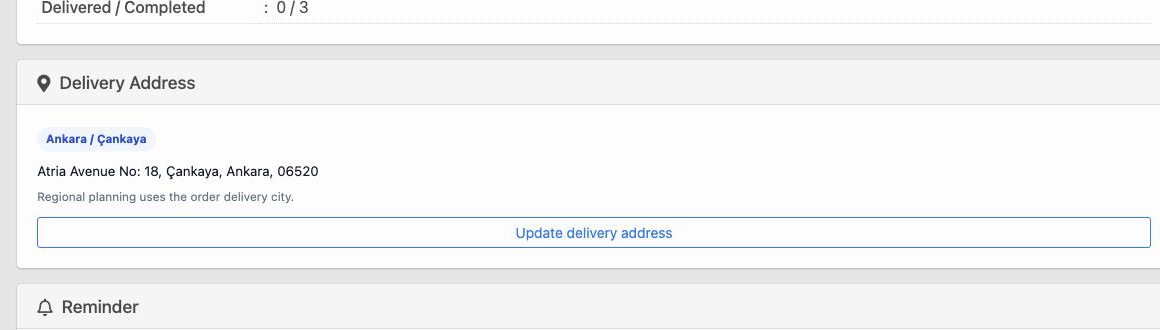
Delbig CRM sevkiyat detayında teslimat ili, ilçesi, adresi ve bölgesel planlama notu
Teslimat adresi kartı sevkiyat planının hangi il, ilçe ve adrese göre yapılacağını netleştirir.

Sevkiyat özeti yöneticinin takip ekranıdır

Yönetici için önemli olan yalnızca tek ürün satırı değildir; siparişin genel sevkiyat durumu da tek bakışta okunmalıdır. Delbig sevkiyat detayında bekleyen, planlanan, sevke hazır, sevk edildi ve tamamlanan miktarlar özetlenir. Bu özet, siparişin teslimata ne kadar yaklaştığını ve hangi adımda aksiyon gerektiğini gösterir.

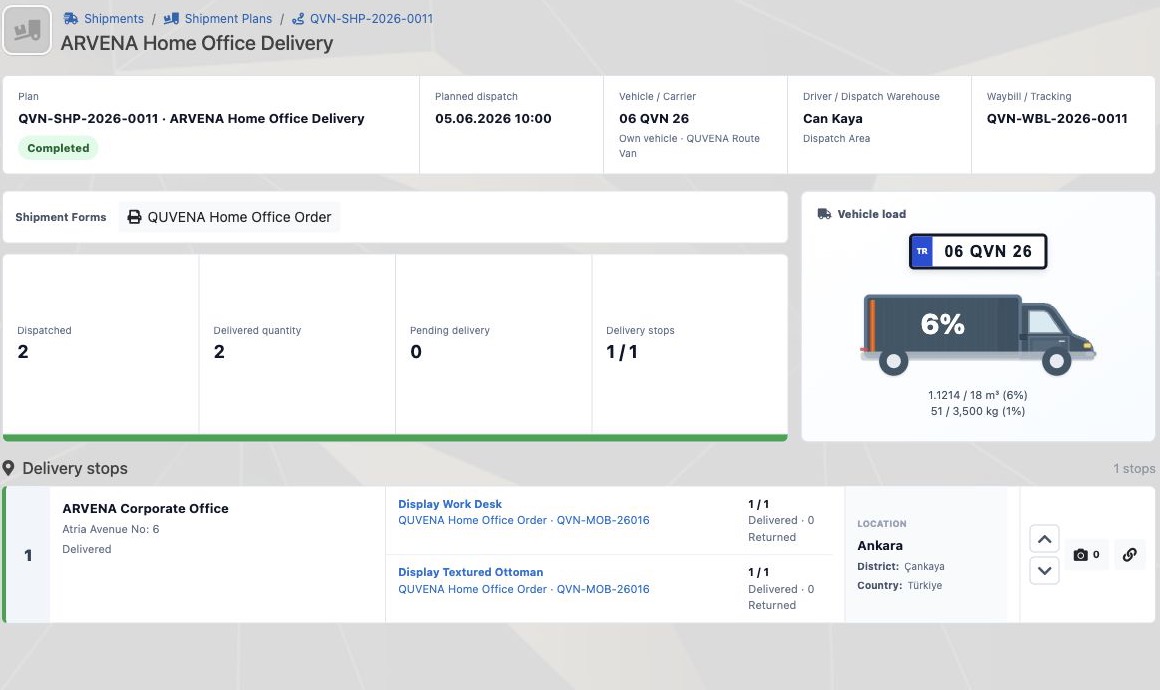
Delbig CRM sevkiyat detayında planlanan, sevke hazır, sevk edildi ve tamamlanan miktar özeti
Sevkiyat özeti siparişin bekleyen, planlanan, sevke hazır, sevk edildi ve tamamlanan miktarlarını tek kartta gösterir.
Stage Information tracked in Delbig Ekip için sonuç
Sipariş hazırlandı Ürün satırları, miktarlar, müşteri ve hedef teslim tarihi aynı sipariş kaydında yer alır. Satış ve operasyon teslim sürecine aynı kayıt üzerinden başlar.
Depo kontrolü Sevke hazır miktar, stoktan çıkışa uygun ürünler ve tedarik sonrası hazır olan satırlar ayrılır. Depo ekibi hangi ürünün çıkabileceğini net görür.
Planlanan sevk Planlanan sevk tarihi, teslimat bölgesi ve haftalık yoğunluk bilgisi kullanılır. Teslimatlar günlük ve haftalık olarak daha rahat sıraya alınır.
Çıkış / sevk edildi Sevk edilen miktar, çıkış tarihi, taşıyıcı, irsaliye veya takip numarası işlenebilir. Müşteriye verilen son durum daha hızlı cevaplanır.
Teslim edildi Teslim edilen miktar ve teslimat kapanışı sipariş geçmişine döner. Satış sonrası takip ve açık iş kontrolü netleşir.

Frequently asked questions

Does the shipment plan work connected to the order?

Evet. Delbig’de sevkiyat planı sipariş ve sipariş ürün satırlarıyla bağlantılı ilerler. Böylece ürün, müşteri, miktar, planlanan tarih ve teslimat durumu aynı kayıt çevresinde takip edilir.

Parçalı sevkiyat veya kısmi teslimat izlenebilir mi?

Evet. Aynı siparişte bir ürün sevk edilmiş, bir ürün sevke hazır, başka bir ürün planlanmış olabilir. Ürün satırları ve miktarlar ayrı takip edildiği için kısmi sevkiyat daha net yönetilir.

Sevkiyat sonrası stoktan düşüm yapılabilir mi?

Stok ve depo modülü kullanılıyorsa sevkiyat çıkışı stok hareketlerine bağlanabilir. Böylece depoda görünen miktar ile müşteriye çıkan miktar aynı operasyon kaydından izlenir.

Mağaza ve showroom teslimatları için uygun mu?

Evet. Mağaza, showroom, bayi veya proje teslimatı yapan firmalarda teslimat adresi, şehir yoğunluğu, sevke hazır ürün ve teslim edilen miktar takibi günlük operasyonu sadeleştirir.

Sevkiyat ve teslimat planınızı Delbig ile görünür hale getirin

Sipariş, depo, sevke hazır miktar, planlanan sevk tarihi, teslimat adresi ve teslim durumunu tek CRM akışında yönetin.

Request a meeting View pricing

Shipment and Delivery Planning: A Controlled Workflow from Order to Customer Delivery

An order is not finished when the sale is recorded. The team still needs to know which warehouse the product will leave from, which customer will receive it, which quantities are ready to ship and how delivery status returns to the order history. In Delbig CRM, shipment planning makes this workflow simple and visible for sales, warehouse and operations teams.

Shipment and delivery planning visual with warehouse dispatch, packages, route and CRM delivery tracking
Enlarge shipment and delivery planning visual

Shipment planning stays connected to the order

For stores, showrooms, field sales teams and project-based delivery teams, one of the hardest questions is what happens after the order becomes ready: who will deliver what, to which customer, and on which date? When the order list, warehouse notes, delivery plan and customer communication stay separate, teams work with different versions of the same delivery promise.

The Delbig CRM shipment screen brings order lines into the planning workflow. If an item is ready in the warehouse, received from a supplier or ready for outbound delivery, planned dispatch date, ready-to-ship status, delivered ratio and shipment status can be followed in the same flow. Sales can give the customer a clearer answer, while warehouse teams see which work needs priority.

Delbig CRM shipment screen with unplanned, planned, ready to ship, delivered and city density areas in English
The shipment screen separates unplanned, planned, ready-to-ship and delivered records; city density makes delivery planning easier to read.

The shipment list gives daily delivery visibility

Shipment planning is more than a list with dates. The same screen should show order, customer, product count, total quantity, planned dispatch ratio, ready-to-ship ratio, delivered ratio and status. This is especially useful when multiple orders will leave for different customers during the same week.

In Delbig, teams can separate waiting work, planned work, ready-to-ship records and delivered records. Filters and status badges help warehouse users see which orders are waiting for dispatch, sales representatives know which customer to update, and managers read where shipment volume is concentrated.

Delbig CRM shipment list with order, customer, product, quantity, planned dispatch, ready to ship and delivered ratios in English
The shipment list tracks order, customer, product count, quantity, planned dispatch, ready-to-ship and delivered ratios in one table.

Ready-to-ship, dispatched and delivered details are tracked by product

Not every product in an order has to leave at the same time. One item may already be dispatched, another may be ready in the warehouse, and a third may only have a planned dispatch date. Without this distinction, the team may assume the whole order is waiting or answer the customer late about partial delivery.

Delbig shipment detail tracks product rows separately. Each row can show quantity, status, estimated delivery or planned dispatch date, ready-to-ship marker and dispatched information. This keeps partial shipment, partial delivery and warehouse outbound control inside the same order record.

Delbig CRM shipment detail with product, quantity, status, planned dispatch, ready to ship and dispatched fields in English
The shipment detail product table shows planned dispatch, ready-to-ship and dispatched information separately for each product line.

Delivery address and regional planning use the same record

For shipment planning to work well, product readiness is not enough. Delivery city, district, address and customer contact details must also be clear. Delbig keeps the delivery address together with the order and customer record, so regional planning uses the same source of data.

This is especially useful for stores and showrooms. Deliveries in the same city or nearby regions can be reviewed together, while records with missing delivery region can be surfaced as planning warnings. The delivery plan is built from the order data itself, not from scattered phone notes.

  • Delivery city, district and address are checked on the shipment detail.
  • Planned dispatch date feeds weekly density and regional planning.
  • Records with missing delivery region are highlighted separately.
  • Sales and warehouse teams answer customers from the same delivery status.
Delbig CRM shipment detail delivery city, district, address and regional planning note in English
The delivery address card clarifies which city, district and address the shipment plan uses.

The shipment summary gives managers a quick follow-up screen

Managers do not only need a single product row; they need to read the overall shipment state of the order quickly. Delbig shipment detail summarizes waiting, planned, ready, dispatched and completed quantities. This shows how close the order is to delivery and where action is still needed.

Delbig CRM shipment detail summary with planned, ready, dispatched and completed quantities in English
The shipment summary shows waiting, planned, ready, dispatched and completed quantities in one card.
Stage Tracked in Delbig Team outcome
Order is ready Product lines, quantities, customer and target delivery date stay on the same order record. Sales and operations start delivery work from the same source.
Warehouse check Ready-to-ship quantity, stock-ready items and supplier-received lines are separated. Warehouse teams clearly see which products can leave.
Planned dispatch Planned dispatch date, delivery region and weekly density are used. Daily and weekly deliveries can be ordered more easily.
Outbound / dispatched Dispatched quantity, outbound date, carrier, waybill or tracking number can be recorded. The latest customer status can be answered faster.
Delivered Delivered quantity and delivery closure return to the order history. After-sales follow-up and open work control become clearer.

Frequently Asked Questions

Is shipment planning connected to the order?

Yes. In Delbig, shipment planning works through the order and order product lines. Product, customer, quantity, planned date and delivery status stay around the same record.

Can partial shipment or partial delivery be tracked?

Yes. In the same order, one product can be dispatched, another can be ready to ship and another can be only planned. Product rows and quantities are tracked separately, so partial shipment becomes clearer.

Can inventory be deducted after shipment?

When inventory and warehouse tracking is used, outbound shipment can connect to stock movements. The quantity seen in the warehouse and the quantity dispatched to the customer can be followed from the same operation record.

Is it suitable for stores and showrooms?

Yes. For stores, showrooms, dealer networks and project delivery teams, delivery address, city density, ready-to-ship products and delivered quantities simplify daily operations.

Make shipment and delivery planning visible with Delbig

Manage order, warehouse, ready-to-ship quantity, planned dispatch date, delivery address and delivery status in one CRM workflow.

Request a meeting View pricing