Order Tracking: One Operations Workflow from Sale to Delivery
Order tracking is not only the answer to “was the order received?” Delbig CRM makes an order that starts from a quote, direct sale or B2B portal trackable in the same record across products, customers, stock source, suppliers, warehouses and shipment steps.
Where does an order start?
There is not only one starting point for an order. The sales team sends a quote to the customer and converts it into an order when accepted. Some teams open a direct order when the products are already clear. In companies working with dealers, branches or corporate customer networks, the request can come through the B2B portal and move into the sales order workflow after internal approval.
That is why order tracking software should not be treated as only a list screen. It should show which channel the order came from, which customer it belongs to, which products will be fulfilled from which source and which people will work on it until delivery in the same record.
Converting a quote into an order
- An accepted quote moves into the order record with product, price and customer information.
- The sales representative continues without losing quote history, sharing links or customer notes.
- Order status can be tracked inside the same customer history.
Direct order or B2B portal
- The showroom, phone sales, field team or dealer manager can open a direct order.
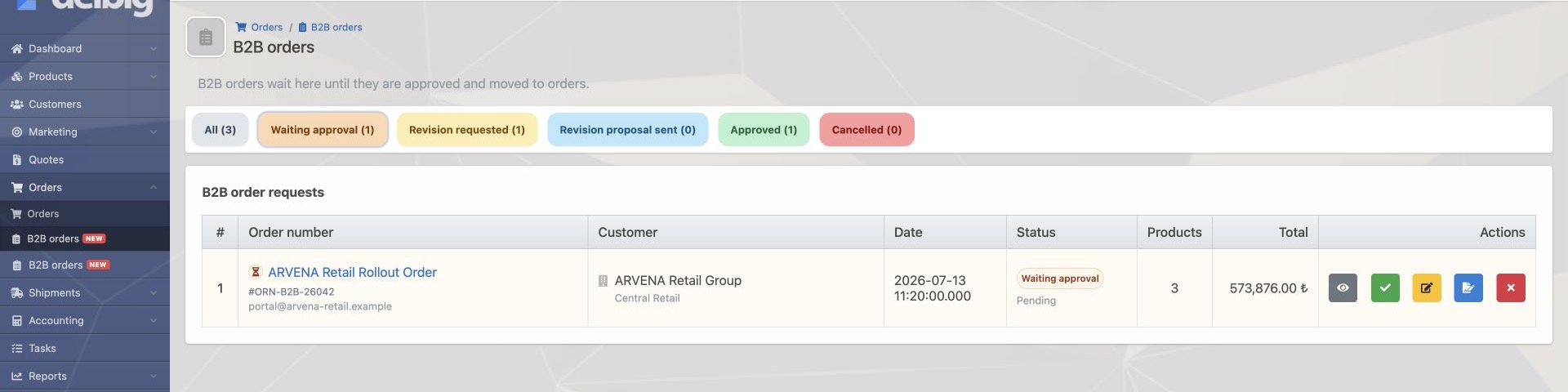
- A dealer or corporate customer can select products and submit an order request through the portal.
- The portal order appears internally as a waiting record for approval, revision or cancellation.


The order workflow is a shared roadmap for the team
Order operations can be complex from the outside, but tracking inside the system should not look complex. After the order is received, the team should see which product will be fulfilled from stock, which will be sourced externally, which has entered the warehouse and which date it will be sent to the customer in the same sequence.
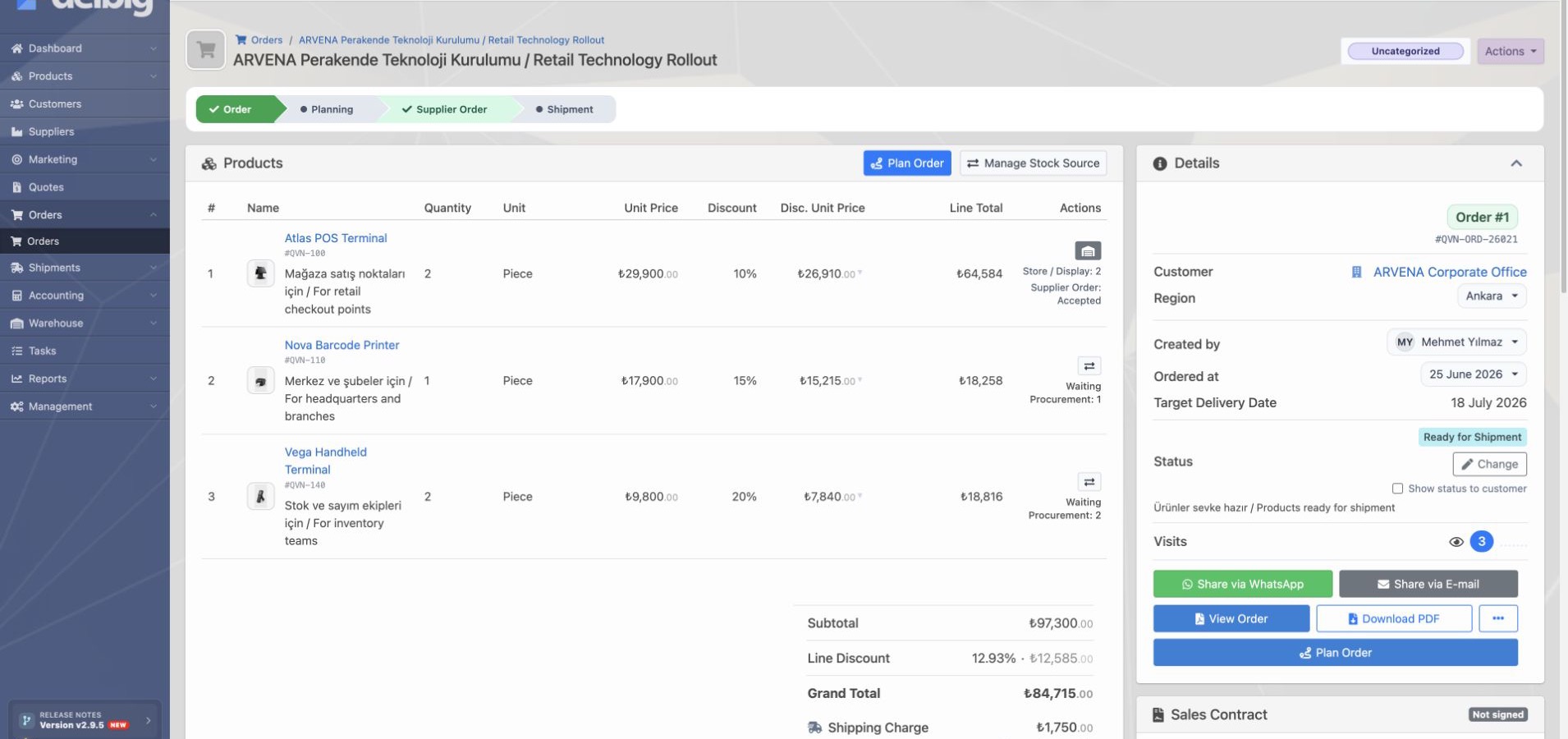
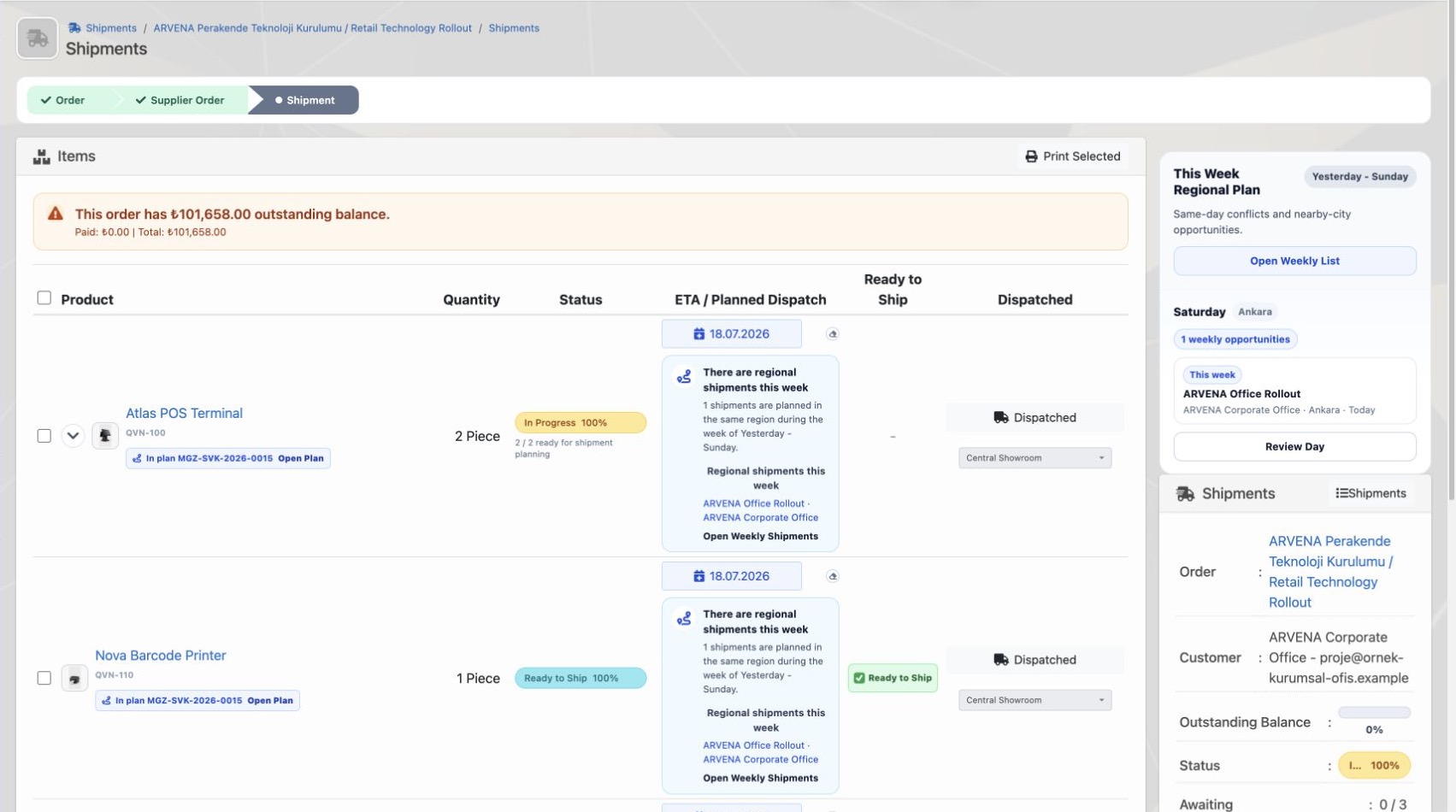
In the Delbig CRM order detail, the workflow line keeps order, supplier order, shipment and after-sales steps connected. When the sales representative, warehouse owner, purchasing team and manager look at the same order record, they can quickly understand where the process stands.


| Stage | Meaning for the team | Information tracked in Delbig |
|---|---|---|
| Order received | A quote was accepted, a direct order was opened or a B2B portal request arrived. | Customer, products, quantities, prices, responsible user and order date. |
| Sourcing decision | The product will be reserved from stock, moved into preparation or expected from the supplier. | Stock fulfillment, quantity waiting in procurement, warehouse-ready quantity and row status. |
| Supplier order | A supplier order is sent for the product that will be sourced externally. | Supplier, sent date, response status, ETA and received warehouse quantity. |
| Warehouse receiving | The sourced or prepared product becomes suitable for shipment. | Warehouse intake, source-ready quantity, stock movement and purchase invoice link when needed. |
| Shipment plan | A delivery plan is made from warehouse to customer. | Planned dispatch date, ready-to-ship marker, dispatch and delivery statuses. |
Not every product has to be fulfilled from the same source
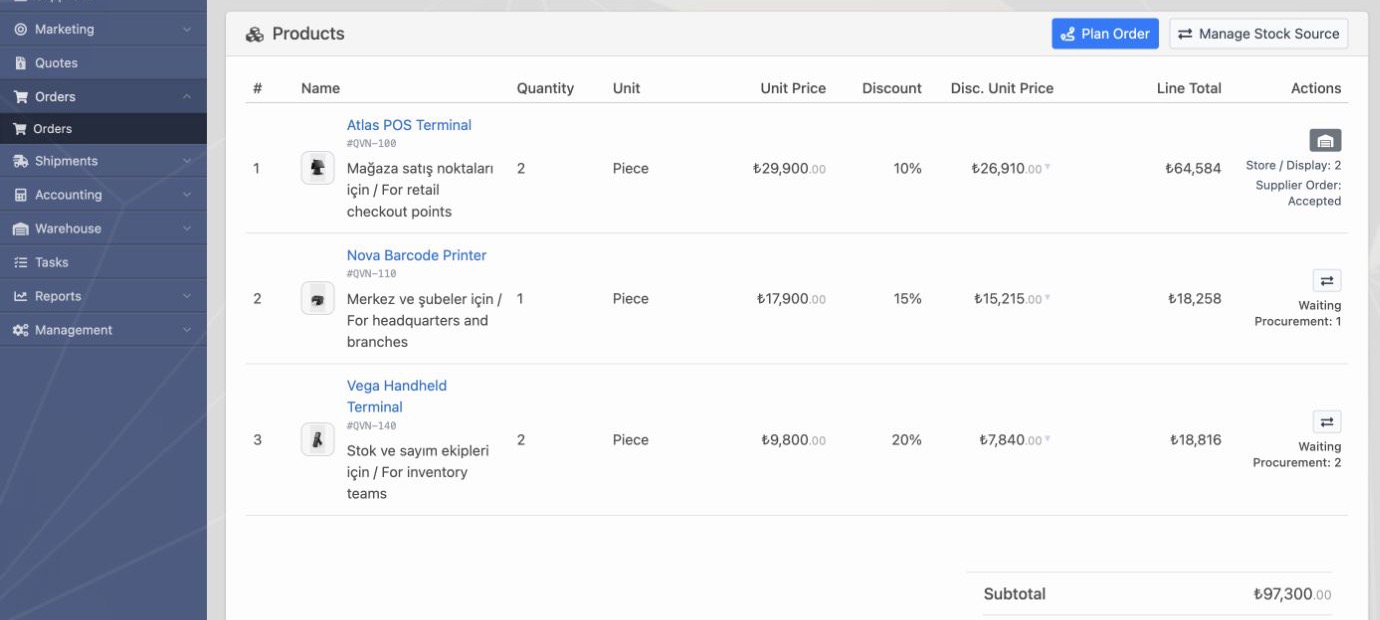
Not every product in an order has to follow the same path. One item can be reserved from branch or main warehouse stock, one can wait in preparation and another can depend on the supplier response and ETA. This is exactly where order tracking becomes valuable: showing where each product is by line.
In Delbig CRM order product rows, stock-reserved products, products waiting for procurement, products with accepted supplier orders and warehouse-ready quantities can be tracked separately. This reduces the “where is the product?” question and helps the sales team give clearer information to the customer.


The order detail card gives a manageable summary
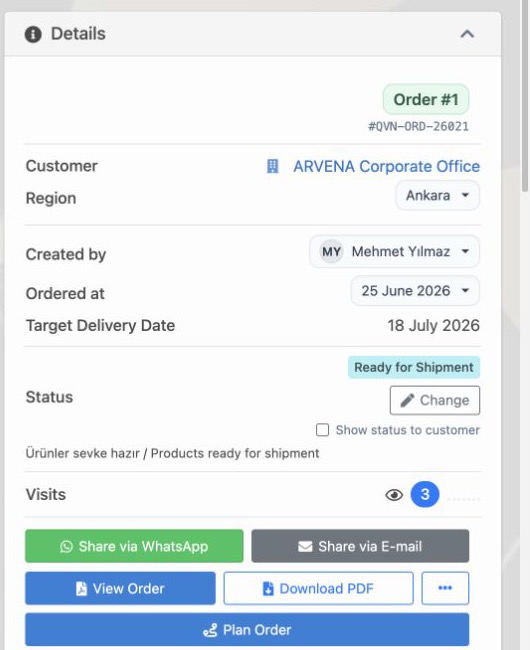
On the order page, customer, region, creator, order date, target delivery date, status and sharing actions should be visible at a glance. This summary makes it easier for sales to update the customer and for operations to move quickly into supplier and shipment steps.


Supplier orders keep ETA and warehouse intake visible
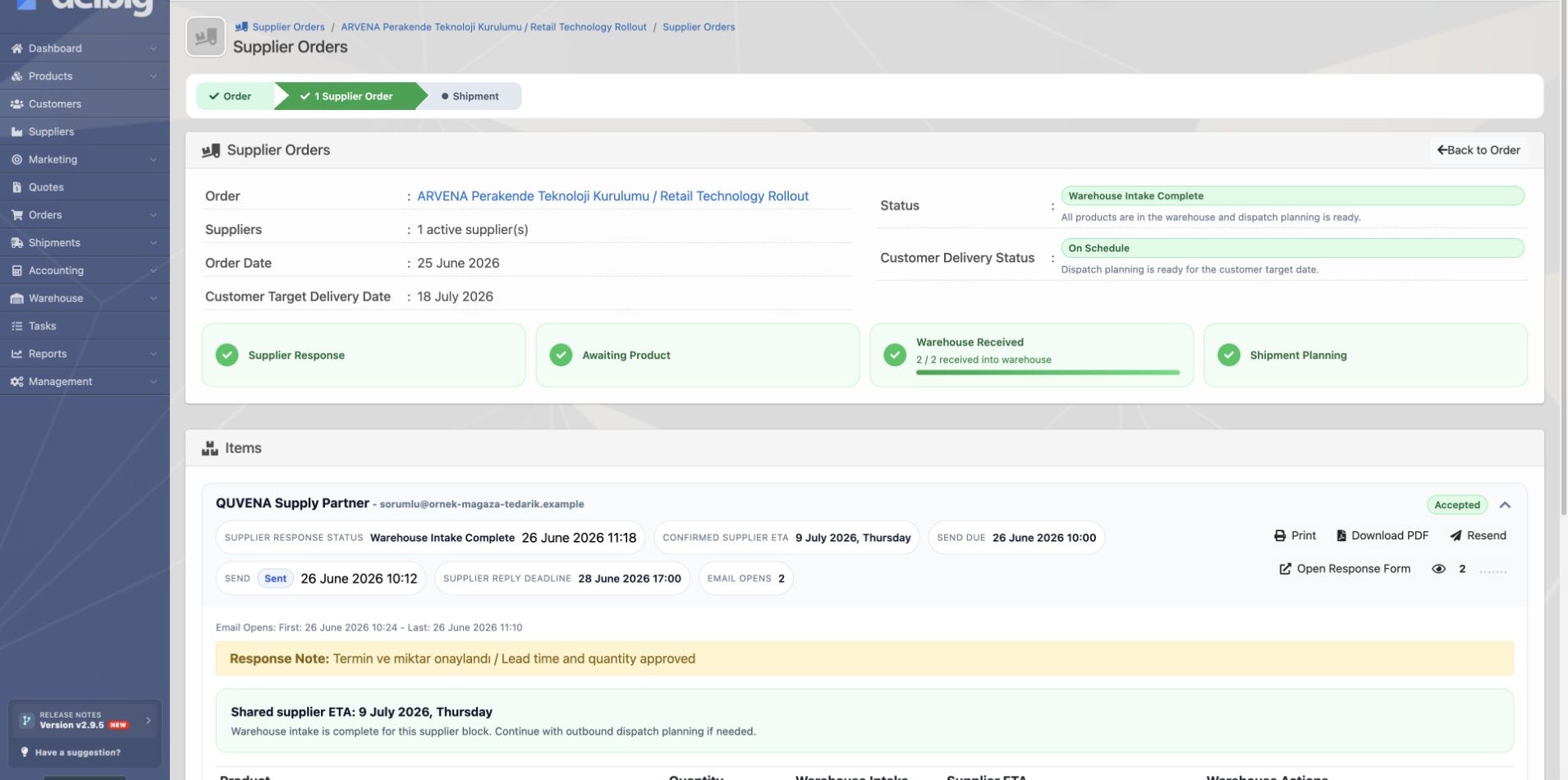
If the company sources a product externally, the process does not end with a note saying “we ordered it.” The supplier order is sent, the supplier response is awaited, the ETA becomes clear, intake quantity is processed when the product reaches the warehouse and it connects to the customer shipment plan. When these steps stay in separate messages, sales and warehouse teams search for the same information in different places.
In the Delbig CRM supplier order screen, response status, send date, supplier-confirmed ETA, warehouse intake quantity and shipment planning action are visible in the same workspace. Purchasing and warehouse teams can track not only that the product was ordered, but also which quantity entered the warehouse.


Order statuses create a shared language
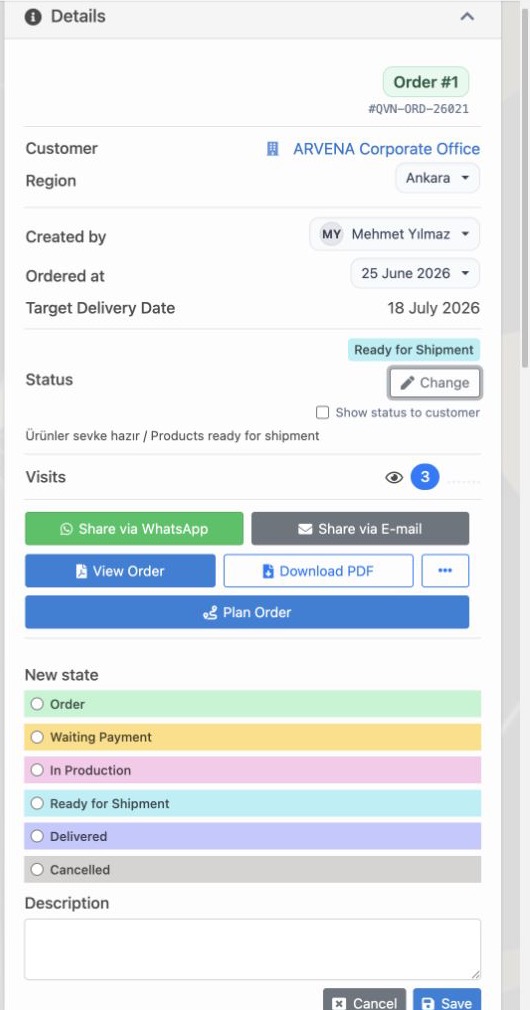
As order tracking grows, the team needs a shared status language. Stages such as “New”, “Waiting payment”, “In preparation”, “Ready for shipment”, “Delivered” or “Cancelled” give the same signals to sales, finance, warehouse and management.
These stages can be updated from one place in the Delbig CRM order status change panel. When the status changes, the team sees not only that the order is open, but also which action is expected. A waiting-payment order points to finance follow-up, an in-preparation order points to operations control and a ready-to-ship order gives a clear task to warehouse and delivery planning.
- Order: the record with clear product, quantity and delivery expectation enters the sales workflow.
- Waiting payment: operations do not move forward before deposit, collection or payment confirmation is completed.
- In preparation: the product is being prepared internally or procurement is being tracked.
- Ready for shipment: the product is in the warehouse; shipment or customer delivery planning comes forward.
- Delivered: customer delivery is completed and after-sales follow-up begins.


A shipment plan is made for warehouse-ready products
The final operations step of an order is customer delivery. After the product enters the warehouse, it should be clear which line is ready to ship, which date it will go out, which quantity is planned and which line is still waiting.
In the Delbig CRM shipment planning screen, products, quantities, planned dispatch date, ready-to-ship marker and outbound information are tracked together. The warehouse team does not stop at “the product arrived”; it also sees when to act for which customer order on the same screen.


Which teams is it for?
Sales and customer representatives
- They track where an accepted quote stands after it becomes an order.
- They can tell the customer more clearly whether the product is in stock, in procurement, in the warehouse or ready to ship.
- They can move B2B portal orders into the internal approval workflow.
Operations, purchasing and warehouse teams
- They connect supplier order, ETA, warehouse intake and shipment plan to the same order record.
- They separate stock-reserved and externally sourced products by line.
- They turn ready-to-ship products and waiting quantities into a delivery plan.
Frequently asked questions
Can order tracking be used independently from quotes?
Yes. An order can be created from an accepted quote, but it can also start as a direct sales record or B2B portal order. The important point is collecting product, customer, source and delivery information in the same order record.
Does the supplier order move inside order tracking?
Yes. Supplier orders can be opened for products that will be sourced externally. Supplier response, ETA, warehouse intake quantity and shipment plan connect to the same operations chain.
Can one order include both stock and supplier-sourced products?
Yes. Order rows can move from different sources. One product can be reserved from stock while another is expected from a supplier, and this distinction is visible by line.
Does the shipment plan work connected to the order?
Yes. Products that become ready in the warehouse can be connected to the customer shipment plan. Planned dispatch date, ready-to-ship marker and delivery status are tracked from the order.
Make your order process visible from sale to delivery
Manage quote, B2B portal, product source, supplier, warehouse and shipment steps in one workflow on Delbig CRM.