
Task and Work Management Software
Delbig task management software assigns work to people or departments, makes deadlines and status visible, and records progress through steps and comments without losing customer, product or quote context.
Assign work to the right person and department
User and department permissions let each person see their responsibility while managers review the whole team in one place.
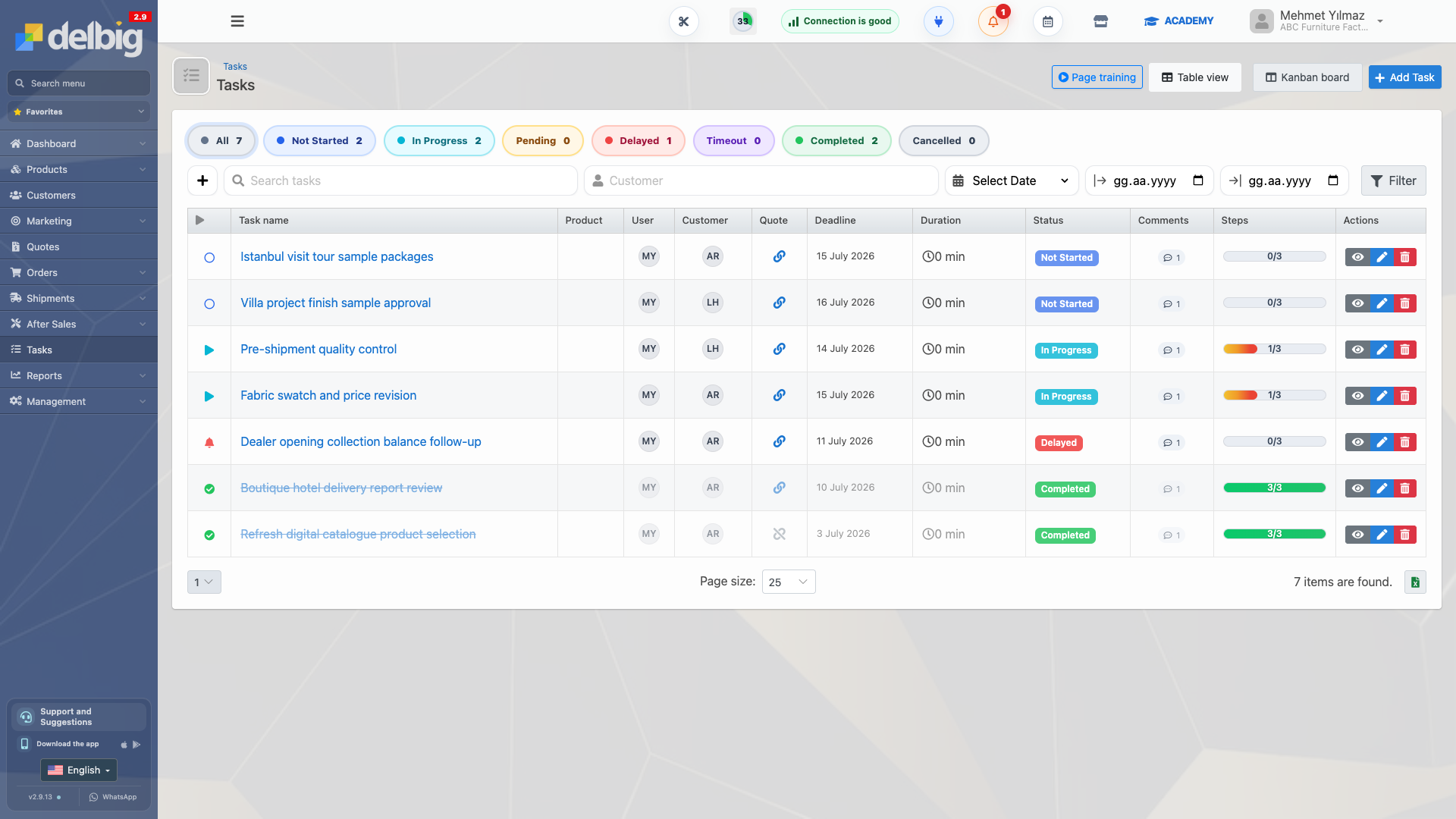
Track deadlines, status and delays in one view
Filter work by not started, in progress, pending, delayed, timed out, completed or cancelled status.
See progress through steps, comments and time records
Steps, comments and recorded time show whether work is actually progressing instead of merely existing on a list.
Connect tasks with customer and sales records
Links to customers, products and quotes turn tasks into shared company memory rather than isolated personal to-do items.
Compare task management software and CRM
Frequently asked questions
What does task management software do?
It assigns work to people or departments and makes completion visible through deadlines, status, steps, comments and time records.
Can Delbig connect tasks to customers and quotes?
Yes. Tasks can be linked to customer, product and quote records so the team works with shared business context.
Build your team task workflow with Delbig
Share your current work allocation; we will map how tasks, customers and sales records can run in one connected flow.