Furniture Product and Inventory Tracking: Keep Collections, Images and Prices Organized

For companies looking for furniture inventory tracking software, the need is not only the question “how many units are available?” Product image, collection, price, warehouse, order reservation, supplier status and readiness for customer shipment should be tracked in the same workflow.

Mobilya ürün, stok ve depo takibini anlatan modern showroom ve depo görseli
A general visual about furniture product, inventory and warehouse tracking.

The product card is the shared record for sales and inventory

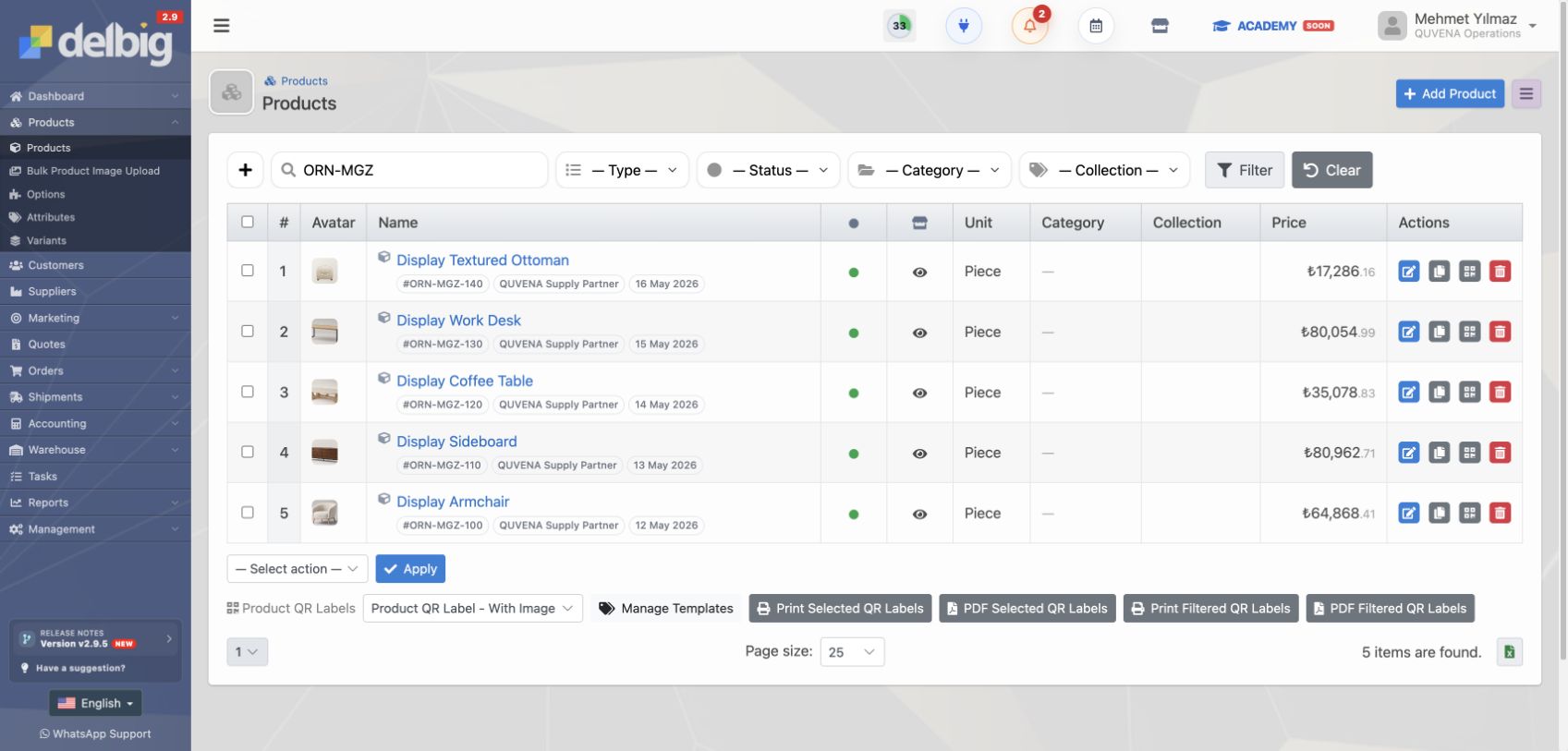
Furniture product tracking does not start with the product name alone. It becomes meaningful with product image, stock code, collection, category, unit, price, dimensions, description and technical details used in sales. The sales team uses the same product card while preparing quotes, and the warehouse team tracks stock movements on the same product.

In Delbig, the product card becomes the common reference for quotes, orders, inventory, warehouses and labels. This prevents a sofa image, stock code, quote price and shipment label from being recreated separately in different places.

Delbig CRM ürün listesinde mobilya ürün görselleri, stok kodları ve fiyat bilgileri
Product cards become the central record used by the sales team, with images, stock codes, categories, units and price information.
Delbig CRM product list showing furniture images, SKUs and price information
Product cards become the central record used by the sales team, with image, SKU, category, unit and price information.
Delbig CRM depo listesinde malzeme, showroom ve sevkiyat depoları
When material, shipment and showroom warehouses are defined separately, the question of where the inventory is can be answered more clearly.
Delbig CRM warehouse list with material, showroom and shipment warehouses
When material, shipment and showroom warehouses are defined separately, the team can answer where each stock item is more clearly.

Inventory tracking is not just quantity; it is source and status tracking

In a furniture company, products in the same order do not all have to follow the same route. One item can be reserved from showroom stock, one can wait in the material warehouse, one can move into the shipment warehouse, and another can wait until it arrives from a supplier.

The inventory view shows in-stock, reserved, available and outgoing quantities by product. This lets the sales team check whether the product is available for the customer while the warehouse team answers which warehouse holds which reserved quantity from the same screen.

Tracking area Meaning in a furniture company Information made visible in Delbig
Product information Collection, image, stock code, dimensions, description and price information Product card, price records and quote/order lines
Material warehouse Fabric, panel, accessory part or main warehouse product Inventory quantity by warehouse and location
Shipment warehouse Product ready for delivery and waiting to be dispatched to the customer Transfer, reserved quantity, outgoing quantity and delivery plan
Reservation Preventing a sold or B2B-ordered product from being used in another sale Active, released or shipment-converted reservation
Supplier receiving Receiving externally sourced products into warehouse Supplier order, purchase invoice and stock movement connection

Separate materials and shipments with multiple warehouses

For furniture companies working as stores or showrooms, “warehouse” may not mean one place. Main material warehouse, showroom display area, ready-to-ship area and project-based temporary warehouses should be tracked separately. Delbig warehouse records make this distinction visible in the system.

This structure reduces confusion between available products and products waiting for procurement. While a product in the material warehouse waits for production or assembly, a product in the shipment warehouse can be connected to the customer delivery plan. The showroom warehouse keeps display and fast-sale products separate.

Reservations separate sold products in the warehouse

In furniture sales, an item shown in stock is not always available for sale. It may already be reserved for an accepted quote, direct sale or B2B portal order. The reservation screen clarifies this distinction by showing which product is reserved for which order, which was released and which turned into shipment planning.

Delbig CRM stok rezervasyonları ekranında aktif, serbest bırakılan ve sevkiyata dönüştürülen ürünler
The reservations screen tracks products reserved for orders, products released after cancellation or revision, and records converted into shipments together.
Delbig CRM stock reservations screen with reserved, released and shipment-converted products
The reservations screen shows products reserved for orders, released after cancellation or revision, and converted into shipments.

Reservation cancellation is also part of operations. When the customer changes the product or the order is revised, reserved stock is released. This lets the warehouse team rely on the reservation status in the system instead of manual notes.

Warehouse movements show the product history

The stock movements screen works like a ledger showing where the product came from, where it went and which transaction changed it. Initial stock, supplier receiving, transfer from material warehouse to shipment warehouse, customer dispatch and stock count movements are tracked with date and source information.

This makes it possible to answer questions such as “did this product arrive from the supplier?”, “was it transferred from the material warehouse to the shipment warehouse?” and “was it dispatched to the customer?” from one movement history. Product tracking should show not only the current quantity, but also how that quantity was formed.

Delbig CRM stok hareketleri ekranında transfer, tedarikçi girişi, müşteri sevki ve sayım hareketleri
Stock movements show the transactions a product went through, from initial stock to supplier receiving, transfer and shipment.
Delbig CRM stock movements screen with transfers, supplier receipts, customer shipments and stock counts
Stock movements show each transaction a product has passed through, from initial stock and supplier receipt to transfer and shipment.

Supplier orders and purchase invoices connect to stock receiving

If a furniture company works as a store, some products are sourced externally. In this case, the process starts with a supplier order; the supplier gives an ETA, the received quantity is accepted when the product arrives, and the financial record is completed with a purchase invoice.

In Delbig, a purchase invoice can be entered manually, imported as a PDF or converted into product lines through photo scanning. When invoice lines are matched with products, the team can select which items will be posted to inventory, connecting invoice capture and warehouse receiving in the same operational chain.

On the purchase invoice screen, product line, supplier code, quantity and unit price are evaluated together with the stock card. When the lines to post to stock are selected, the receiving warehouse is chosen.

  • The invoice from photo scanning or PDF import is kept as the source.
  • Product lines are matched with stock cards.
  • Material, showroom or shipment warehouse can be selected.
  • After approval, the lines can be posted to the warehouse as stock movements.

This structure reduces the “the product arrived but does not appear in stock” problem for store and project teams working with suppliers.

Delbig CRM alış faturası stok kartında ürün satırlarını depoya işleme seçimi
Selected product lines in the purchase invoice can be posted as stock receiving into the material warehouse.
Delbig CRM purchase invoice stock card for posting selected product lines into a warehouse
Selected purchase invoice product rows can be posted into the material warehouse as stock receipts.
Delbig CRM alış faturasında tedarikçi kodu, ürün, miktar, birim fiyat ve toplam bilgileri
After photo scanning or PDF import, product lines are reviewed with supplier code, quantity and price information.
Delbig CRM purchase invoice rows with supplier code, product, quantity, unit price and total
After photo scanning or PDF import, product rows are reviewed with supplier code, quantity and price information.

Label designs can be separated for shipment and material warehouses

Warehouse organization should not stay only on screen. A different label design can be used for products in the material warehouse and for products ready for shipment. Barcode, QR code, product image, stock code and warehouse purpose can appear on the label.

In Delbig, label templates can be prepared as product-image labels or simple warehouse labels. A material warehouse label focuses on shelf and inventory control, while a shipment warehouse label helps separate products ready for delivery quickly.

Delbig CRM etiket şablonlarında malzeme deposu, sevkiyat deposu ve ürün görselli etiket tasarımları
Label templates can be prepared separately for material warehouse, shipment warehouse and product-image use cases.
Delbig CRM label templates for material warehouse, shipment warehouse and product-image labels
Label templates can be prepared separately for material warehouse, shipment warehouse and product-image use cases.

The right expectation for companies looking for furniture inventory tracking software

For a company looking for furniture inventory tracking software, the right solution is a system that does not separate product cards from warehouse movements. A simple quantity list may seem useful in the short term, but if sales, procurement, reservations, purchase invoices and shipments are not connected to the same record, the team still searches between phone calls, WhatsApp and Excel.

Delbig CRM treats product and inventory workflows together with the sales process. When product data connects to quotes and orders, stock quantity connects to warehouses and reservations, and supplier receiving connects to purchase invoices and shipment, the product discussed with the customer is tracked internally through the same record.

Frequently asked questions

Can Delbig be used as furniture inventory tracking software?

Yes. When product cards, warehouse records, stock movements, reservations, supplier receiving, purchase invoices and label templates are used together, Delbig supports furniture inventory tracking needs in connection with the sales process.

Can material warehouse and shipment warehouse be tracked separately?

Yes. The company can create multiple warehouses; inventory quantity, transfers and location information can be tracked separately for areas such as material warehouse, showroom warehouse and shipment warehouse.

Can a sold product be separated from available stock?

Yes. With reservations, the product assigned to an order can remain visible in stock while reducing the available quantity. If the order is cancelled or revised, the reservation can be released.

Can a purchase invoice be captured by photo and posted to stock?

Purchase invoice lines received through photo scanning or PDF import can be matched with products. After approval, selected lines can be posted as stock receiving into the relevant warehouse.

To see the workflow from order to shipment furniture order tracking software page, and for the overall sector structure furniture management software guide.

Track products, inventory and warehouses in the same workflow

Make collection, product card, warehouse, reservation, supplier receiving, purchase invoice and shipment steps more visible in Delbig CRM.

Request a meeting View pricing