
Tedarikçi ve Satın Alma Takibi: Ürün, Fiyat, Sipariş, Fatura ve Ödeme Aynı Akışta
Satın alma takibi yalnızca “hangi tedarikçiye sipariş verdik?” sorusundan ibaret değildir. Delbig CRM’de tedarikçi kartı, çalışma ve fiyat kuralı, tedarikçi ürün adı-kodu, alış fiyatı, tedarikçi siparişi, alış faturası, stok girişi, ödeme ve ekstre aynı satın alma akışında izlenebilir.

Tedarikçi kartı satın alma kurallarının başlangıç noktasıdır
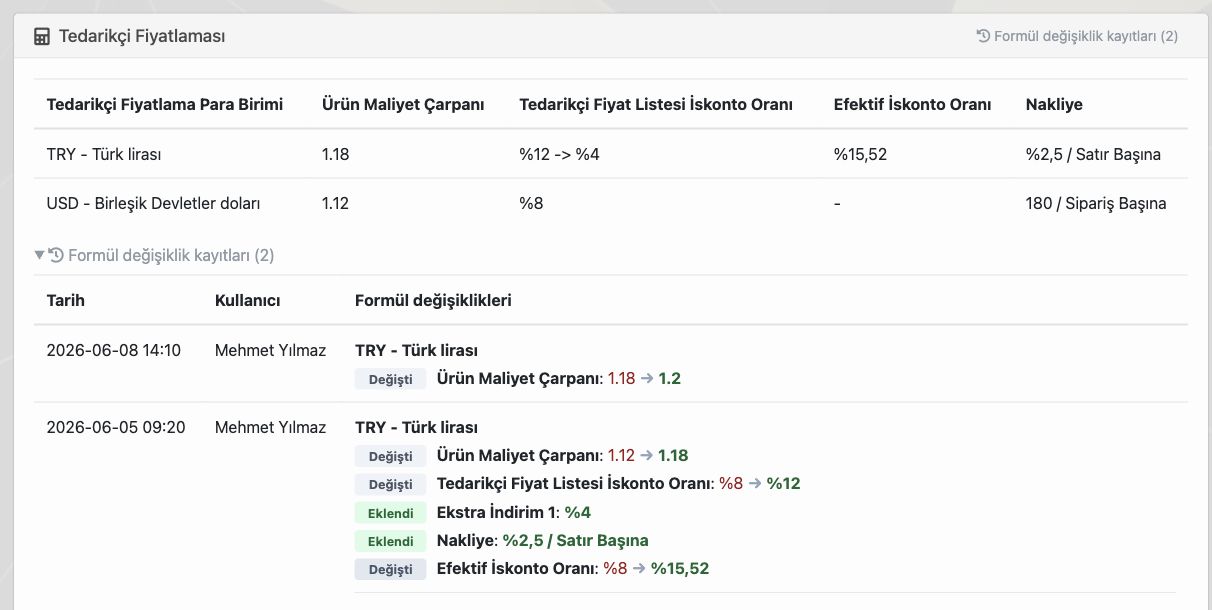
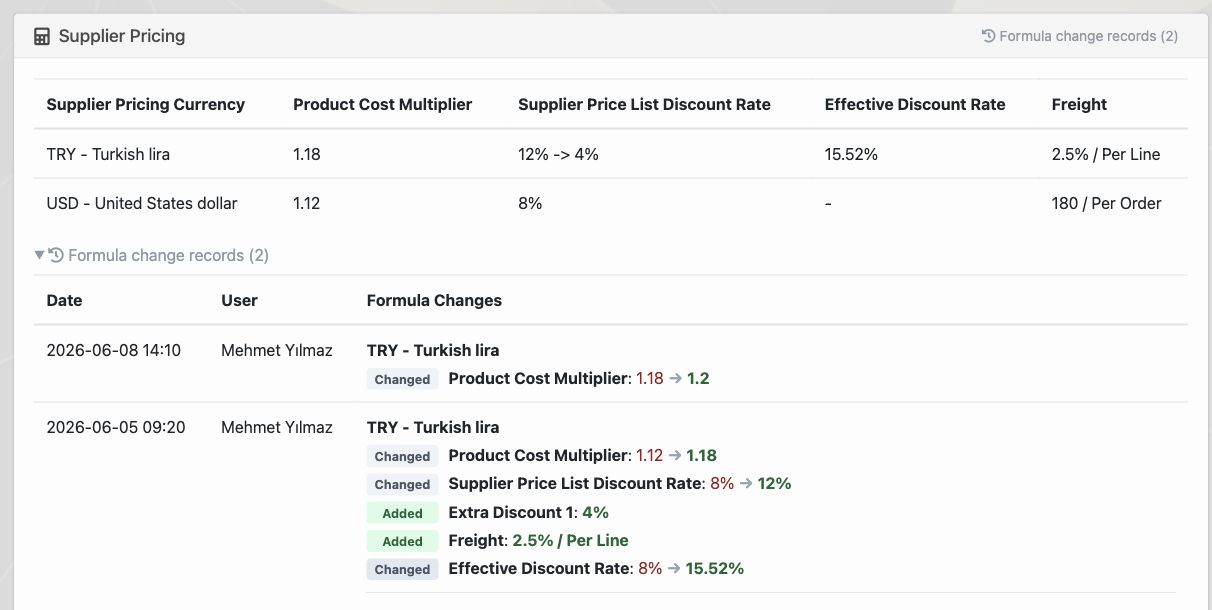
Tedarikçi sisteme eklendikten sonra firma bu tedarikçiyle nasıl çalıştığını bir kez tanımlar. Alış para birimi, maliyet çarpanı, iskonto oranı, ek iskonto, nakliye kuralı veya sipariş bazlı ek maliyet gibi alanlar tedarikçi kartında tutulduğunda satın alma ekibi aynı ürünü her siparişte baştan hesaplamak zorunda kalmaz.
Bu yapı özellikle fiyatların sık değiştiği sektörlerde önemlidir. Tedarikçi yeni bir fiyat listesi gönderdiğinde veya alış koşulu değiştiğinde Delbig’de formül değişiklik kayıtları görülebilir. Yönetici hangi tarihte hangi maliyet çarpanının, iskonto oranının veya nakliye kuralının değiştiğini takip eder; ekip eski maliyetle yeni maliyeti karıştırmadan çalışır.
Tedarikçideki ürün adı ile içerideki ürün adı ayrı tutulur
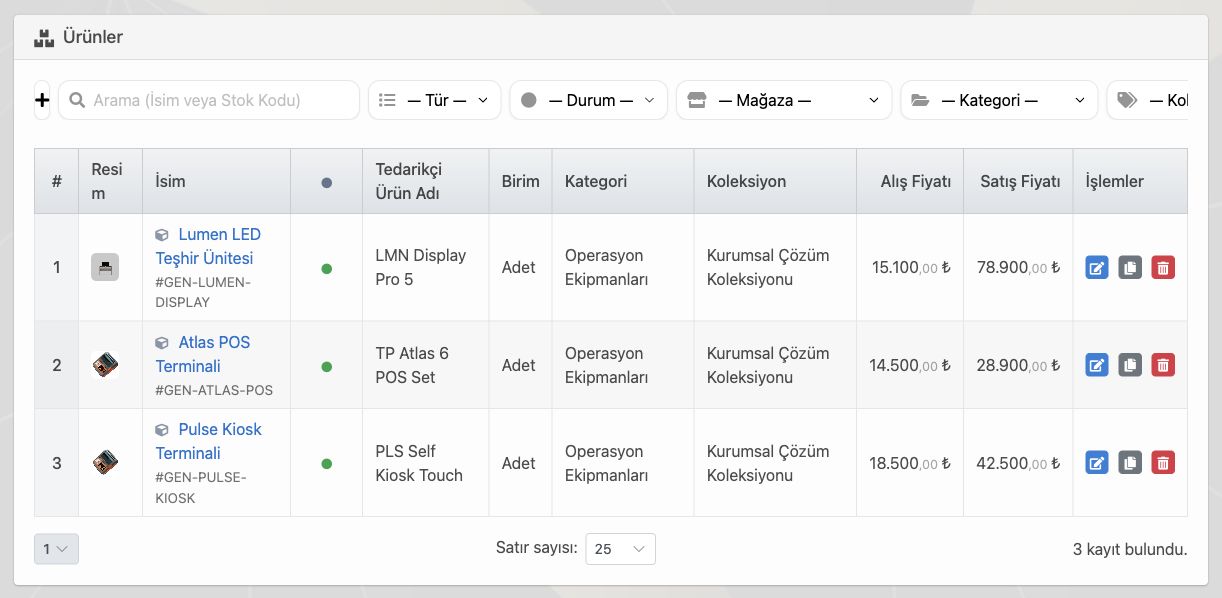
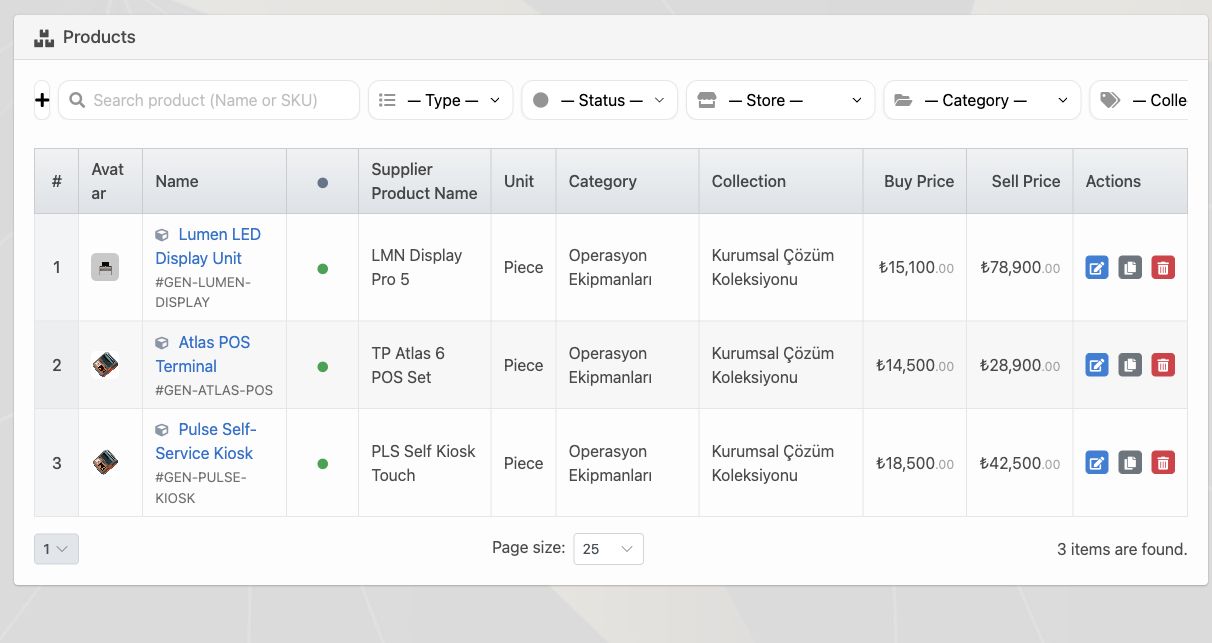
Satın almada en sık yaşanan karışıklıklardan biri, tedarikçinin kullandığı ürün adı veya kodunun firma içindeki ürün adıyla aynı olmamasıdır. İçeride ürün “Lumen LED Teşhir Ünitesi” olarak geçerken tedarikçi aynı ürünü “LMN Display Pro 5” adıyla ve farklı ürün koduyla gönderebilir. Bu durum Excel veya mesaj üzerinden takip edildiğinde yanlış ürün siparişi, yanlış fiyat veya yanlış stok girişi riski doğurur.
Delbig’de ürün kartı, tedarikçi ürün adı ve tedarikçi ürün kodu ayrı alanlar olarak tutulur. Satın alma ekibi tedarikçi siparişi verirken veya alış faturası işlerken içerideki stok kodunu, ürün adını ve tedarikçideki karşılığını birlikte görür. Sistem bu ayrımı kaybetmediği için tedarikçi farklı isim kullansa bile ürün eşleştirme aynı kayıt üzerinden yürür.
Tedarikçi siparişi satış siparişinden kopmadan ilerler
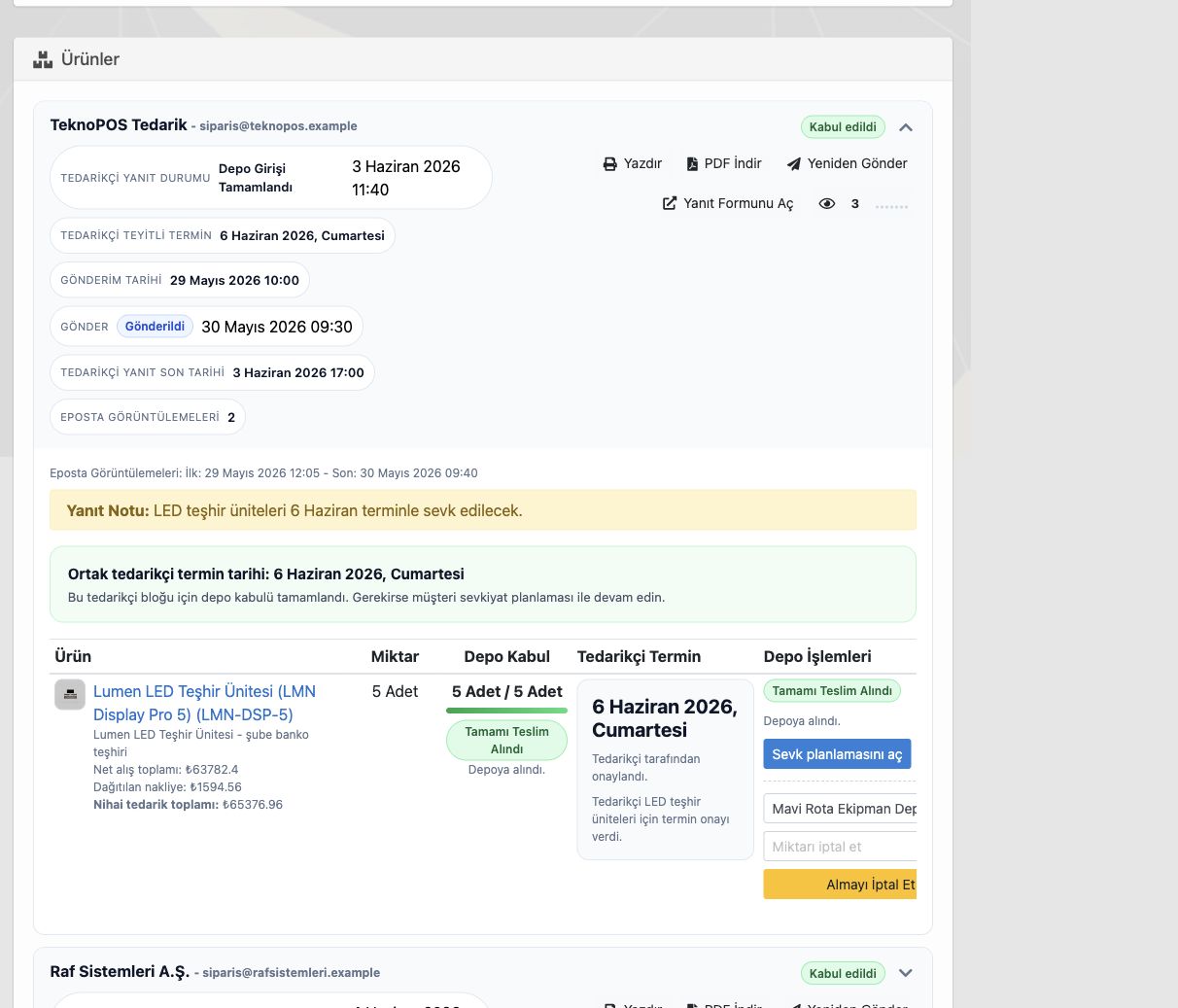
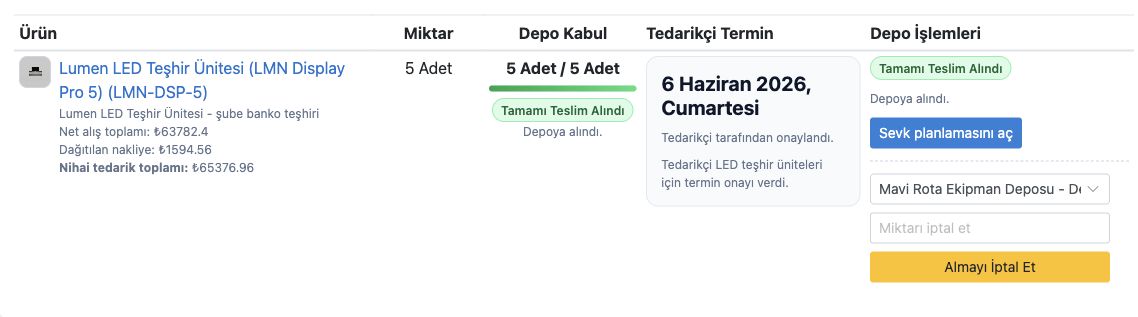
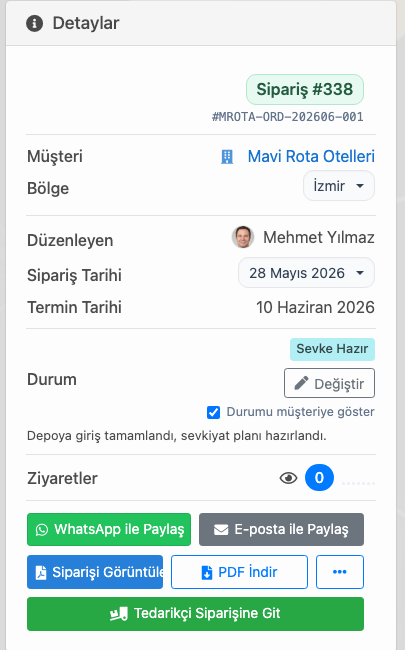
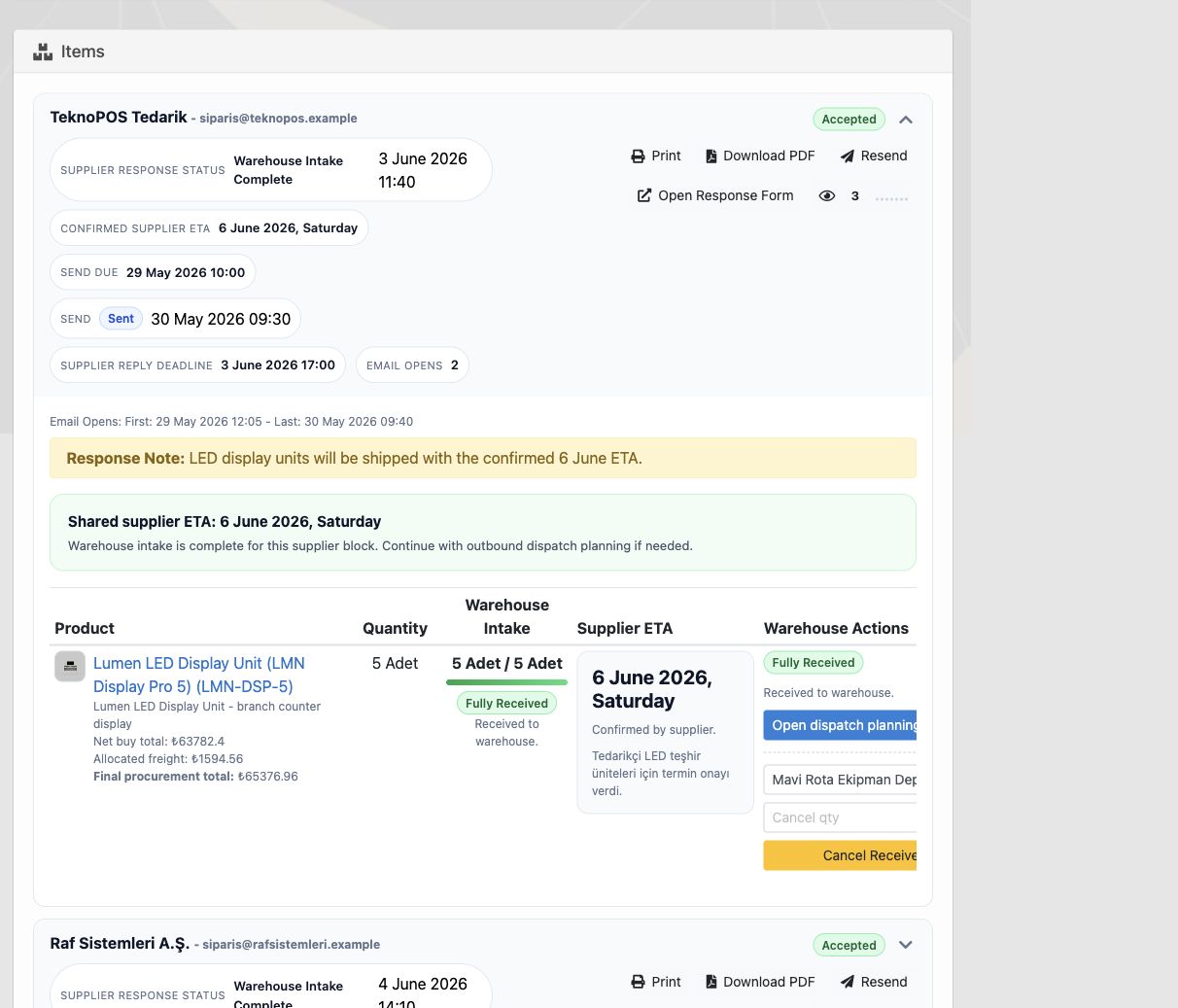
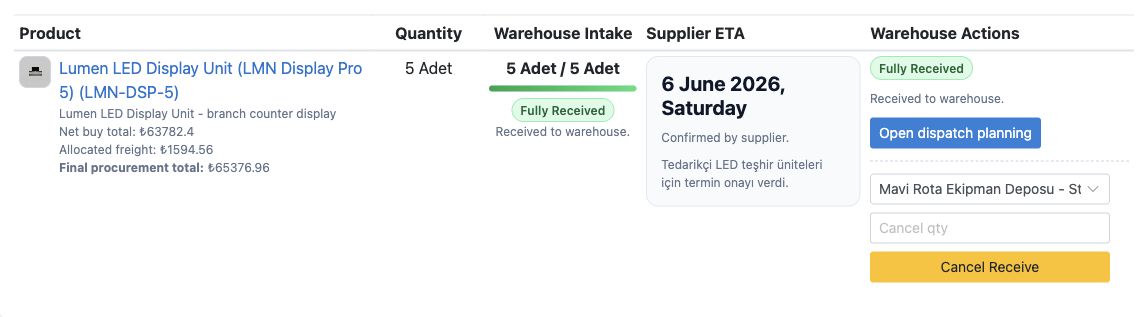
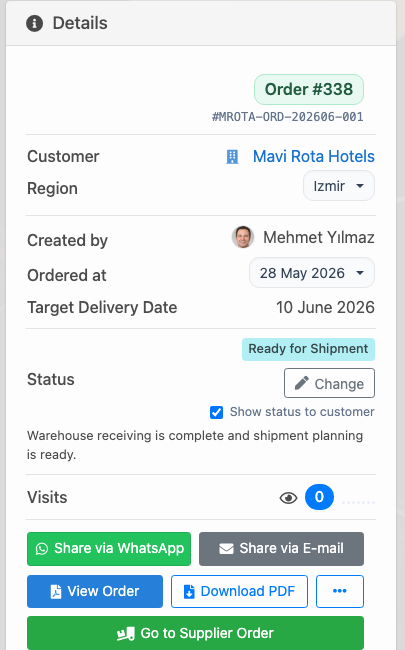
Bir satış siparişindeki ürün dışarıdan tedarik edilecekse satın alma süreci ayrı bir not veya e-posta zinciri olarak kalmamalıdır. Delbig’de tedarikçi siparişi açıldığında tedarikçi, gönderim tarihi, yanıt durumu, teyitli termin, depoya kabul miktarı ve sevkiyat planı aynı çalışma alanında izlenebilir.
Bu ekran satın alma, depo ve satış ekibinin aynı bilgiden konuşmasını sağlar. Tedarikçi siparişi kabul ettiğinde ekip yalnızca “tedarikçiye geçildi” bilgisini değil, hangi ürünün hangi miktarla depoya alınacağını ve müşteri teslim planına ne zaman bağlanacağını da görür.
Alış faturası alış fiyatını ve stok girişini besler
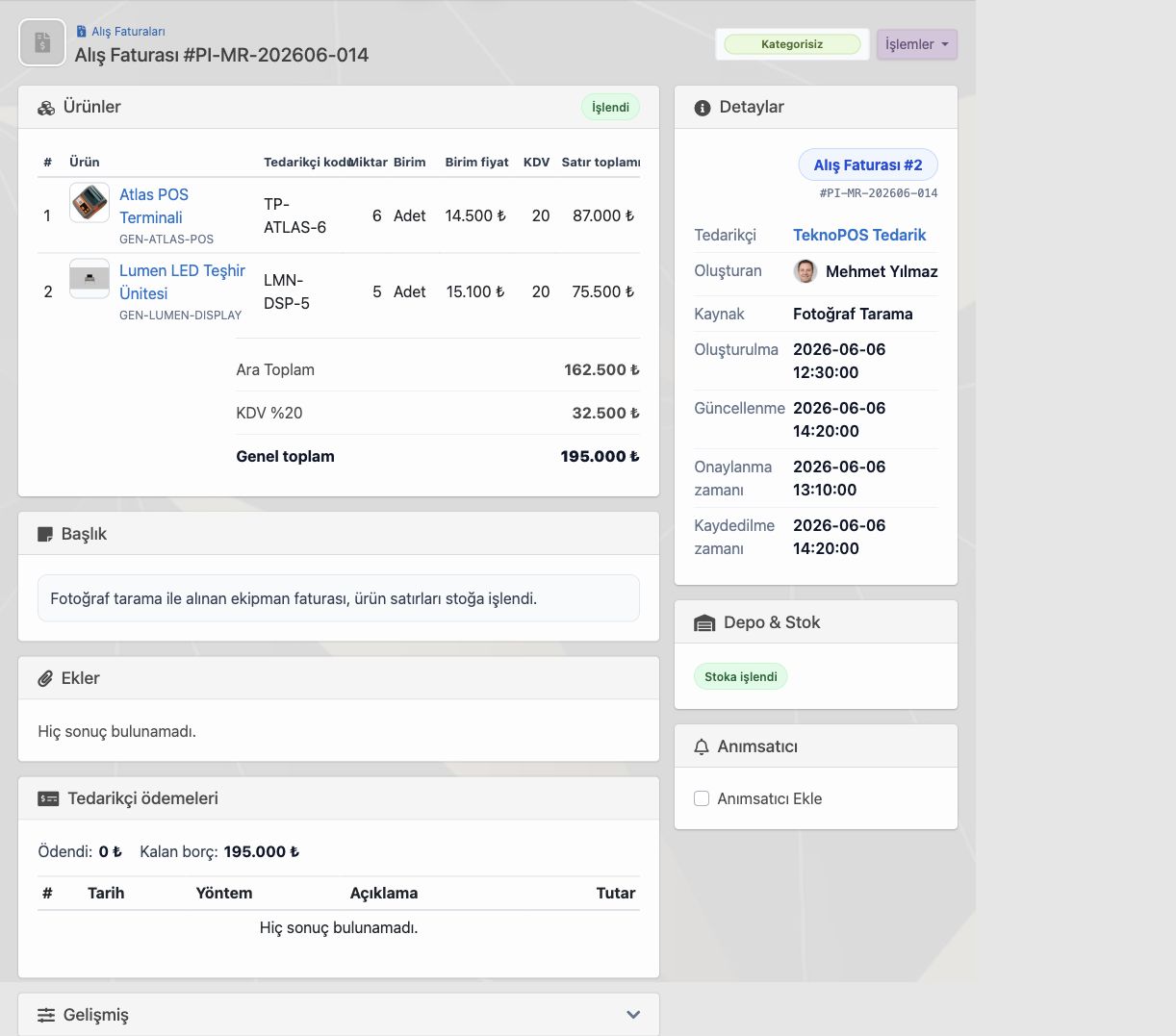
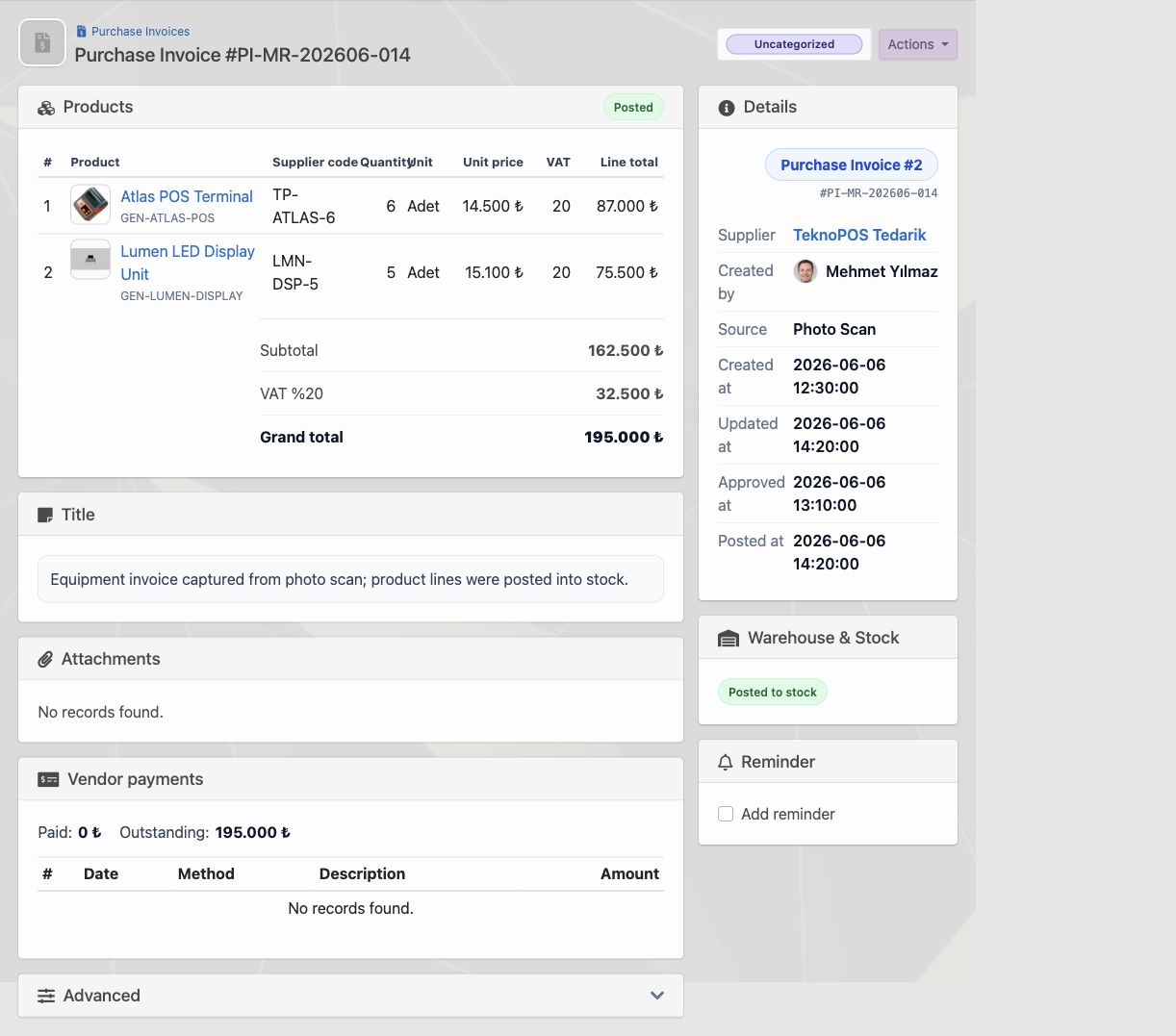
Alış fiyatları manuel girilebilir; ancak doğru satın alma takibinde fatura da bu akışın parçası olmalıdır. Delbig’de alış faturası manuel oluşturulabilir, PDF kaynağından içeri alınabilir veya fotoğraf tarama kaynağıyla ürün satırlarına dönüştürülebilir. Fatura satırları ürünle eşleştiğinde tedarikçi kodu, miktar, birim fiyat ve satır toplamı aynı ekranda kontrol edilir.
Faturadan gelen fiyat önceki alış fiyatından farklıysa ekip bunu fiyat değişikliği olarak değerlendirebilir. Böylece tedarikçiden gelen yeni maliyet ürün kartına ve satın alma geçmişine bağlanır. Fatura stoğa işlendiğinde de satın alma kaydı, depo girişi ve stok hareketi ayrı ayrı kopmaz.
Ödeme ve ekstre tedarikçi kaydının parçasıdır
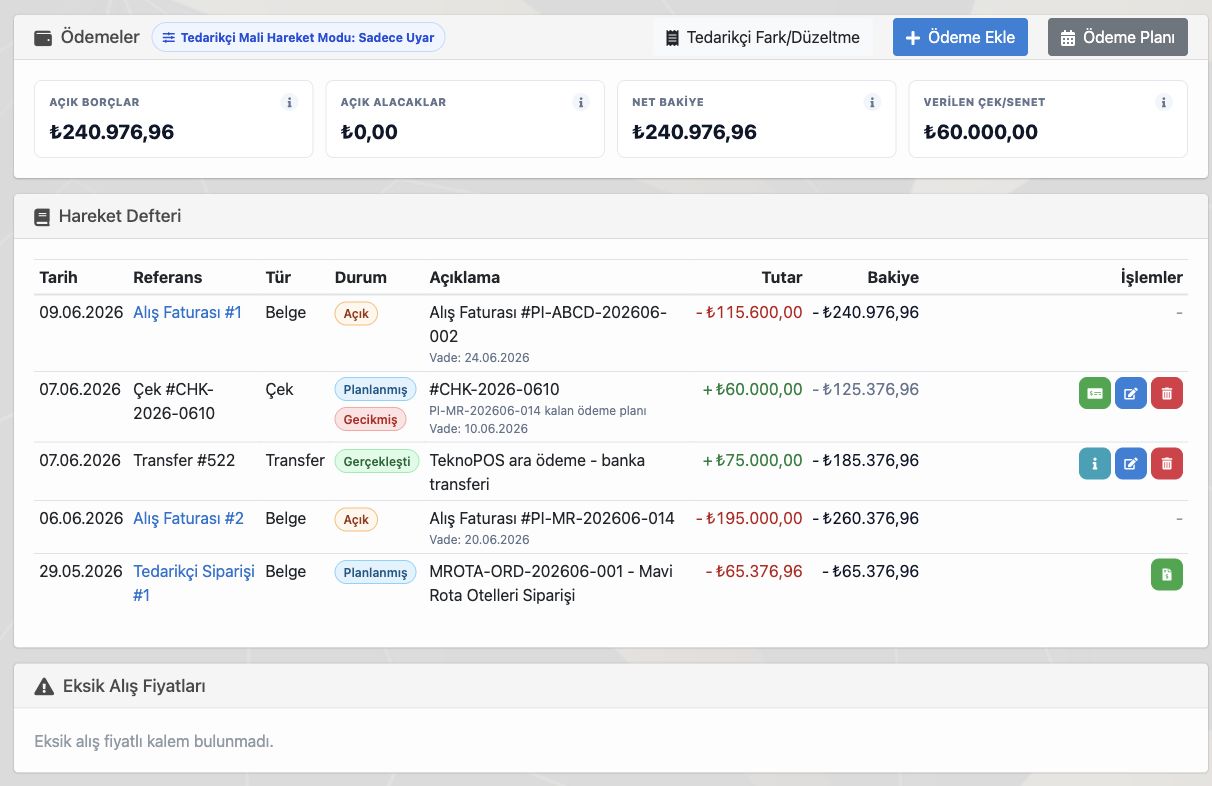
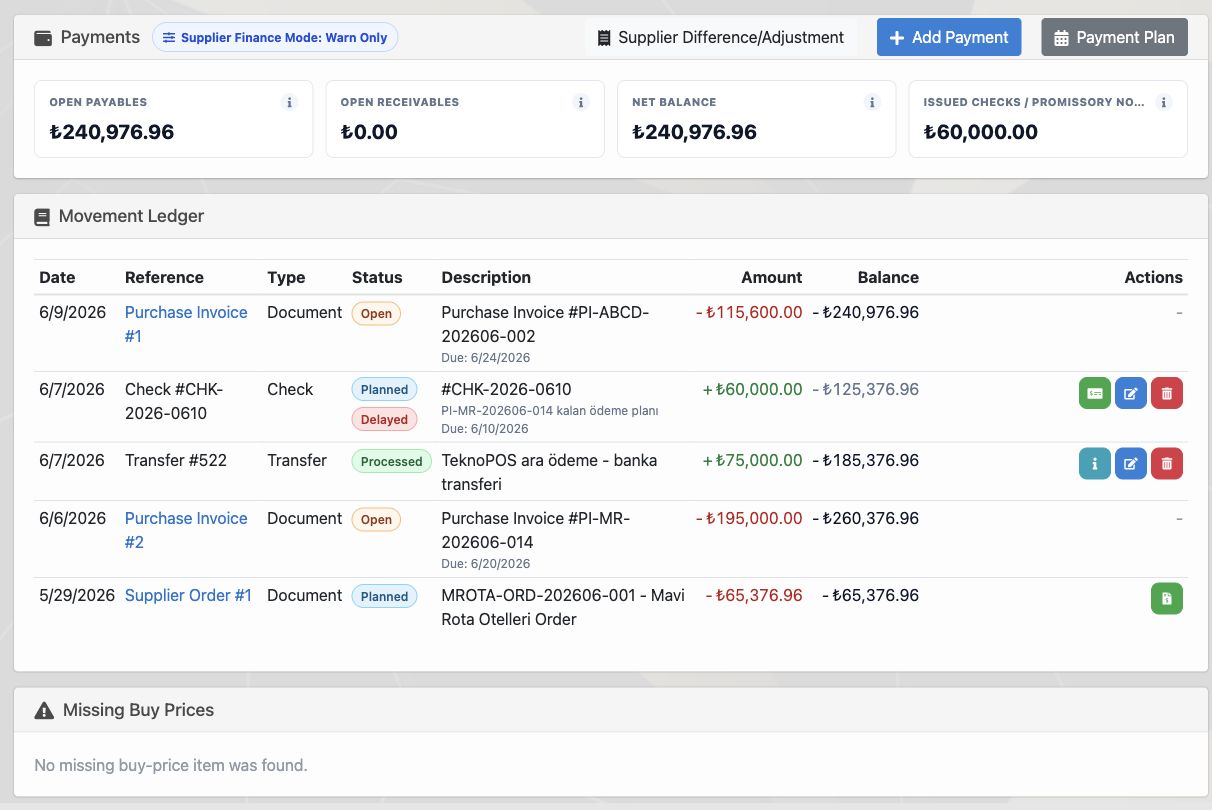
Satın alma süreci ürün depoya girdiğinde bitmez. Tedarikçiye yapılacak ödeme, planlanan çek veya senet, gerçekleşen banka transferi ve açık borç aynı tedarikçi kaydı üzerinden izlenmelidir. Delbig’de tedarikçi ödeme ekranı açık borç, açık alacak, net bakiye, verilen çek/senet ve hareket defteriyle satın alma finansını görünür tutar.
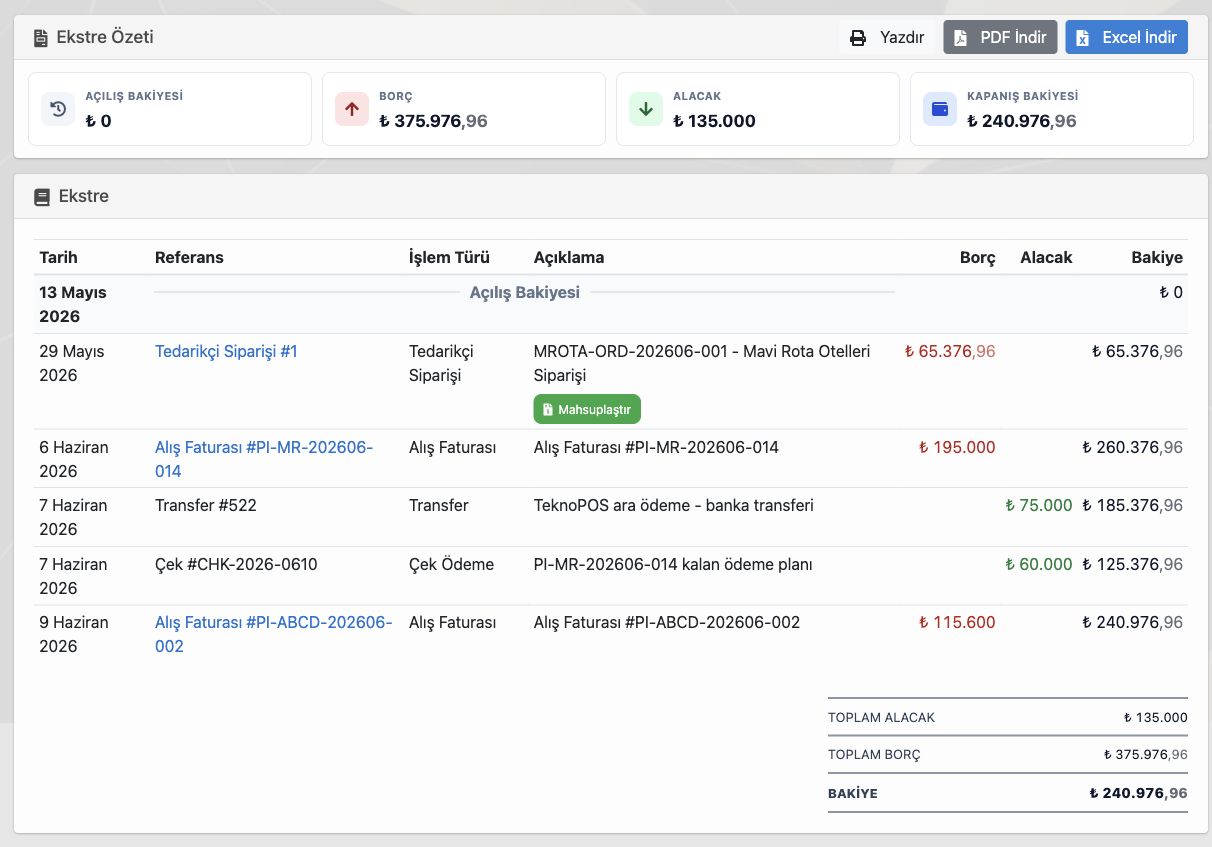
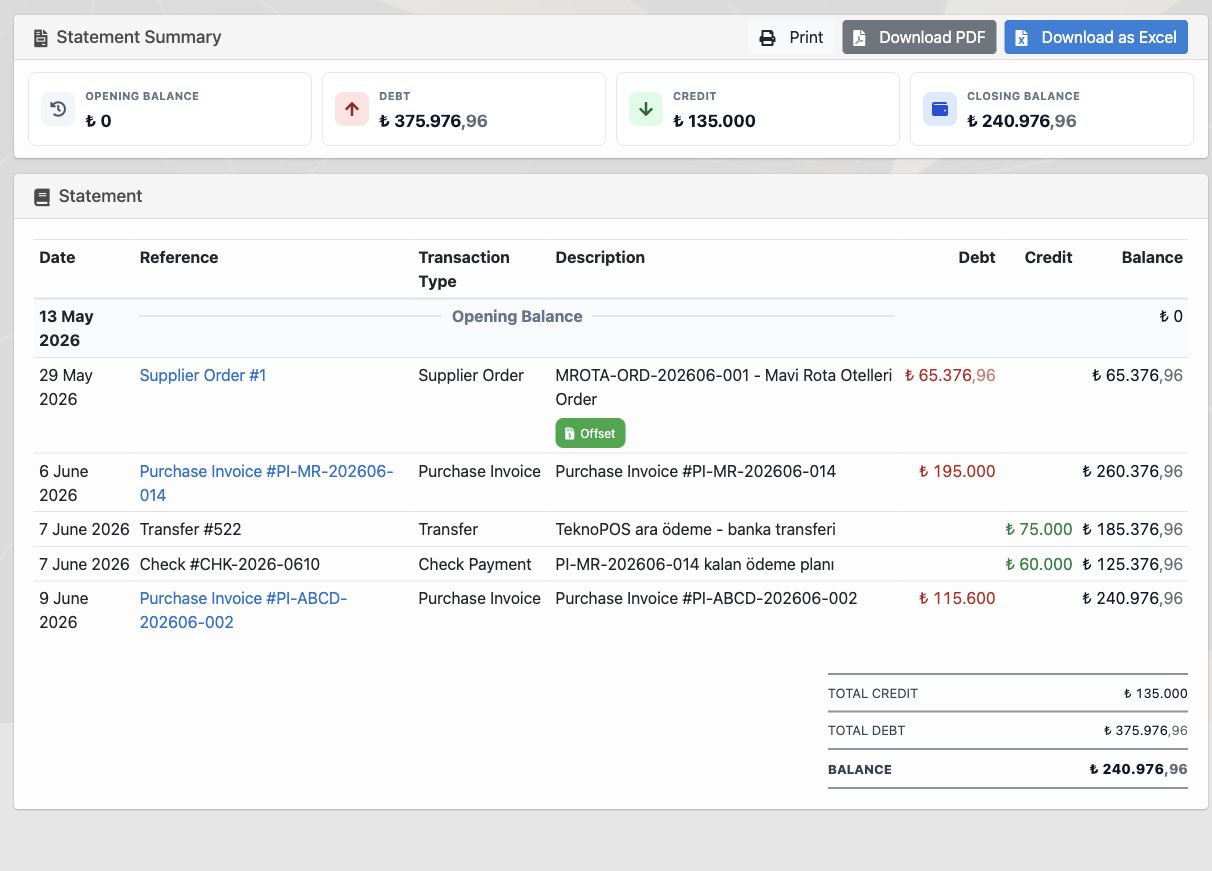
Ekstre ekranı ise tedarikçiyle paylaşılabilecek daha net bir döküm üretir. Borç, alacak, kapanış bakiyesi, alış faturaları, tedarikçi siparişleri, ödemeler ve planlanan hareketler aynı tabloda görülebilir; PDF, Excel veya yazdırma aksiyonlarıyla paylaşım kolaylaşır.
| İhtiyaç | Delbig’de karşılığı | Sonuç |
|---|---|---|
| Tedarikçi çalışma kuralı | Para birimi, maliyet çarpanı, iskonto ve nakliye kuralı tedarikçi kartında tutulur. | Satın alma fiyatı her siparişte yeniden hesaplanmaz. |
| Farklı ürün adı/kodu | İç ürün adı ve tedarikçi ürün adı-kodu ayrı alanlarda izlenir. | Yanlış ürün siparişi ve yanlış fatura eşleştirme riski azalır. |
| Tedarikçi siparişi | Yanıt, termin, gönderim ve depoya kabul bilgileri tek çalışma alanında tutulur. | Satın alma, depo ve satış ekibi aynı süreç bilgisinden çalışır. |
| Alış fiyatı değişikliği | Manuel giriş veya alış faturası üzerinden fiyat değişiklik kayıtları takip edilir. | Yeni tedarik maliyeti ürün geçmişine bağlanır. |
| Alış faturası ve stok | Fatura satırları ürünle eşleşir, stoğa işleme kaydı oluşturulabilir. | Fatura, stok girişi ve satın alma kaydı birbirinden kopmaz. |
| Ödeme ve ekstre | Açık borç, ödeme, çek/senet planı ve tedarikçi ekstresi aynı kartta yönetilir. | Tedarikçiyle finansal mutabakat daha net ilerler. |
İlgili çözüm sayfaları
Stok ve Depo Takibi
Stok görünümü, depo, rezervasyon, hareket, sayım, etiket, alış faturası ve sevkiyat stok düşümünü izleyin.
Sipariş Takibi
Tekliften, doğrudan satıştan veya B2B portaldan gelen siparişi stok, tedarikçi, depo ve sevkiyata bağlayın.
Sık sorulan sorular
Tedarikçi ürün adı içerideki ürün adından farklı olabilir mi?
Evet. Delbig’de içeride kullanılan ürün adı ve stok kodu ile tedarikçinin kullandığı ürün adı ve tedarikçi kodu ayrı tutulabilir. Böylece sipariş, fatura ve stok eşleştirme aynı ürün kaydına bağlanır.
Alış fiyatları alış faturası üzerinden güncellenebilir mi?
Evet. Fatura satırları ürünlerle eşleştiğinde birim fiyat satın alma maliyeti olarak değerlendirilebilir. Fiyat değişikliği oluştuğunda kayıt geçmişi üzerinden ne zaman ve hangi kaynakla değiştiği izlenebilir.
Tedarikçi siparişi depoya kabul sürecini gösterir mi?
Evet. Tedarikçi siparişinde yanıt durumu, teyitli termin, depoya alınan miktar ve sevkiyat planına geçiş bilgisi takip edilebilir.
Tedarikçi ödemeleri ve ekstre aynı ekranda görülebilir mi?
Evet. Açık borç, gerçekleşen ödeme, planlanan çek/senet ve hareket defteri tedarikçi finans ekranında; paylaşılabilir döküm ise ekstre ekranında yönetilebilir.
Tedarikçi ve satın alma akışınızı Delbig ile tek yerde yönetin
Tedarikçi kartı, ürün eşleştirme, alış fiyatı, sipariş, alış faturası, ödeme ve ekstre süreçlerini aynı CRM yapısında takip edin.
Supplier and Purchasing Tracking: Products, Prices, Orders, Invoices and Payments in One Workflow
Purchasing tracking is not only about knowing which supplier received the order. In Delbig CRM, supplier cards, pricing rules, supplier product names and codes, buy prices, supplier orders, purchase invoices, stock receiving, payments and statements can be managed in the same purchasing workflow.
The supplier card is where purchasing rules begin
After a supplier is added to the system, the company can define how it works with that supplier once. Purchase currency, cost multiplier, discount rate, extra discount, freight rule or order-level additional cost can be kept on the supplier card, so the purchasing team does not need to recalculate the same product from scratch on every order.
This becomes especially important in markets where prices change often. When a supplier sends a new price list or purchase condition, Delbig can show formula change records. Managers can see when a cost multiplier, discount rate or freight rule changed, and the team works without mixing old and new costs.
Supplier product names stay separate from internal product names
One common purchasing problem is that the supplier’s product name or code does not match the company’s internal product name. Internally, a product may be tracked as “Lumen LED Display Unit,” while the supplier sends it as “LMN Display Pro 5” with a different code. In spreadsheets or messages, this can lead to wrong orders, wrong prices or wrong receiving.
In Delbig, the product card, supplier product name and supplier product code are separate fields. When the purchasing team creates a supplier order or processes a purchase invoice, they can see the internal stock code, internal product name and supplier-side equivalent together. The system keeps the match intact even when the supplier uses a different name.
Supplier orders stay connected to the sales order
When an item in a sales order must be sourced externally, purchasing should not become a separate note or email chain. In Delbig, once a supplier order is opened, supplier, sent date, response status, confirmed ETA, warehouse received quantity and shipment planning can be tracked in the same workspace.
This lets purchasing, warehouse and sales teams work from the same source. When the supplier accepts the order, the team can see not only that the supplier was contacted, but also which product quantity will be received into the warehouse and when it can connect to customer delivery planning.
The purchase invoice feeds buy price and stock receiving
Buy prices can be entered manually, but a good purchasing workflow should also use the invoice as part of the process. In Delbig, a purchase invoice can be created manually, imported from a PDF or converted into product lines through a photo scan source. When invoice rows are matched to products, supplier code, quantity, unit price and line total can be reviewed on the same screen.
If the invoice price differs from the previous buy price, the team can treat it as a price change. The new supplier cost becomes connected to the product card and purchasing history. When the invoice is posted to stock, purchasing, warehouse receiving and stock movement stay connected.
Payments and statements are part of the supplier record
The purchasing process does not end when products enter the warehouse. Supplier payments, planned checks or promissory notes, completed bank transfers and open payables should be tracked on the same supplier record. In Delbig, the supplier payments screen shows open payables, open receivables, net balance, issued checks/notes and the movement ledger.
The statement screen provides a clearer document that can be shared with the supplier. Debit, credit, closing balance, purchase invoices, supplier orders, payments and planned movements can be reviewed in one table, with PDF, Excel and print actions.
| Need | In Delbig | Result |
|---|---|---|
| Supplier working rule | Currency, cost multiplier, discount and freight rules are kept on the supplier card. | Purchase cost is not recalculated from scratch on every order. |
| Different product name/code | Internal product name and supplier product name/code are tracked separately. | Wrong ordering and wrong invoice matching risks are reduced. |
| Supplier order | Response, ETA, sent date and warehouse receiving are kept in one workspace. | Purchasing, warehouse and sales teams work from the same status. |
| Buy price change | Manual entries or purchase invoice prices can be tracked as price changes. | New supplier cost connects to product history. |
| Purchase invoice and stock | Invoice rows are matched with products and can be posted to stock. | Invoice, receiving and purchasing records stay connected. |
| Payments and statement | Open payable, payment, check/note plan and supplier statement are managed on the same record. | Supplier reconciliation becomes clearer. |
Related solution pages
Inventory and Warehouse Tracking
Track stock overview, warehouses, reservations, movements, counts, labels, purchase invoices and shipment deductions.
Order Tracking
Connect orders from quotes, direct sales or the B2B portal with inventory, suppliers, warehouses and shipment.
Frequently Asked Questions
Can the supplier product name be different from the internal product name?
Yes. Delbig can keep the internal product name and stock code separate from the supplier product name and supplier code. Orders, invoices and inventory matching still connect to the same product record.
Can buy prices be updated from purchase invoices?
Yes. When invoice rows are matched with products, unit price can be evaluated as a purchasing cost. If a price change occurs, the record shows when it changed and from which source.
Does the supplier order show warehouse receiving?
Yes. Supplier order response status, confirmed ETA, received warehouse quantity and shipment planning transition can be tracked.
Can supplier payments and statements be viewed together?
Yes. Open payables, completed payments, planned checks/notes and the movement ledger are managed on the supplier financial screen; the shareable statement is managed on the statement screen.
Manage supplier and purchasing workflows in one place with Delbig
Track supplier cards, product matching, buy prices, orders, purchase invoices, payments and statements in the same CRM structure.