
Toptan Satış ve Bayi Yönetimi: Fiyat, Portal ve Sipariş Takibi
Toptan satış yapan mobilya firmalarında iş yalnızca daha yüksek adetli sipariş almak değildir. Her bayinin fiyat listesi, ödeme düzeni, ürün seçimi, kumaş ve renk notları, termin beklentisi ve sipariş onay süreci farklı ilerleyebilir. Delbig CRM bu akışı bayi portalı, özel fiyat listesi, B2B sipariş onayı ve detaylı sipariş satırlarıyla birlikte yönetir.
Toptan satış perakendeden farklı bir takip ister
Perakende satışta müşteri çoğu zaman tek sipariş verir ve süreç kısa kapanır. Toptan satışta ise bayi, mağaza, showroom veya kurumsal müşteri aynı ürünlerden tekrar tekrar sipariş geçer; bazı ürünleri sezon ön siparişi olarak ister, bazı satırlarda oturum kumaşı, sırt kumaşı, ayak rengi, teslimat notu veya mağaza bilgisi belirtir.
Bu yüzden toptan satış yönetimi yalnızca sipariş formu değildir. Bayinin hangi fiyat listesinden çalıştığı, portala hangi e-posta ile girdiği, siparişin içeride kim tarafından onaylandığı, ürün satırlarında hangi özel detayların olduğu ve siparişin ne zaman normal satış siparişine dönüşeceği aynı akışta görülmelidir.
Bayi tarafında kolaylık
- Bayi kendi portalında ürünleri görür, miktar seçer ve ürün notu girer.
- Kendisine tanımlanan fiyat listesiyle çalışır; eski PDF veya yanlış fiyatla sipariş geçmez.
- Siparişinin onay beklediğini, revize istendiğini veya onaylandığını kendi ekranından takip eder.
Firma tarafında kontrol
- Her bayiye veya seçili bayi grubuna özel fiyat listesi atanabilir.
- B2B siparişler doğrudan normal siparişlere karışmadan ayrı onay kuyruğunda bekler.
- Kumaş, renk, ayak, teslimat ve revizyon notları sipariş satırında kaybolmadan kalır.
Bayiye portal erişimi ve özel fiyat listesi tanımlanır
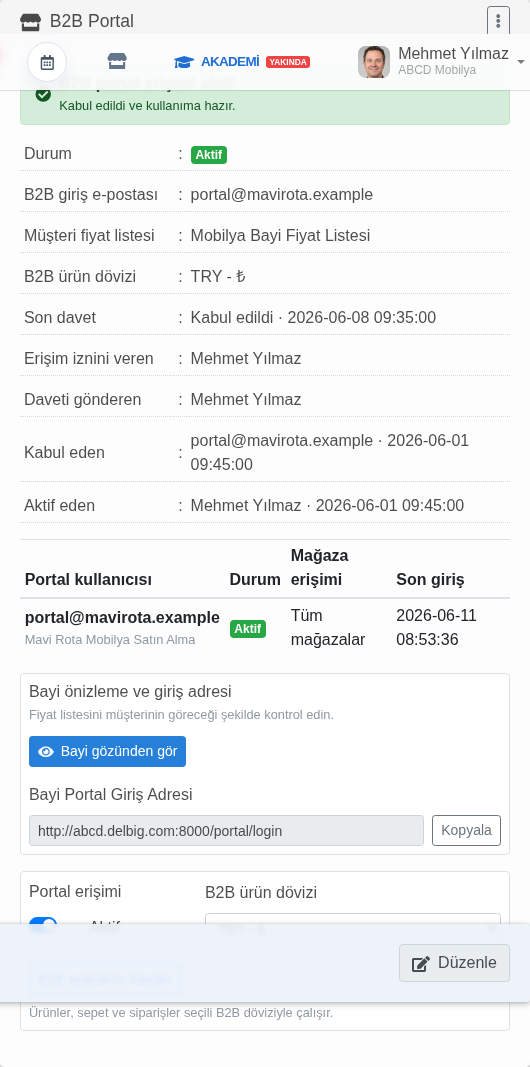
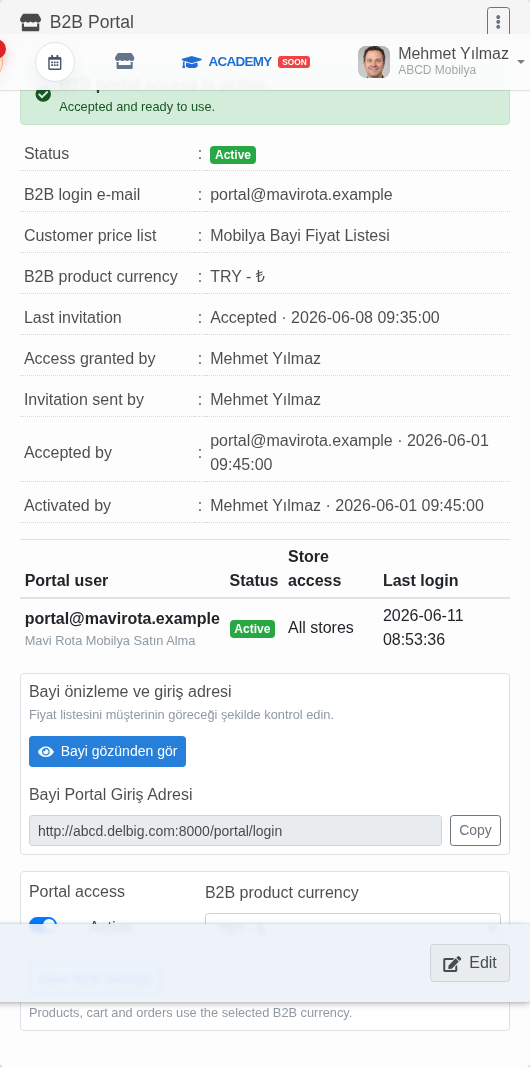
Delbig CRM’de bayi yönetiminin ilk adımı müşteri kartında başlar. Bayinin portal giriş e-postası, aktif kullanıcı durumu, ürün dövizi, mağaza erişimi ve hangi fiyat listesiyle çalışacağı burada tanımlanır. Böylece bayi portala girdiğinde genel listeyi değil, kendisine açılan ürünleri ve anlaşmalı fiyatlarını görür.
Bu yapı toptan satışta kritik bir güvenlik sağlar. Aynı koltuk takımı bir bayide farklı, başka bir showroomda farklı, ihracat müşterisinde farklı fiyatla ilerleyebilir. Fiyat listesi müşteriye bağlandığı için satış ekibi her siparişte fiyatı tekrar hatırlamak zorunda kalmaz; portal siparişi, teklif veya iç sipariş aynı müşteri fiyat düzeninden beslenir.
- Bayiye özel fiyat listesi seçili müşteriye atanabilir.
- Ürün dövizi ve mağaza erişimi müşteri bazında kontrol edilir.
- Portal daveti, kabul durumu ve son giriş bilgisi içeride izlenir.
- Bayiye açık fiyat otomatik geldiği için sipariş girişinde manuel fiyat karışıklığı azalır.
Bayi portalı mobilya siparişini standartlaştırır
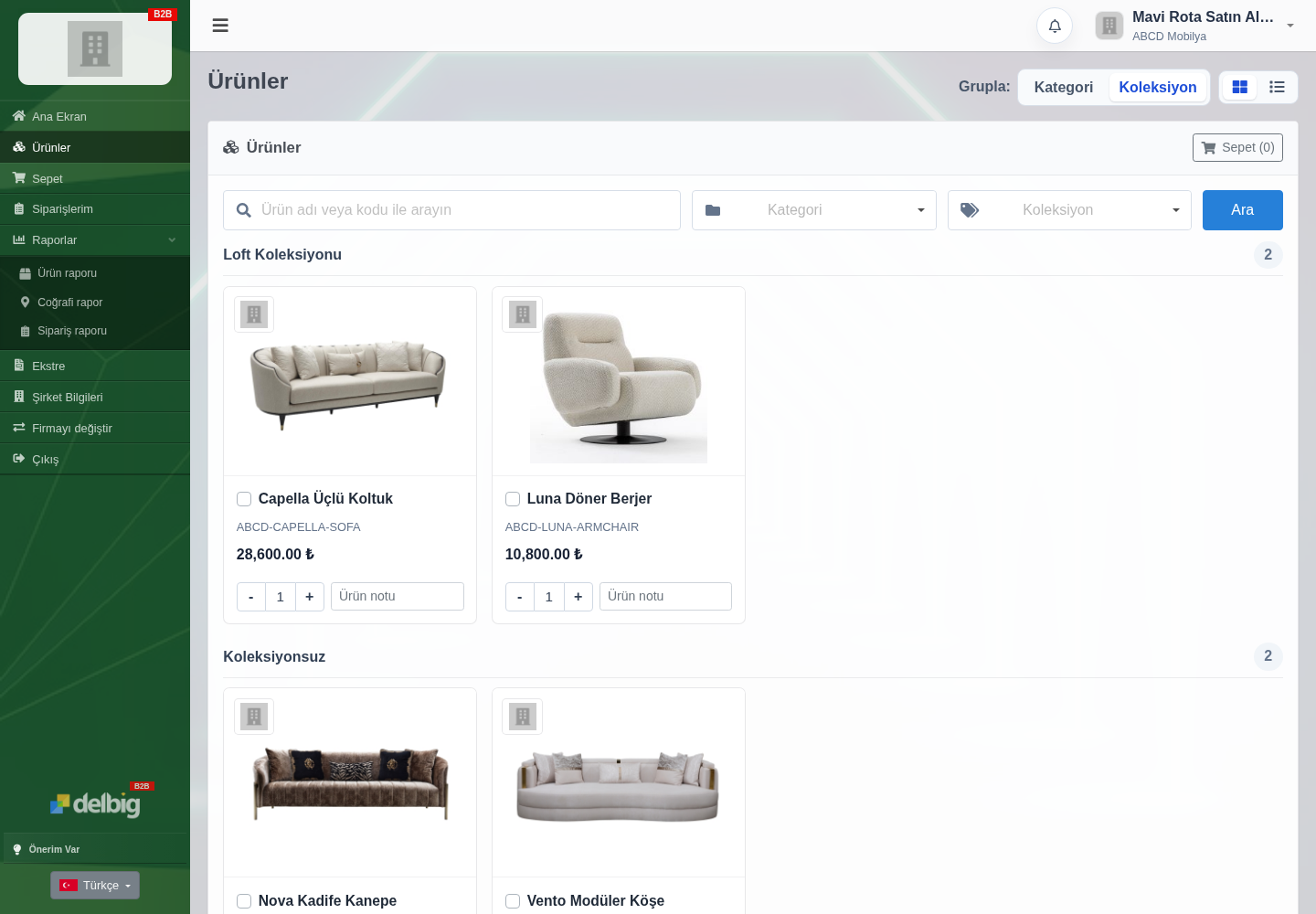
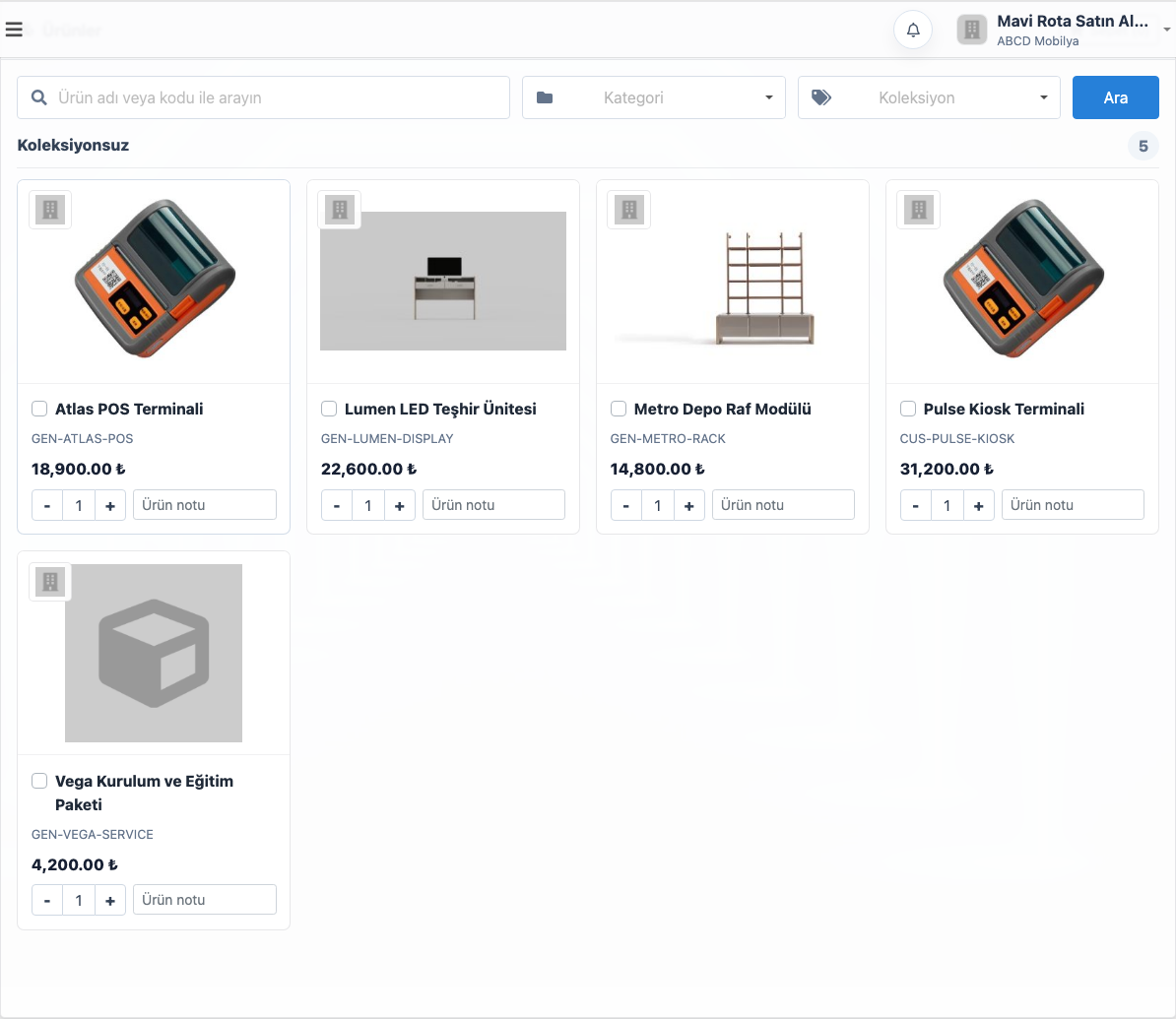
Bayi portalında ürünler görsel, ürün adı, stok kodu, fiyat ve miktar alanıyla listelenir. Bayi ürünleri koleksiyon veya kategoriye göre süzebilir, miktar girebilir ve ürün notu yazabilir. Mobilya tarafında bu not alanı özellikle değerlidir; bayi oturum kumaşı, sırt kumaşı, ayak rengi, şube teslimatı veya sezon teşhir notunu daha sipariş oluşmadan satıra ekleyebilir.
Bu ekran, telefonla ürün kodu okutma veya WhatsApp üzerinden dağınık sipariş alma ihtiyacını azaltır. Bayi kendi ekranında hangi ürünleri hangi fiyatla gördüğünü bilir; firma tarafında ise gelen talep sistemde düzenli satırlar halinde görünür.
Gelen bayi siparişi ayrı onay kuyruğuna düşer
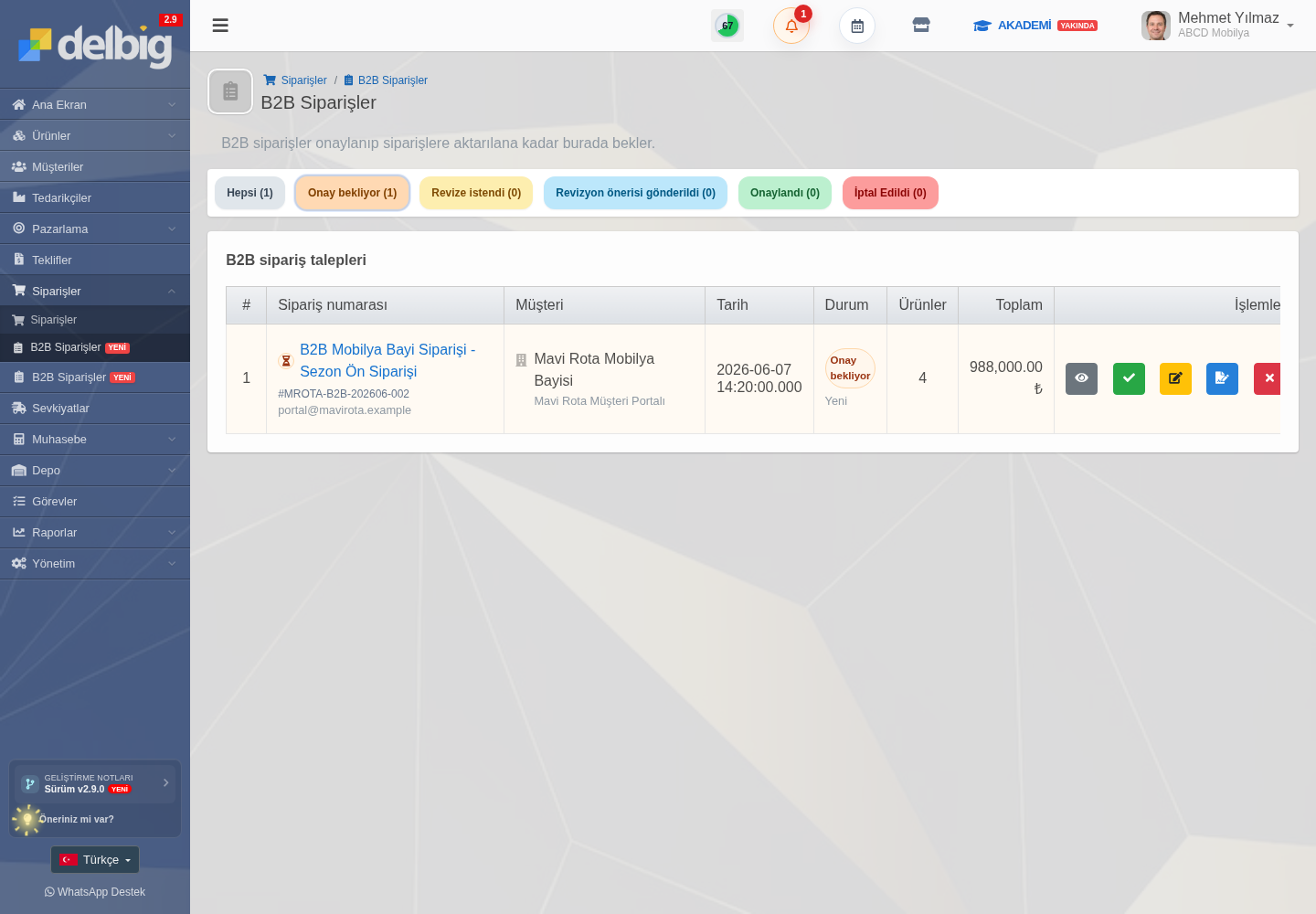
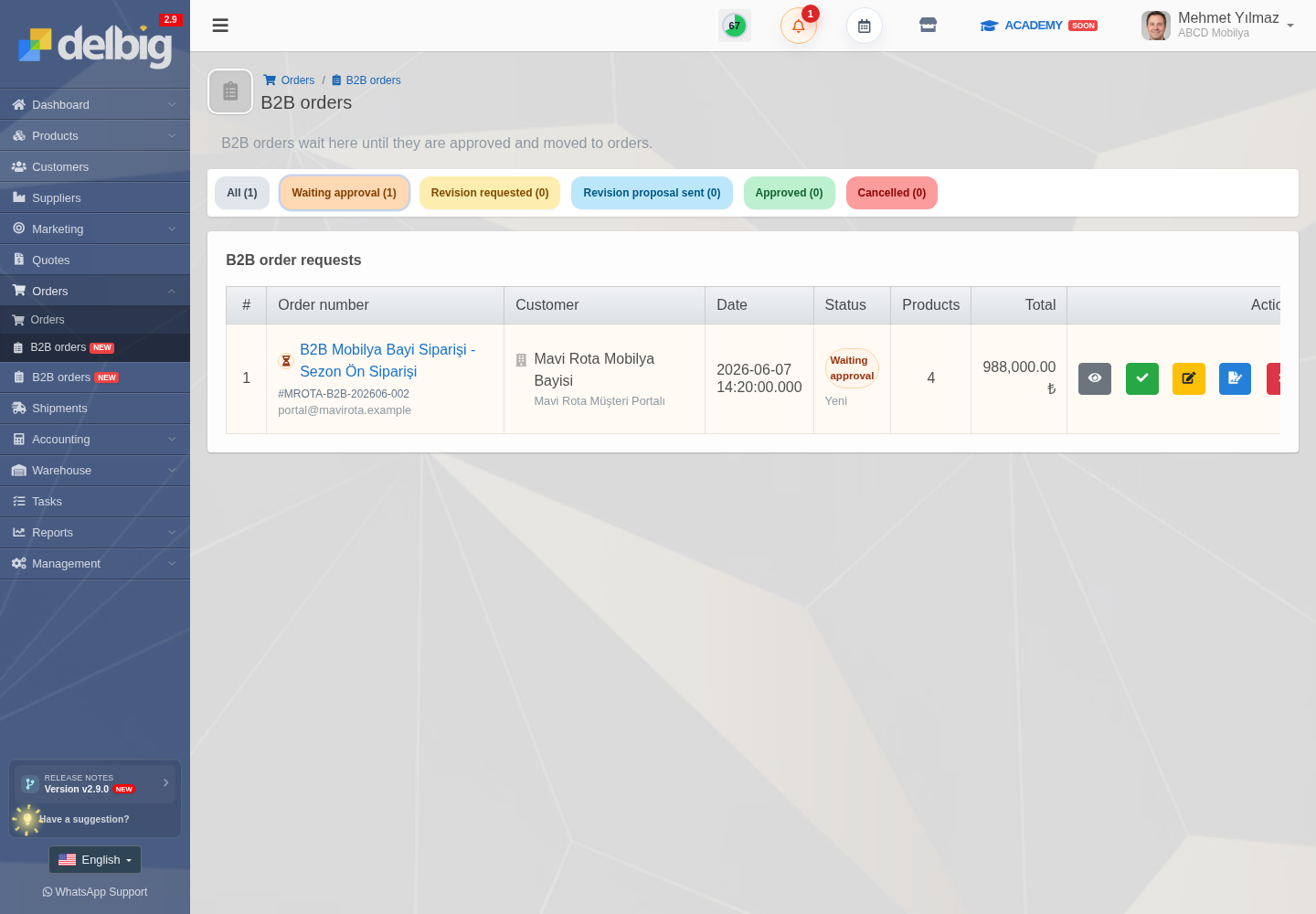
Bayi portalından gönderilen talep, içeride doğrudan açık siparişlere karışmaz. B2B siparişler ayrı bir onay kuyruğunda bekler. Ekip burada sipariş başlığını, sipariş numarasını, müşteriyi, ürün sayısını, toplam tutarı, sipariş tarihini ve durumu görür; ardından onay, revizyon, revizyon önerisi veya iptal kararını verebilir.
Bu ayrım toptan satışta önemlidir. Bayi yüksek adetli sipariş geçebilir, bazı satırlarda termin teyidi gerekebilir, fiyat listesi geçerli olsa bile stok veya üretim planı kontrol edilmelidir. Delbig CRM portal kolaylığını içerideki operasyon kontrolüyle dengeler.
Sipariş satırında kumaş, renk ve ürün detayı kaybolmaz
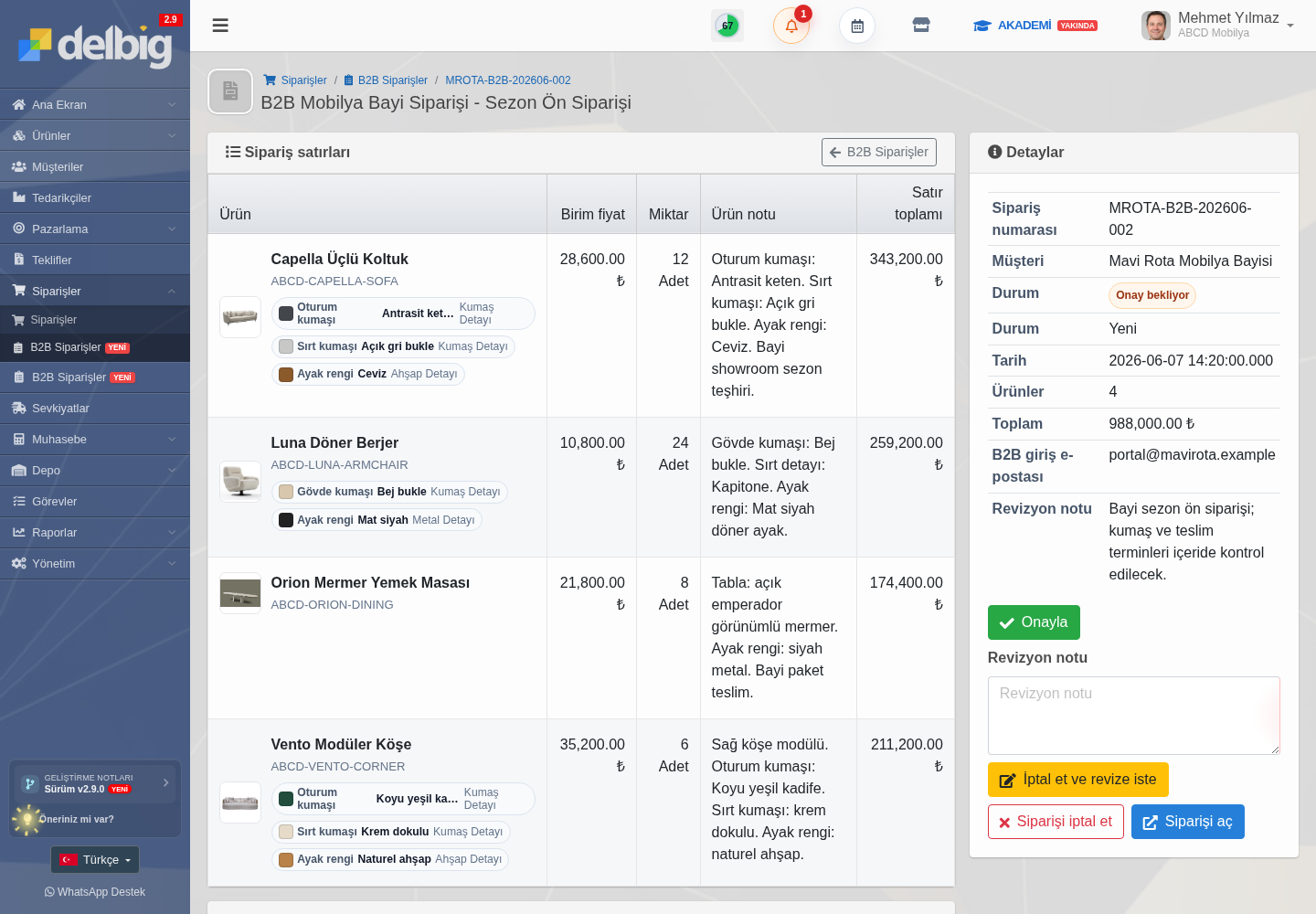
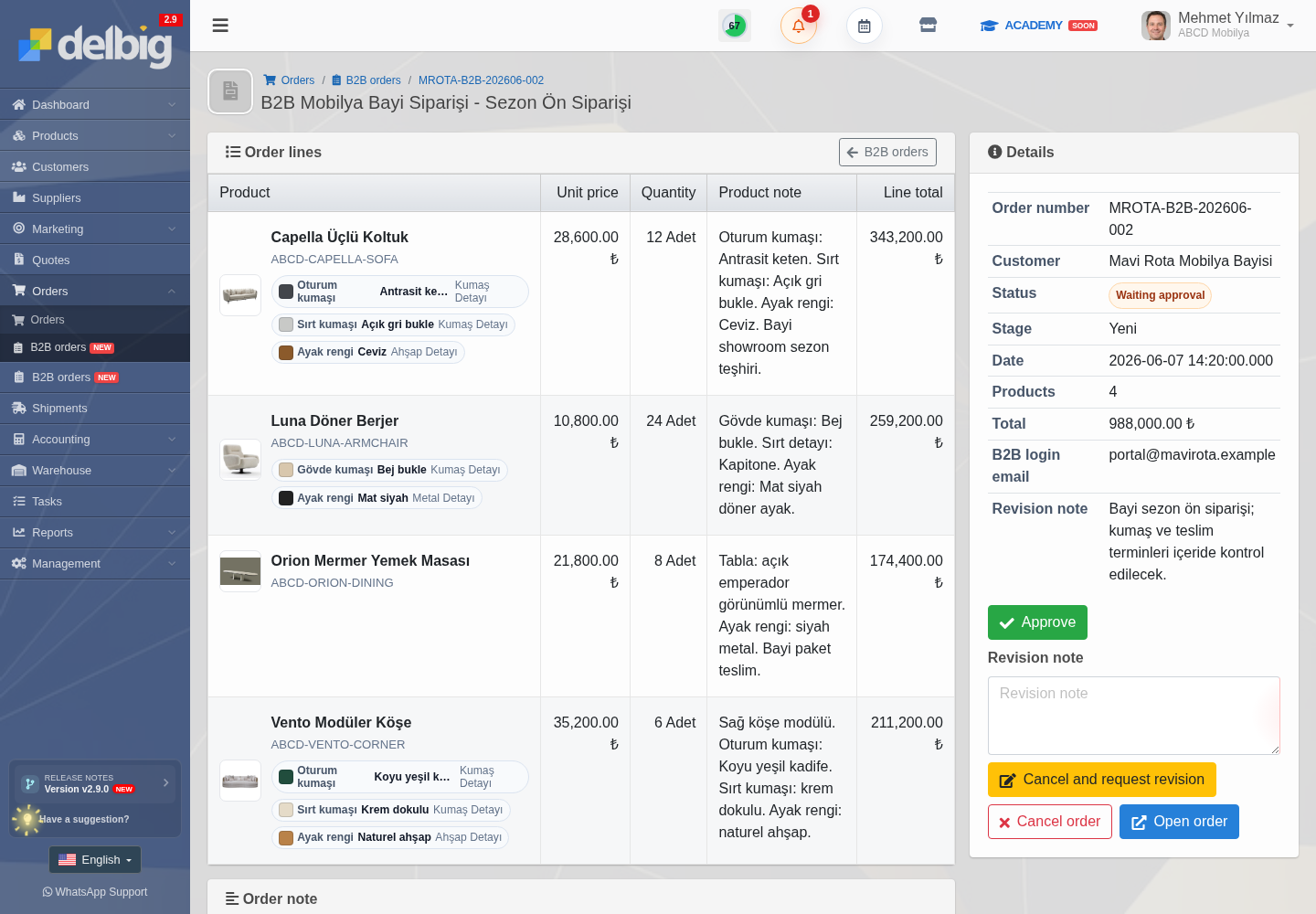
Mobilya toptan satışında aynı ürün adı tek başına yeterli olmayabilir. Capella üçlü koltuk için oturum kumaşı antrasit keten, sırt kumaşı açık gri bukle, ayak rengi ceviz olabilir; Luna berjerde gövde kumaşı bej bukle ve ayak rengi mat siyah ilerleyebilir. Bu detaylar sipariş satırında tutulmadığında üretim, depo ve bayi arasında tekrar tekrar teyit gerekir.
Delbig CRM B2B sipariş detayında ürün satırları miktar, birim fiyat, satır toplamı ve ürün notlarıyla birlikte görünür. Ekip, bayiden gelen siparişi onaylamadan önce ürün varyasyonlarını ve özel notları kontrol eder. Onaydan sonra aynı bilgi satış siparişi, tedarik, depo ve sevkiyat tarafına daha temiz aktarılır.
Fiyat listesi bayiye göre çalışır, PDF ve Excel ile paylaşılabilir
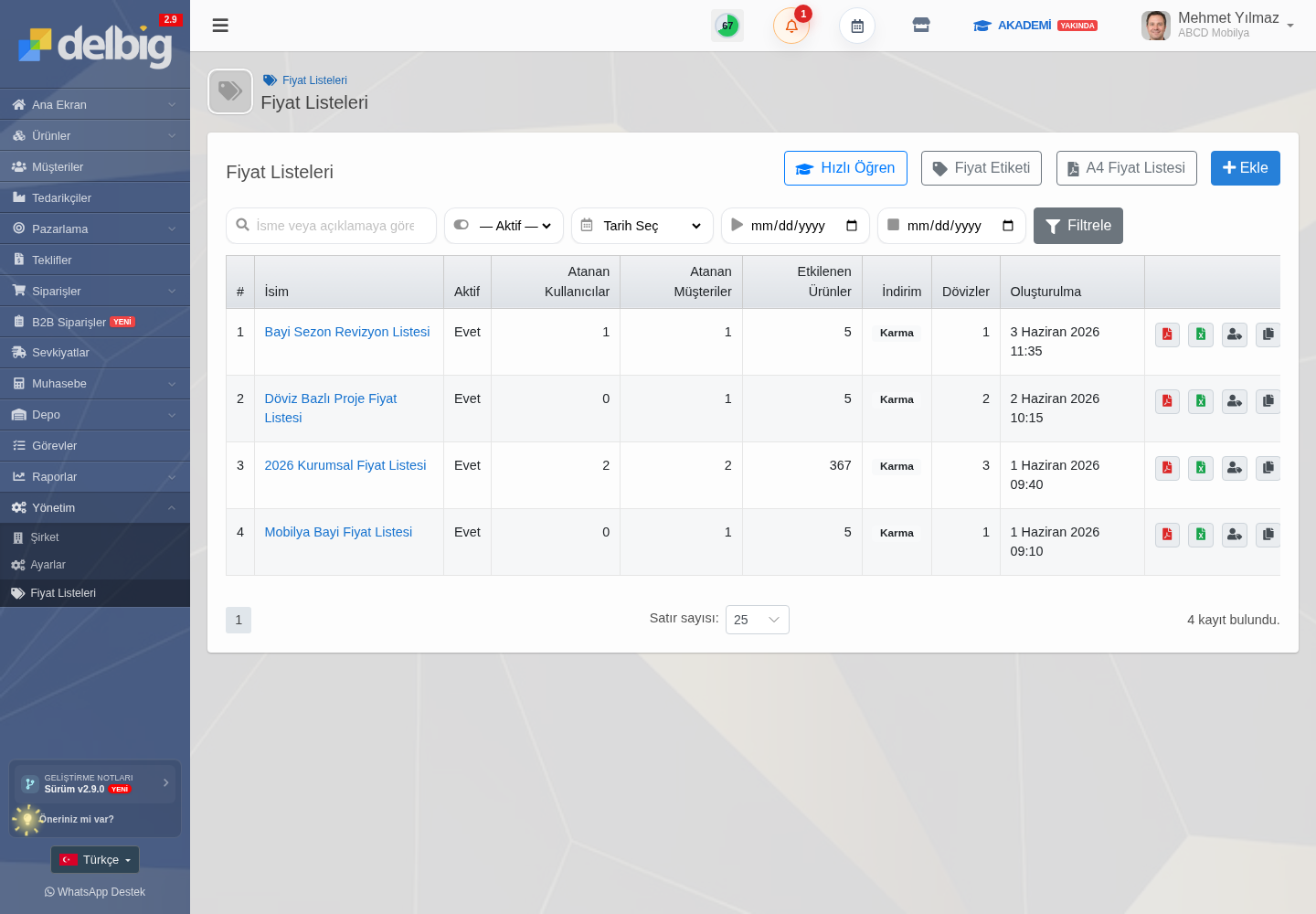
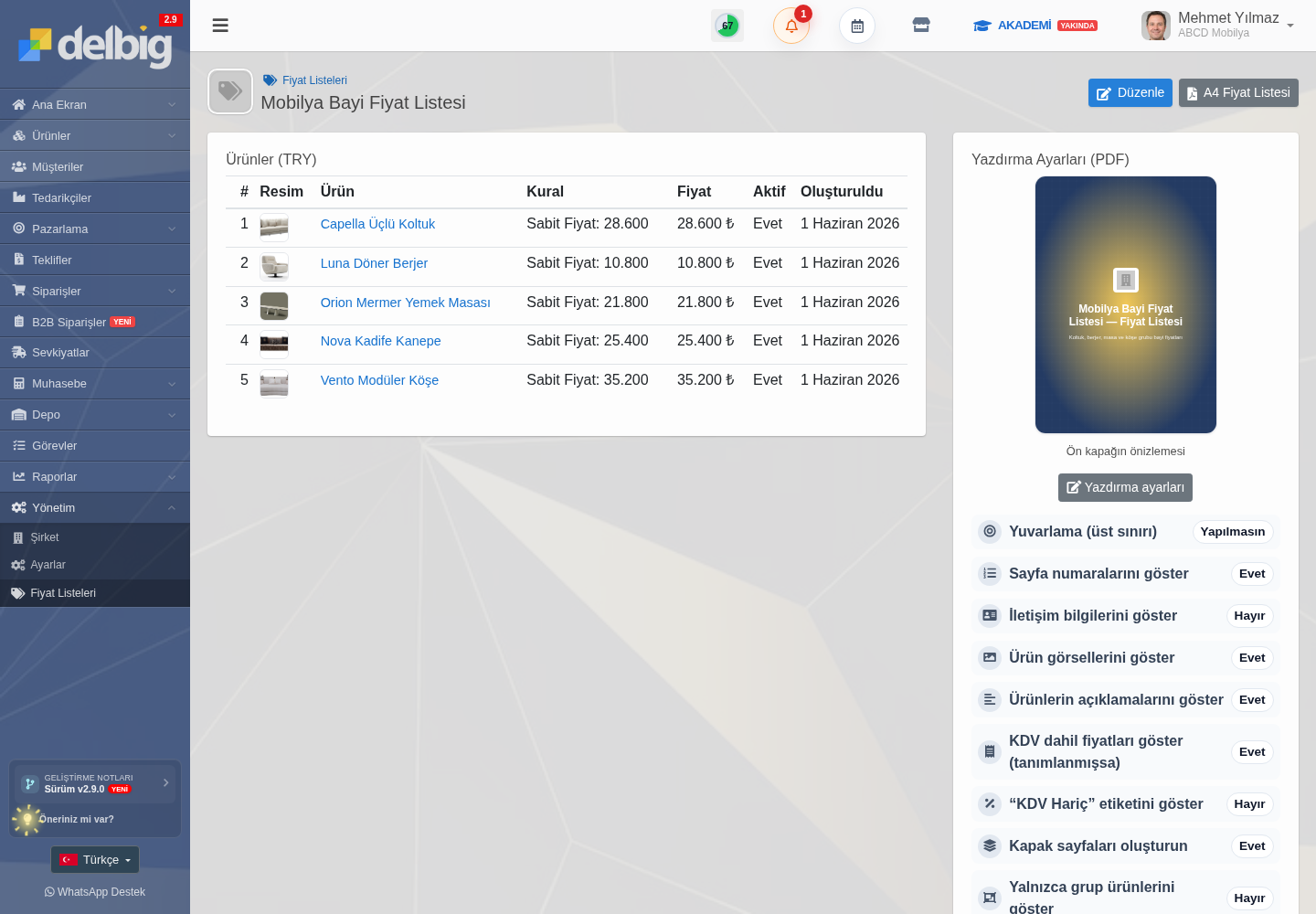
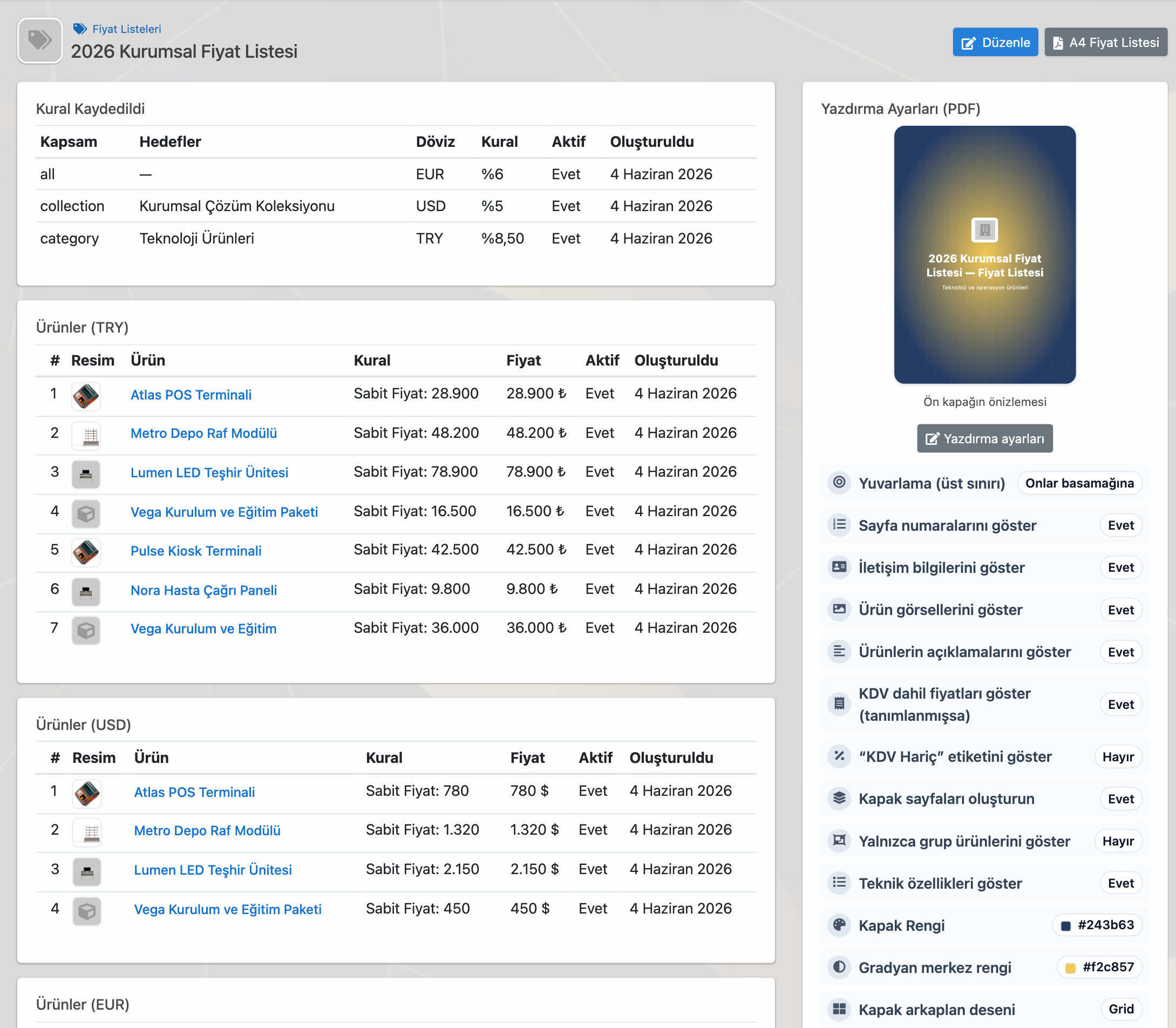
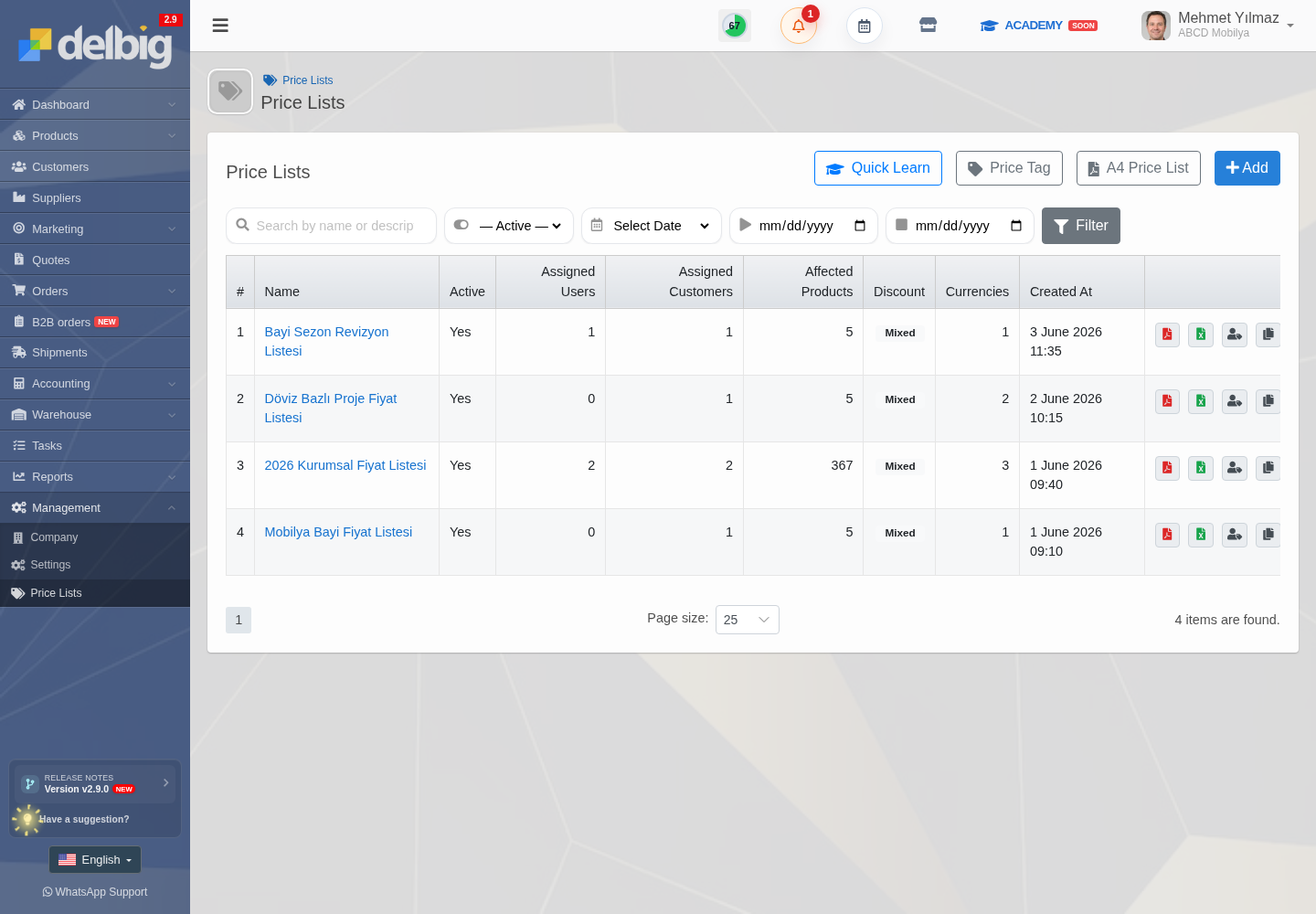
Toptan satışta fiyat listeleri canlı bir yönetim aracıdır. Delbig CRM’de sınırsız fiyat listesi oluşturulabilir; liste belirli bayilere, kullanıcılara, ürünlere, kategorilere, koleksiyonlara veya tüm ürünlere uygulanabilir. Ürün fiyatı manuel düzenlenebilir, toplu düzenleme veya Excel ile güncellenebilir, fiyat listesi PDF/A4 olarak alınabilir.
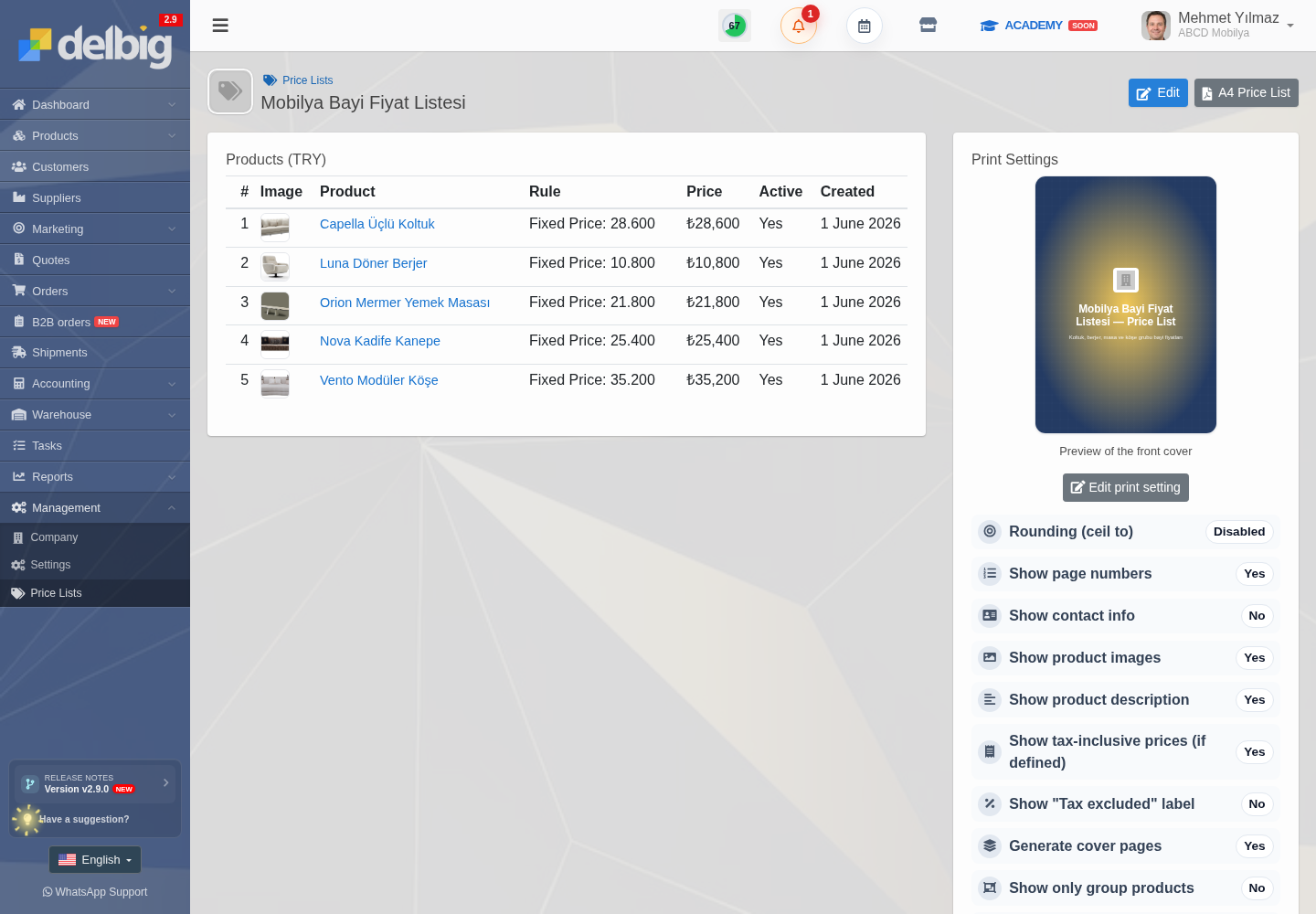
Bu sayede bayi için hazırlanan özel liste yalnızca içeride duran bir kayıt olmaz. Yönetici listeyi kontrol eder, PDF veya Excel çıktısını alır, gerekiyorsa müşteriye ya da ekip içindeki kullanıcılara tanımlar. Bayi portala girdiğinde siparişini otomatik bu fiyatlarla verir.
Bayi kendi sipariş geçmişini takip eder
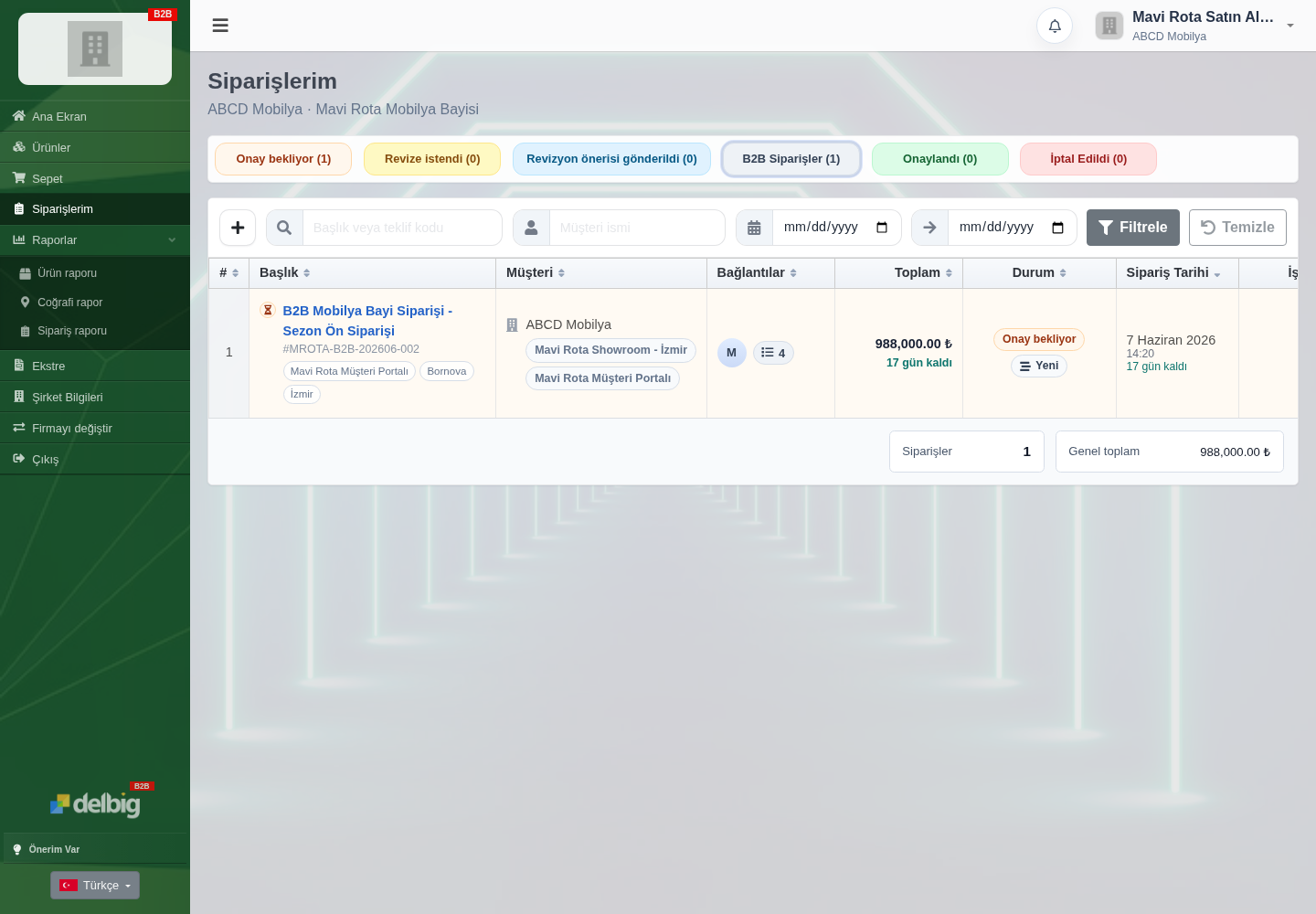
Portal yalnızca sipariş girişi için kullanılmaz. Bayi kendi ekranında onay bekleyen, revize istenen, onaylanan veya iptal edilen siparişlerini görebilir. Böylece firma tarafında “siparişim ulaştı mı?” sorusu azalır; bayi kendi talebinin durumunu ve toplam tutarını doğrudan izler.
Aynı bayi birden fazla üreticiyle çalışabilir
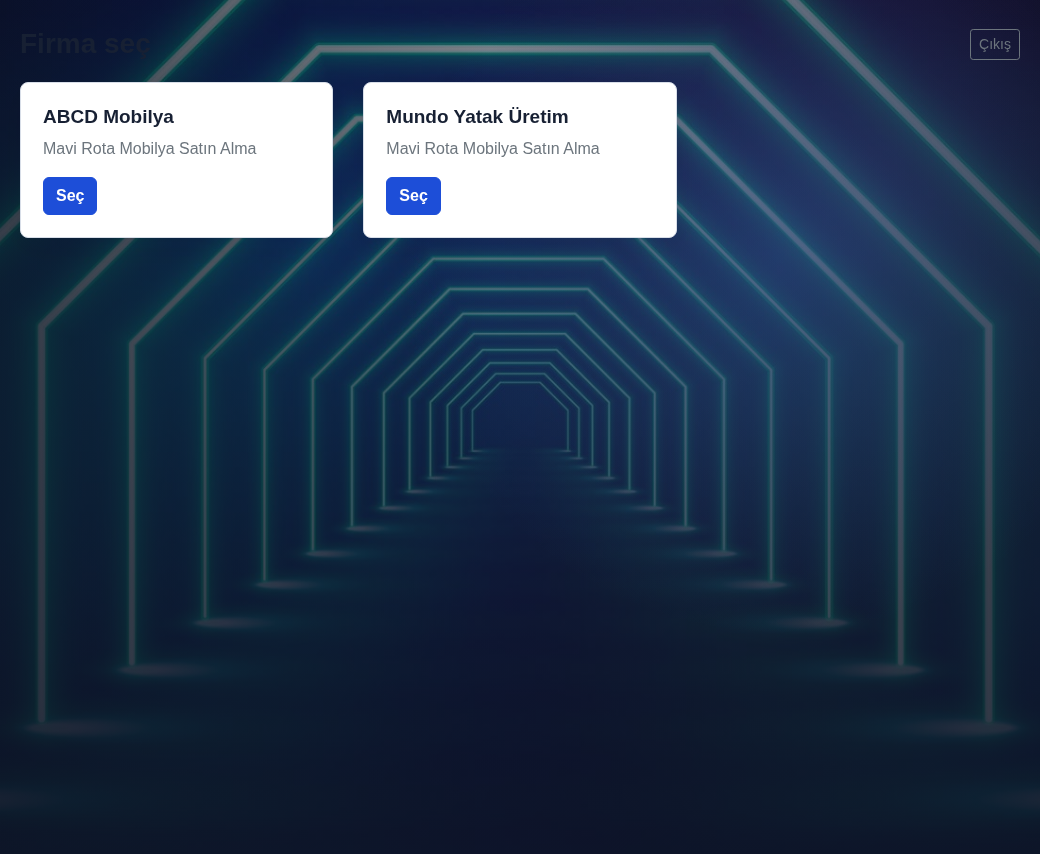
Bayi farklı Delbig kullanan üreticilerle çalışıyorsa her üretici için ayrı alışkanlık kurmak zorunda kalmaz. Aynı portal kullanıcısı giriş yaptıktan sonra firma seçimi yapabilir; ABCD Mobilya veya başka üretici hesabına geçerek o firmaya ait ürün, fiyat listesi ve siparişlerini yönetir.
Bu yapı bayi için kullanımı kolaylaştırırken, üretici tarafında kontrolü korur. Her üretici kendi ürün kataloğunu, bayi fiyat listesini, B2B sipariş onayını ve müşteri geçmişini ayrı yönetir.
Toptan satış ve bayi yönetimi hangi işleri toparlar?
| İş ihtiyacı | Delbig CRM’de karşılığı | Sonuç |
|---|---|---|
| Bayiye özel fiyat vermek | Müşteri bazlı fiyat listesi, ürün dövizi ve portal erişimi. | Her siparişte doğru bayi fiyatı otomatik gelir. |
| Mobilya detaylı sipariş almak | Ürün notu, kumaş, ayak rengi, miktar ve satır toplamı. | Üretim, depo ve satış ekibi aynı satır bilgisini görür. |
| Bayi siparişini kontrol etmek | B2B sipariş onay kuyruğu, revizyon ve iptal aksiyonları. | Portal hız sağlar ama firma kontrolü kaybolmaz. |
| Fiyat listesini paylaşmak | PDF/A4, Excel, kategori, koleksiyon ve ürün bazlı uygulama. | Fiyat güncellemesi dosya karmaşasına dönüşmez. |
| Bayinin tekrar takibini azaltmak | Portal sipariş geçmişi ve durum takibi. | Bayi siparişinin nerede olduğunu kendi ekranından görür. |
Related solution pages
B2B Dealer / Customer Portal
Bayilere katalog, fiyat listesi, sepet, sipariş geçmişi ve içeride kontrollü onay kuyruğu sunun.
Product and Price List Management
Tekil fiyat, toplu düzenleme, Excel, PDF, dövizli liste, müşteri ataması ve fiyat geçmişini yönetin.
Frequently asked questions
Her bayiye ayrı fiyat listesi tanımlanabilir mi?
Evet. Delbig CRM’de bayi, müşteri veya kullanıcı bazında fiyat listesi atanabilir. Aynı ürün farklı bayilerde farklı fiyat veya dövizle çalışabilir.
Bayi siparişi doğrudan onaylanmış sipariş olur mu?
Hayır. B2B portal talebi içeride ayrı onay kuyruğuna düşer. Ekip siparişi inceleyip onaylayabilir, revizyon isteyebilir, revizyon önerisi gönderebilir veya iptal edebilir.
Kumaş ve renk gibi mobilya detayları siparişte tutulabilir mi?
Evet. Ürün notları ve satır detaylarıyla oturum kumaşı, sırt kumaşı, ayak rengi, teslimat notu veya bayi açıklaması sipariş satırında korunabilir.
Bayi fiyat listesini PDF veya Excel olarak alabilir miyiz?
Evet. Fiyat listeleri PDF/A4 ve Excel çıktısıyla paylaşılabilir. Liste ürün, kategori, koleksiyon veya tüm ürünlere uygulanabilir ve sonradan güncellenebilir.
Bayi siparişlerinizi kontrollü ve hızlı yönetin
Mobilya bayi portalı, özel fiyat listeleri, B2B sipariş onayı ve detaylı ürün satırlarını Delbig CRM üzerinde birlikte kullanın.
Wholesale Sales and Dealer Management: Pricing, Portal and Order Tracking
For furniture companies selling wholesale, the job is not only receiving larger orders. Each dealer may have a different price list, payment structure, product selection, fabric and color notes, delivery expectations and approval workflow. Delbig CRM manages this flow with dealer portal access, customer-specific price lists, B2B order approval and detailed order lines.
Wholesale sales need a different workflow than retail
In retail, the customer often places one order and the process closes quickly. In wholesale, a dealer, showroom, branch or corporate customer orders the same products repeatedly, may send seasonal pre-orders and may add seat fabric, back fabric, leg color, delivery notes or store information on specific lines.
Wholesale sales management is therefore more than an order form. The system should show which price list the dealer uses, which e-mail gives portal access, who approves the order internally, which custom details exist on each product line and when the request becomes a regular sales order.
Convenience for the dealer
- The dealer sees products in the portal, chooses quantities and adds product notes.
- The dealer works with the assigned price list instead of using old PDFs or wrong prices.
- The dealer follows whether the order is waiting for approval, revision or approval from their own screen.
Control for the company
- A special price list can be assigned to each dealer or selected dealer group.
- B2B orders wait in a separate approval queue before mixing into regular orders.
- Fabric, color, leg, delivery and revision notes stay attached to order lines.
Portal access and special price list are assigned to the dealer
In Delbig CRM, dealer management starts on the customer card. The dealer portal login e-mail, active user status, product currency, store access and assigned price list are defined here. When the dealer signs in, they see assigned products and agreed prices instead of a generic list.
This provides critical control in wholesale sales. The same sofa set can be priced differently for one dealer, another showroom or an export customer. Because the price list is connected to the customer, the sales team does not need to remember pricing manually on every order; portal orders, quotes and internal orders use the same customer pricing structure.
- A dealer-specific price list can be assigned to selected customers.
- Product currency and store access are controlled per customer.
- Portal invitation, acceptance and last login are visible internally.
- Manual price confusion decreases because the assigned price is used automatically.
The dealer portal standardizes furniture orders
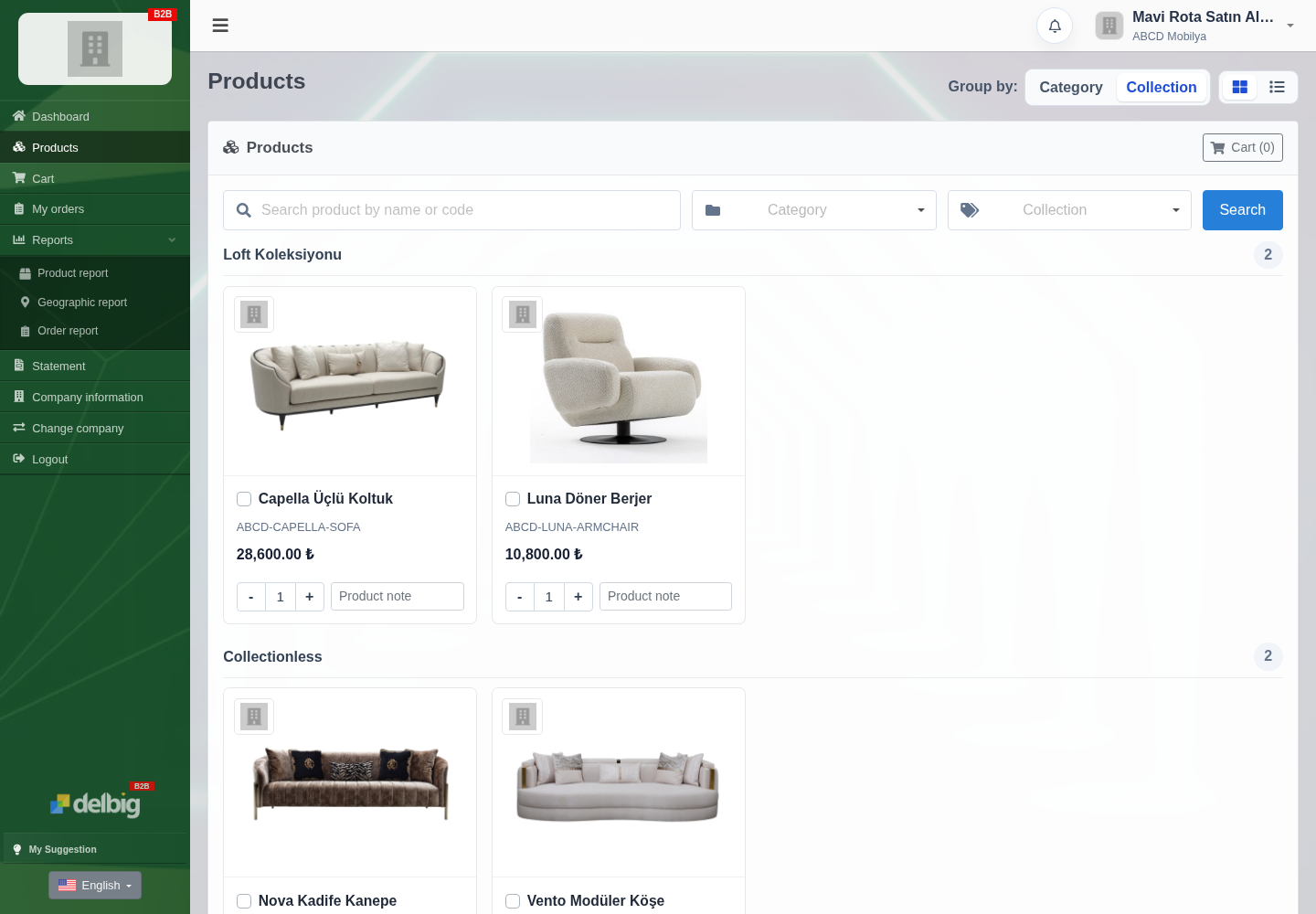
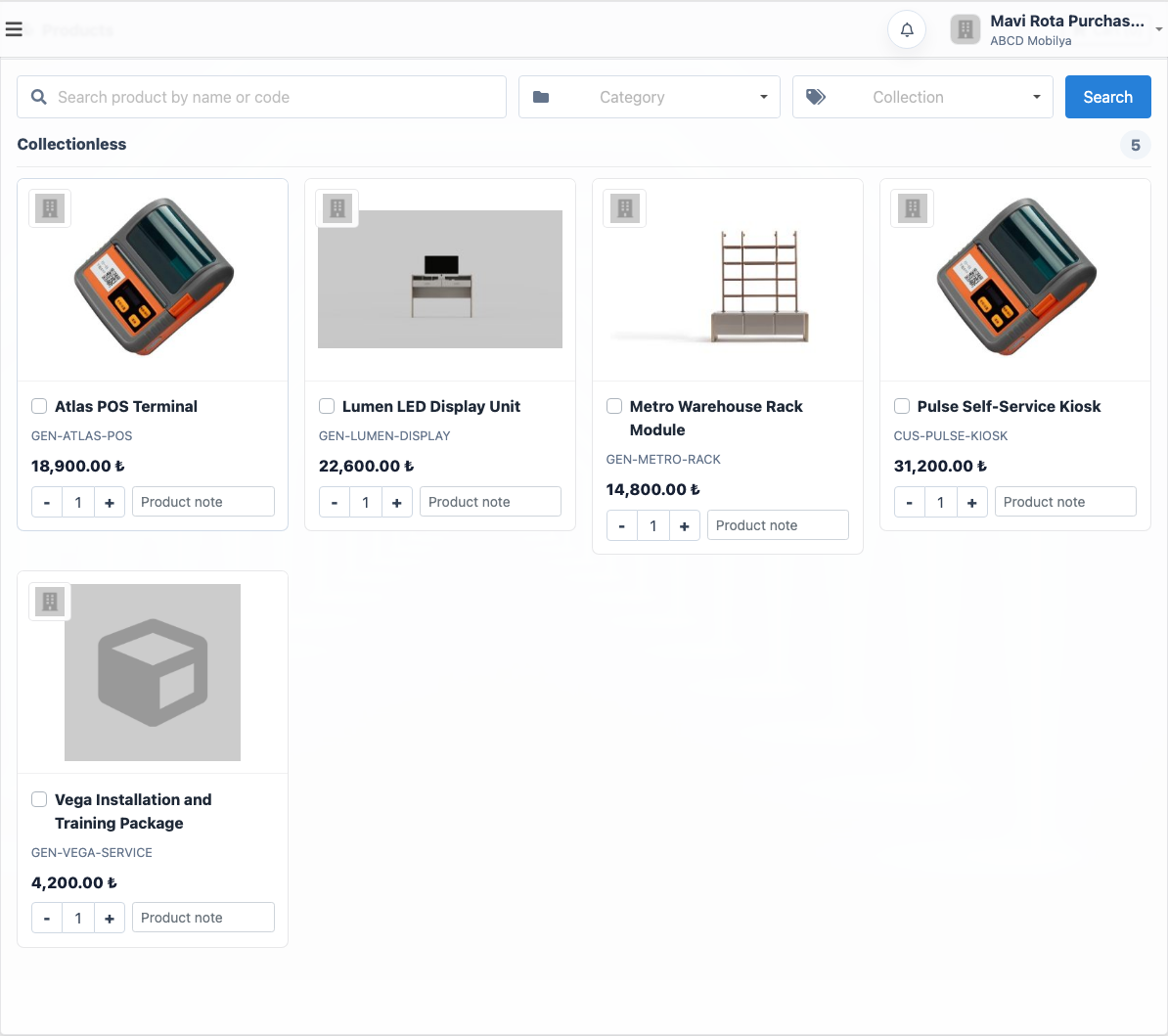
In the dealer portal, products are listed with image, product name, SKU, price and quantity fields. The dealer can filter by collection or category, enter quantities and write a product note. In furniture, this note field is especially valuable because seat fabric, back fabric, leg color, store delivery or seasonal display notes can be attached before the order is created.
This screen reduces the need to read product codes on the phone or collect scattered WhatsApp orders. The dealer knows which products and prices are available, while the company receives the request as structured order lines inside the system.
Incoming dealer orders enter a separate approval queue
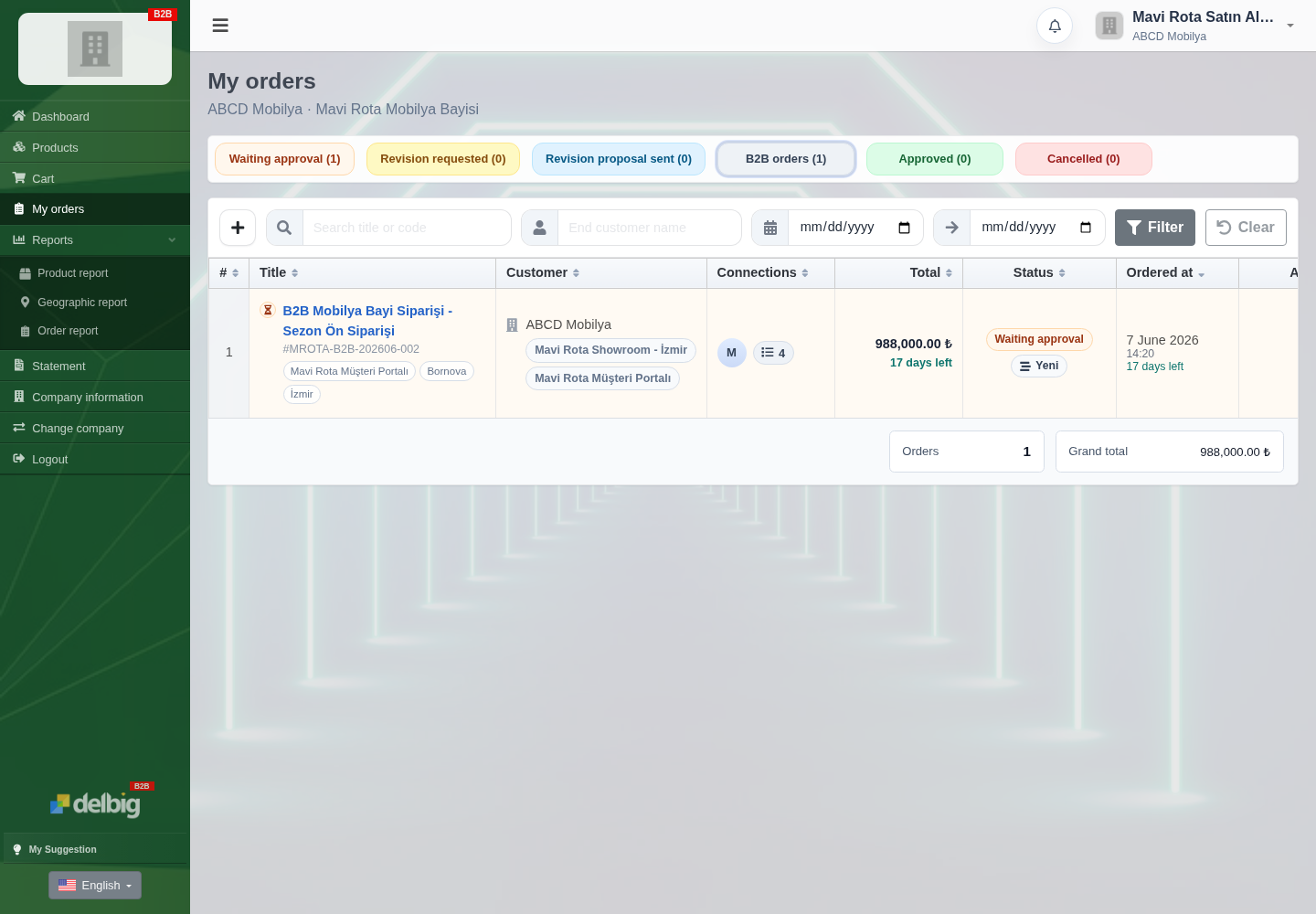
A request sent from the dealer portal does not immediately mix into open orders. B2B orders wait in a separate approval queue. The team sees the order title, order number, customer, product count, total amount, order date and status, then can approve, request a revision, send a revision proposal or cancel the order.
This separation matters in wholesale sales. A dealer may place a high-quantity order, some lines may need delivery confirmation, and even when the price list is correct, stock or production planning may need to be checked. Delbig CRM balances portal speed with internal operational control.
Fabric, color and product details stay on the order line
In furniture wholesale sales, the product name alone may not be enough. A three-seat sofa can use anthracite linen seat fabric, light gray boucle back fabric and walnut legs; an armchair can use beige boucle body fabric and matte black legs. If these details are not kept on the order line, production, warehouse and dealer teams need repeated confirmations.
In Delbig CRM B2B order detail, product lines are shown with quantity, unit price, line total and product notes. The team checks product variations and special notes before approving the dealer request. After approval, the same information moves more cleanly into sales order, procurement, warehouse and shipment workflows.
Price lists work per dealer and can be shared as PDF or Excel
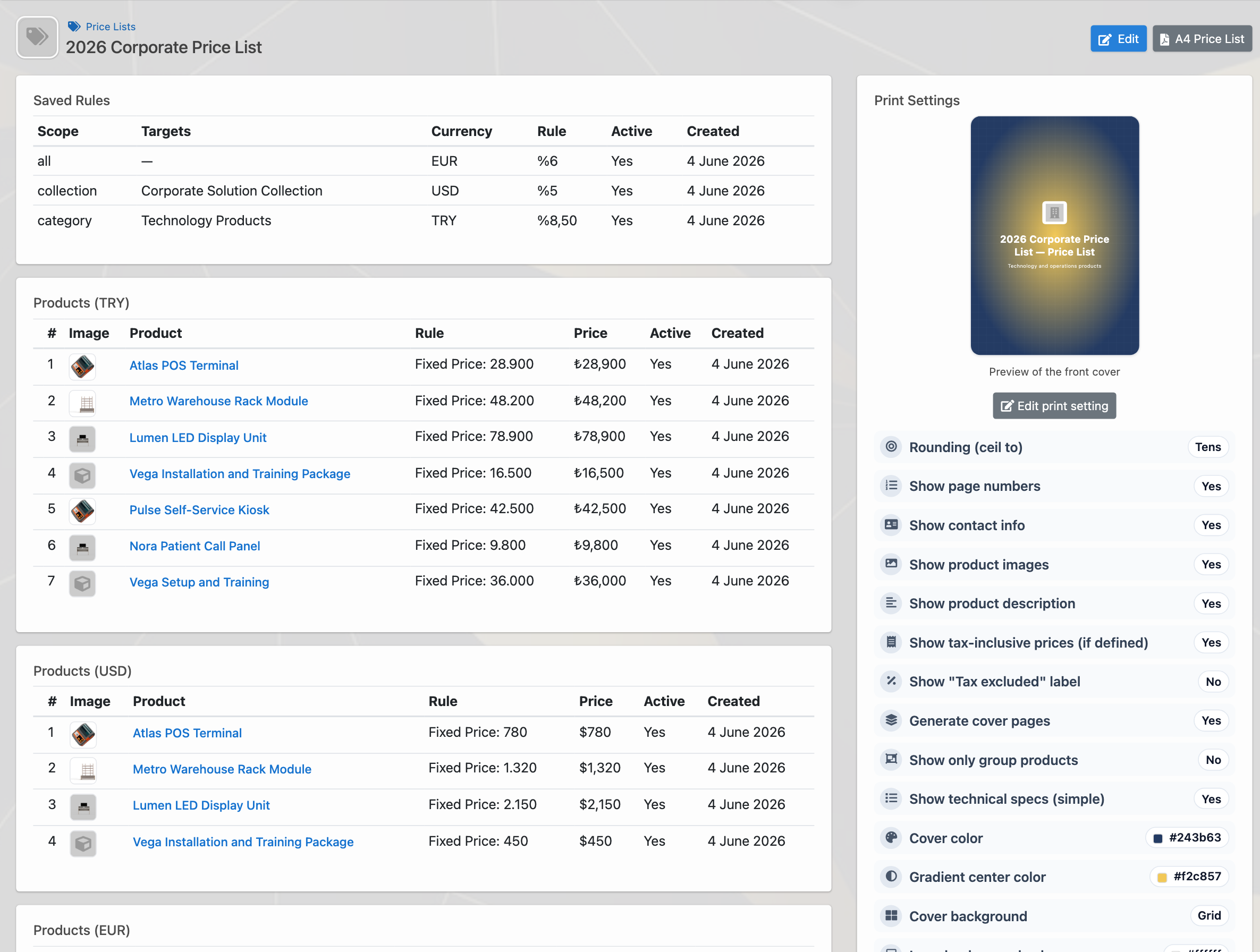
In wholesale, price lists are active management tools. Delbig CRM can create unlimited price lists; each list can be assigned to selected dealers, users, products, categories, collections or all products. Product prices can be edited manually, updated in bulk or managed through Excel, and the price list can be exported as PDF/A4.
This turns a dealer-specific price list into more than an internal record. Managers can review it, export PDF or Excel, and assign it to customers or internal users. When the dealer enters the portal, orders are automatically created with these prices.
The dealer follows order history from the portal
The portal is not used only for order entry. The dealer can see waiting approval, revision requested, approved or cancelled orders on their own screen. This reduces the “did my order reach you?” traffic and lets the dealer follow the request status and total amount directly.
One dealer can work with multiple producers
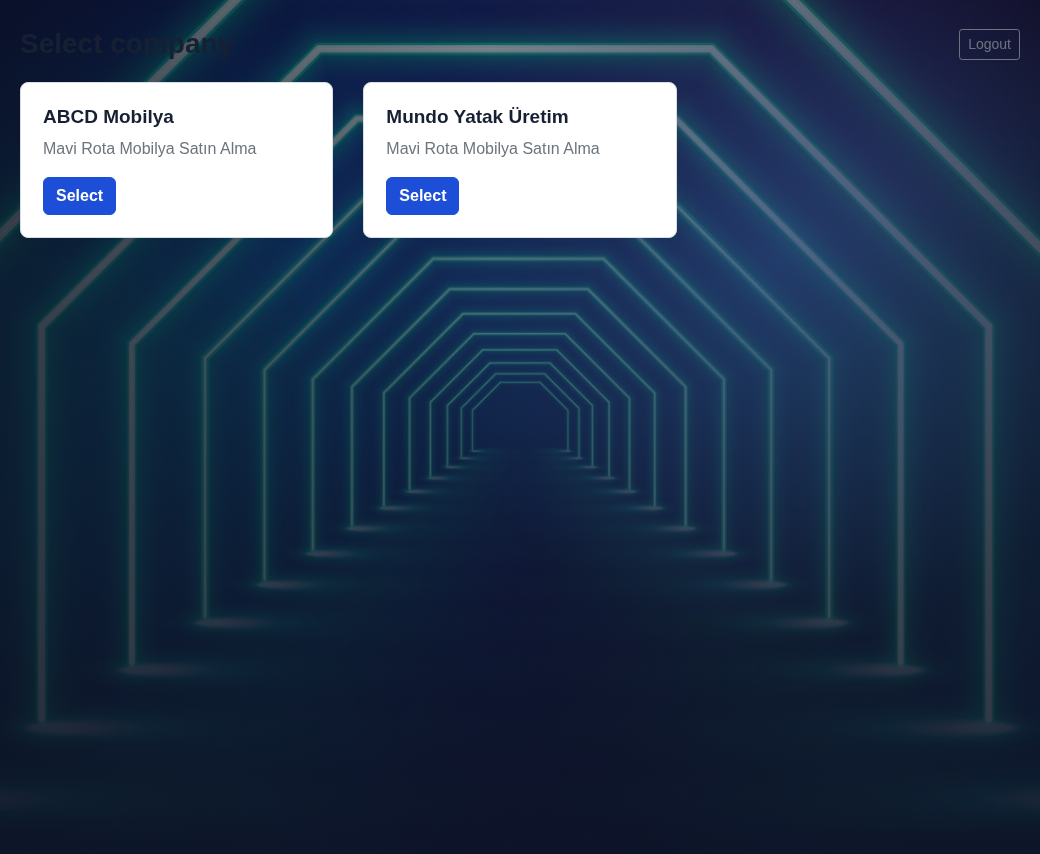
If the dealer works with several producers that use Delbig, they do not need to build a separate habit for each producer. After login, the same portal user can choose the company account and switch to ABCD Mobilya or another producer to manage that company’s products, price list and orders.
This makes the portal easier for the dealer while keeping producer-side control intact. Each producer manages its own product catalog, dealer price list, B2B order approval and customer history separately.
What does wholesale sales and dealer management organize?
| Business need | Delbig CRM equivalent | Result |
|---|---|---|
| Give dealer-specific prices | Customer-based price list, product currency and portal access. | The correct dealer price is used automatically on each order. |
| Receive detailed furniture orders | Product note, fabric, leg color, quantity and line total. | Production, warehouse and sales teams see the same line detail. |
| Control dealer orders | B2B approval queue, revision and cancellation actions. | The portal adds speed without losing company control. |
| Share price lists | PDF/A4, Excel, category, collection and product-based rules. | Price updates do not turn into file chaos. |
| Reduce repeated follow-up | Portal order history and status tracking. | The dealer sees where the order stands from their own screen. |
Related solution pages
B2B Dealer / Customer Portal
Offer dealers a catalog, price list, cart, order history and controlled internal approval queue.
Product and Price List Management
Manage individual prices, bulk edits, Excel, PDF, multi-currency lists, customer assignments and price history.
Frequently asked questions
Can each dealer have a separate price list?
Yes. Delbig CRM can assign price lists by dealer, customer or user. The same product can use different prices or currencies for different dealers.
Does a dealer order become an approved order immediately?
No. A B2B portal request enters a separate internal approval queue. The team can review the order, approve it, request a revision, send a revision proposal or cancel it.
Can furniture details such as fabric and color stay on the order?
Yes. Product notes and line details can keep seat fabric, back fabric, leg color, delivery notes or dealer explanations on the order line.
Can dealer price lists be exported as PDF or Excel?
Yes. Price lists can be shared as PDF/A4 and Excel. A list can apply to products, categories, collections or all products, and can be updated later.
Manage dealer orders with speed and control
Use furniture dealer portal, special price lists, B2B order approval and detailed product lines together in Delbig CRM.