
Ürün ve Fiyat Listesi Yönetimi: Fiyat Değişimini Kontrol Altına Alın
Ürün fiyatı, satış ekibinin müşteriye verdiği sözün en kritik parçasıdır. Delbig CRM’de ürün fiyatları tek tek düzenlenebilir, toplu fiyat düzenleme ekranından güncellenebilir, Excel ile dışarı alınıp tekrar içeri aktarılabilir ve sınırsız fiyat listesiyle müşteri, kullanıcı, kategori, koleksiyon veya ürün bazında yönetilebilir.
Fiyat yönetimi yalnızca ürün kartına fiyat yazmak değildir
Özellikle ülkemizde fiyatların sık değişmesi, ürünle çalışan firmalar için ciddi zaman alan bir operasyona dönüşür. Güncel fiyatı satış ekibine duyurmak, bayi veya müşteriye doğru listeyi göstermek, eski fiyatın ne zaman değiştiğini bulmak ve farklı dövizlerde aynı ürünü tekrar hesaplamak Excel dosyalarıyla ilerlediğinde hata riski büyür.
Delbig CRM’de ürün kartı satış, teklif, B2B portal, fiyat listesi ve raporlama tarafının ortak kaydıdır. Bir ürünün tekil fiyatı değiştirilebilir; aynı ürün farklı fiyat listelerinde farklı döviz ve kural ile gösterilebilir; geçmiş değişiklikler de sonradan kontrol edilebilir.
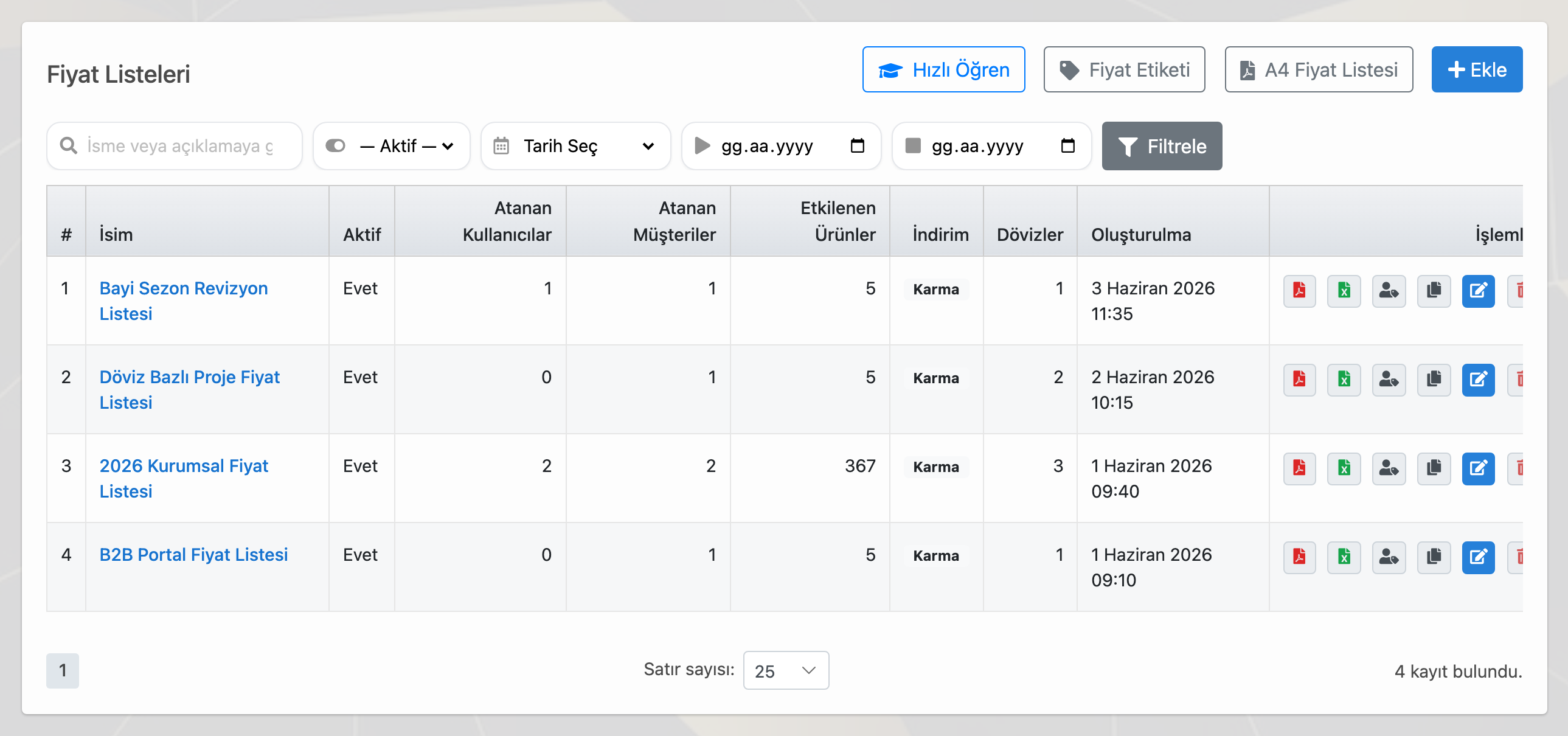
Fiyat listeleri müşteri ve ekip bazında ayrılabilir
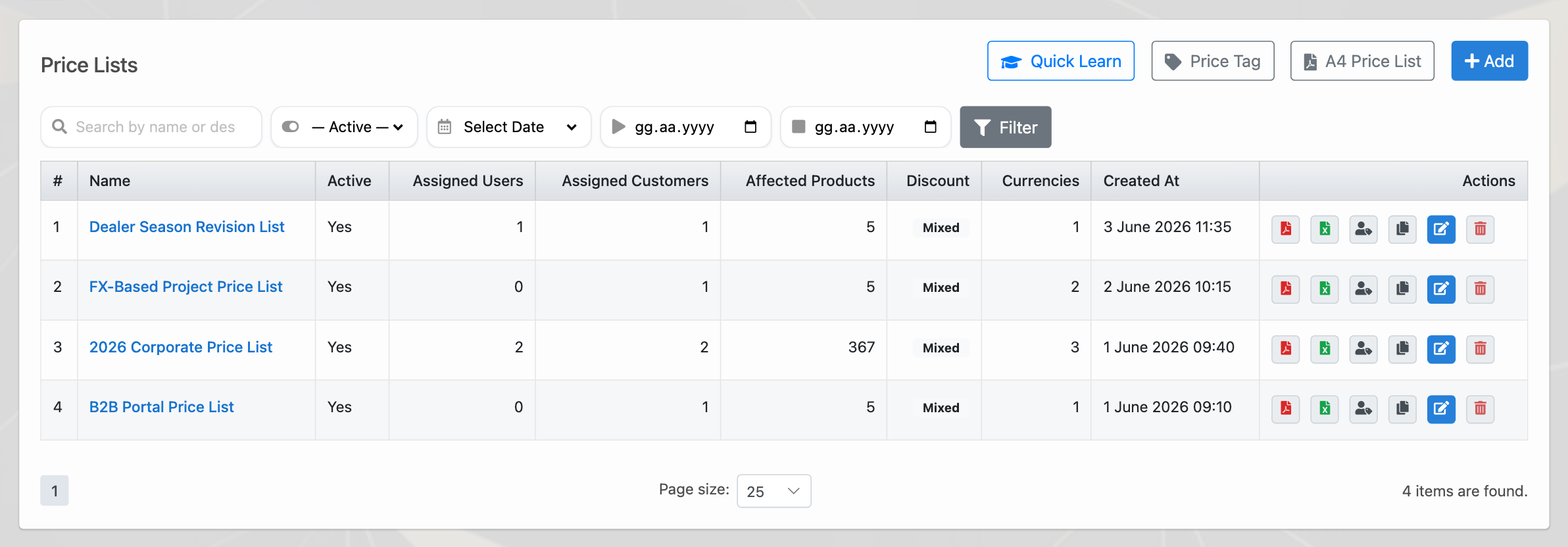
Her müşteriye aynı fiyat listesini göstermek zorunda değilsiniz. Delbig’de bayi, kurumsal müşteri, showroom ekibi, saha satış ekibi veya iç kullanıcı için ayrı fiyat listeleri hazırlanabilir. Bir fiyat listesi belirli müşterilere veya belirli kullanıcılara atanabilir; böylece herkes yalnızca kendisi için tanımlanan fiyat setiyle çalışır.
Bu yapı B2B portal kullanan firmalarda daha da önemlidir. Bayi portalına giriş yapan müşteri, kendisine tanımlanan fiyat listesi ve ürün döviziyle çalışır. İç ekip ise aynı fiyat listesini PDF, Excel veya teklif hazırlama sürecinde kontrollü şekilde kullanabilir.
Fiyat listesinde yönetilenler
- Sınırsız sayıda fiyat listesi oluşturulabilir.
- Liste müşteriye, bayi hesabına veya iç kullanıcıya atanabilir.
- TRY, USD, EUR gibi farklı dövizlerde fiyat seti hazırlanabilir.
- PDF/A4 fiyat listesi ve Excel çıktısı aynı kayıttan alınabilir.
Uygulama kapsamı
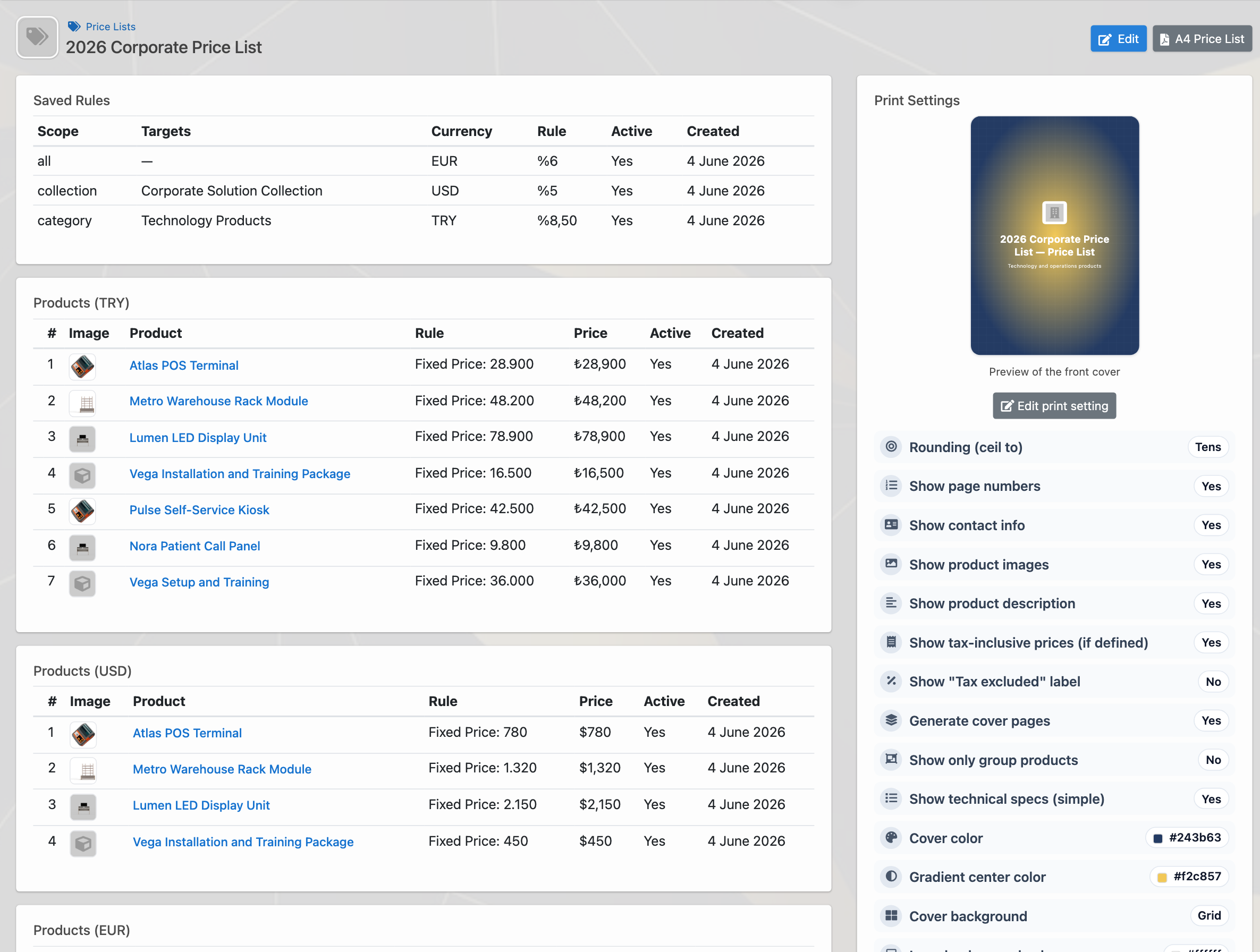
- Belirli bir ürüne sabit fiyat uygulanabilir.
- Kategoriye göre yüzdesel veya sabit kural verilebilir.
- Koleksiyona göre özel fiyat çalışması yapılabilir.
- Tüm ürünlere genel fiyat kuralı uygulanabilir.
Toplu fiyat düzenleme Excel dağınıklığını azaltır
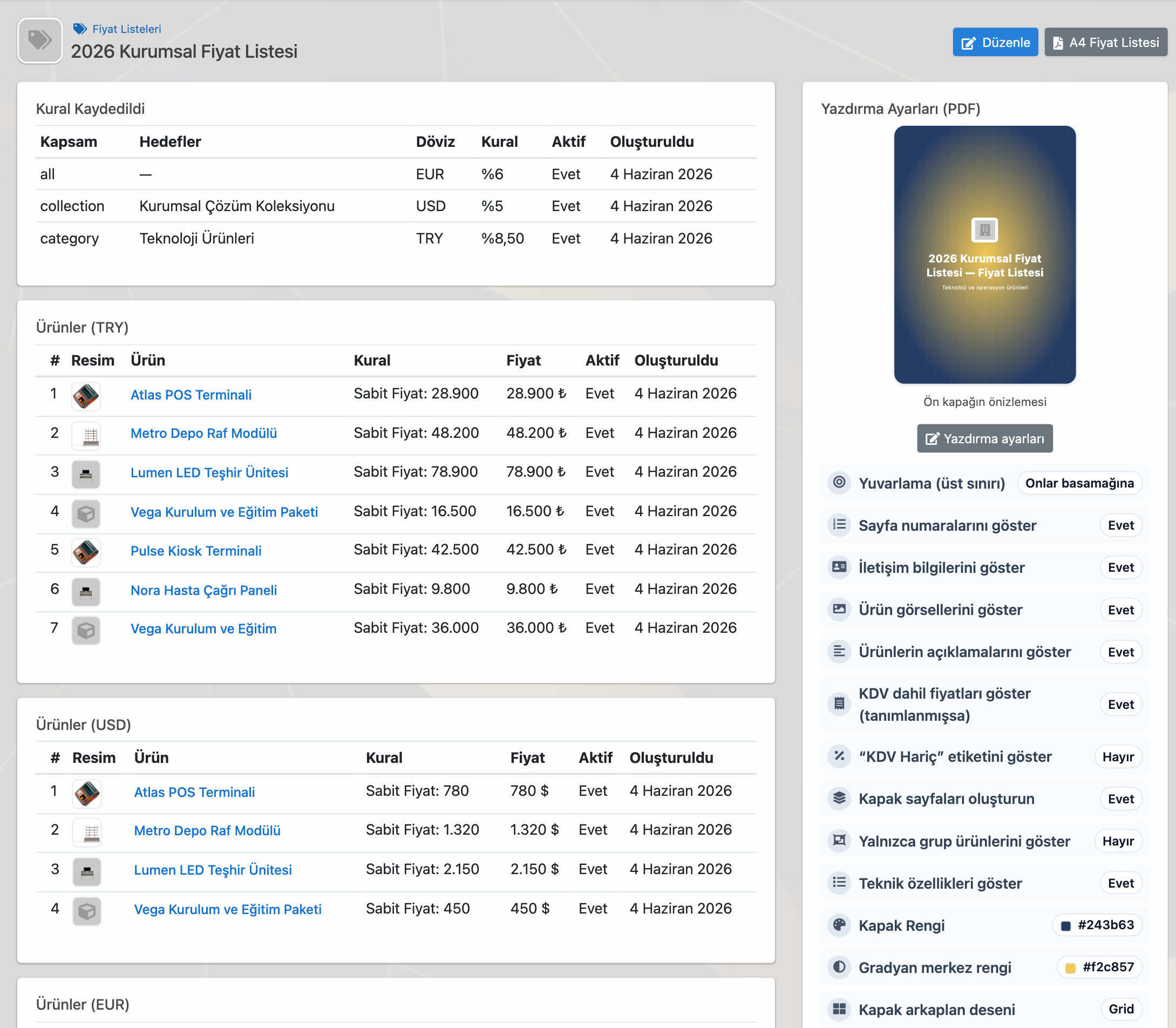
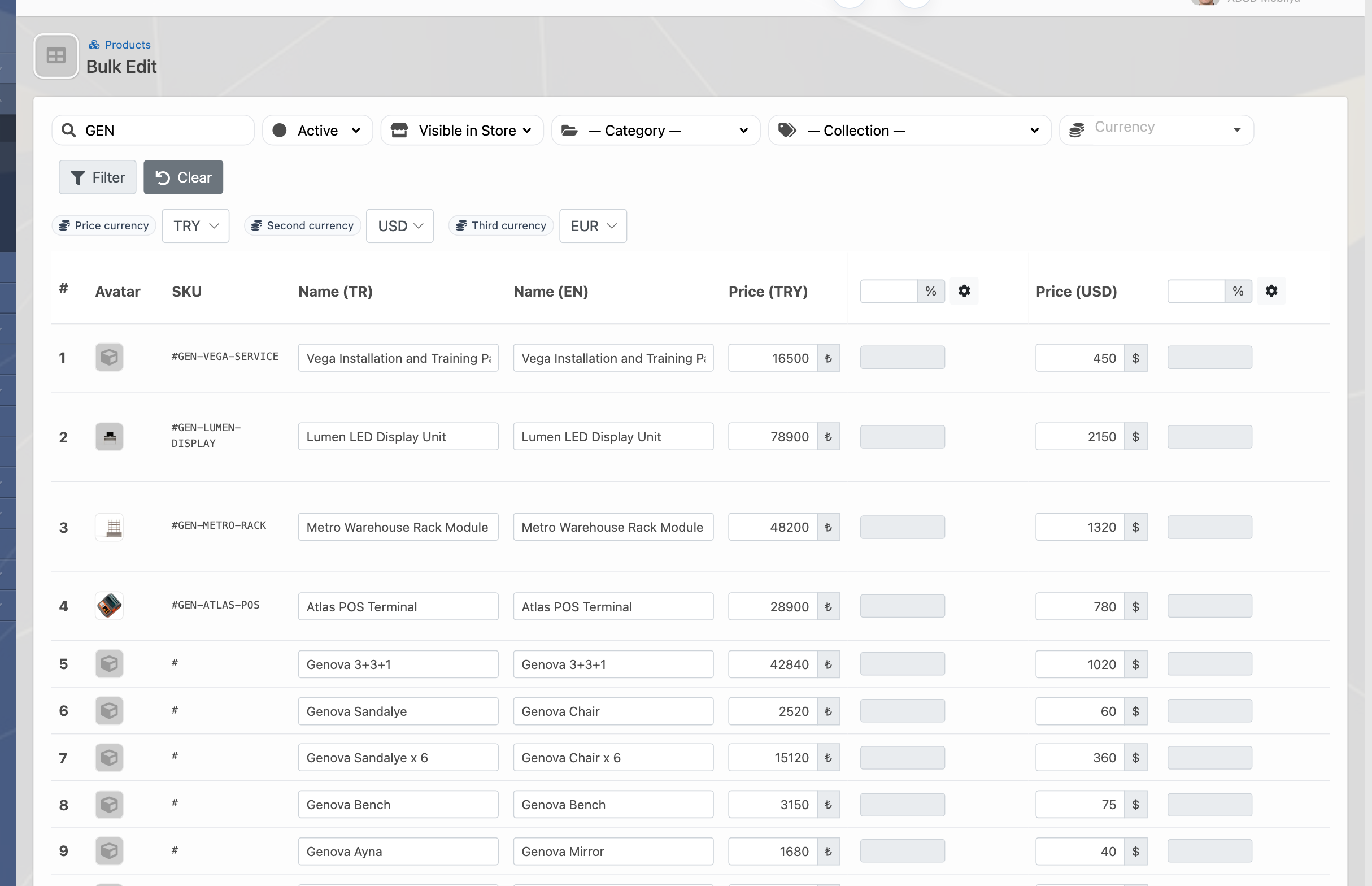
Ürün sayısı arttıkça tek tek fiyat güncellemek pratik olmaktan çıkar. Delbig toplu fiyat düzenleme ekranında ürünler filtrelenebilir; aktiflik, mağazada görünürlük, kategori, koleksiyon ve arama alanlarıyla doğru ürün grubu seçilebilir. Aynı ekranda TRY, USD ve EUR gibi birden fazla döviz için fiyatlar güncellenebilir.
Excel ihtiyacı tamamen yok sayılmaz; fiyatlar dışarı alınabilir, üzerinde çalışma yapılabilir ve tekrar içeri aktarılabilir. Ancak günlük çalışma ekranı yalnızca dosya yönetimine bağlı kalmaz. Satış ekibi ve yönetici, fiyatları sistem içindeki ürün kayıtlarıyla doğrudan ilişkilendirerek ilerler.
Fiyat geçmişi eski ve yeni fiyatı görünür tutar
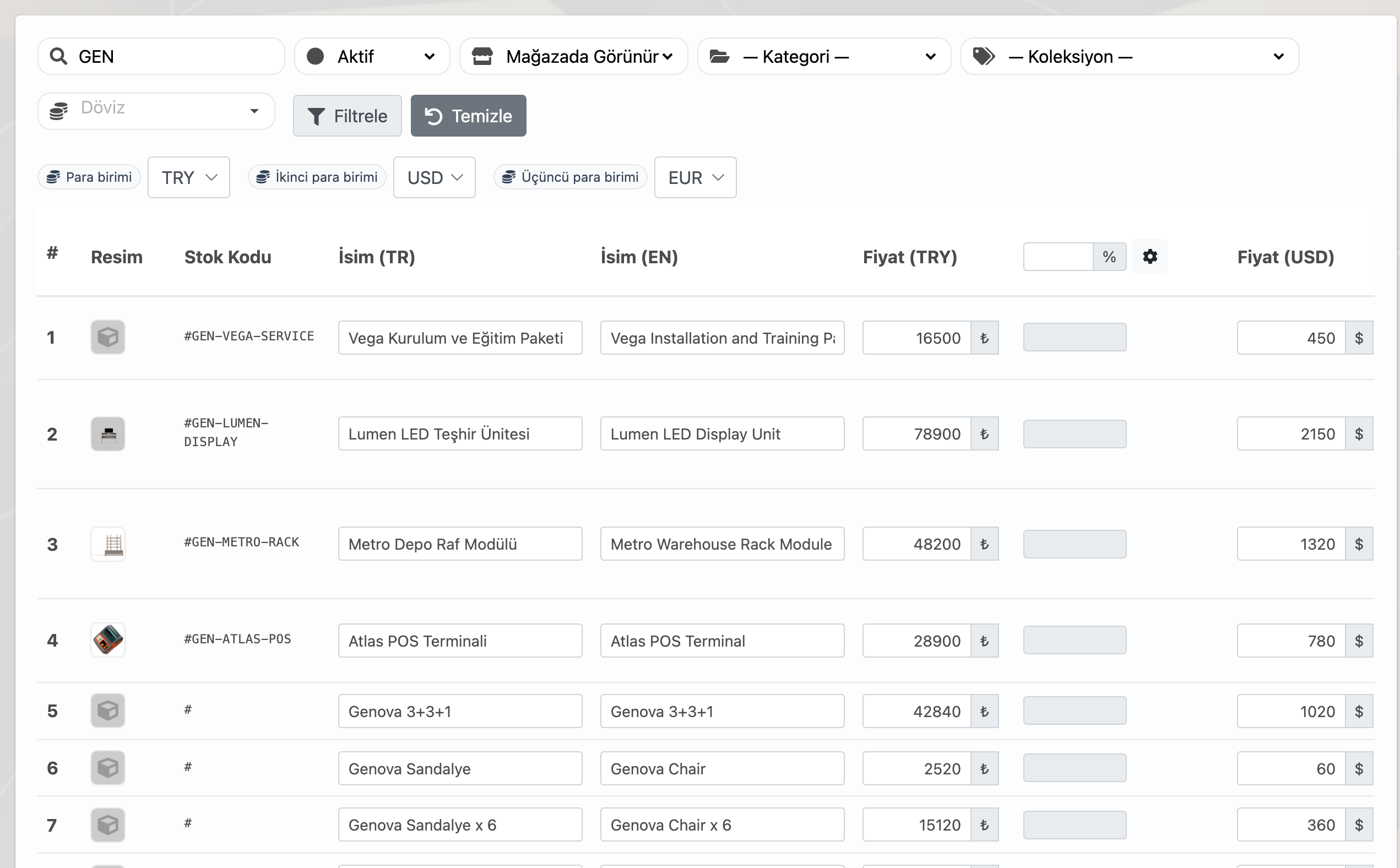
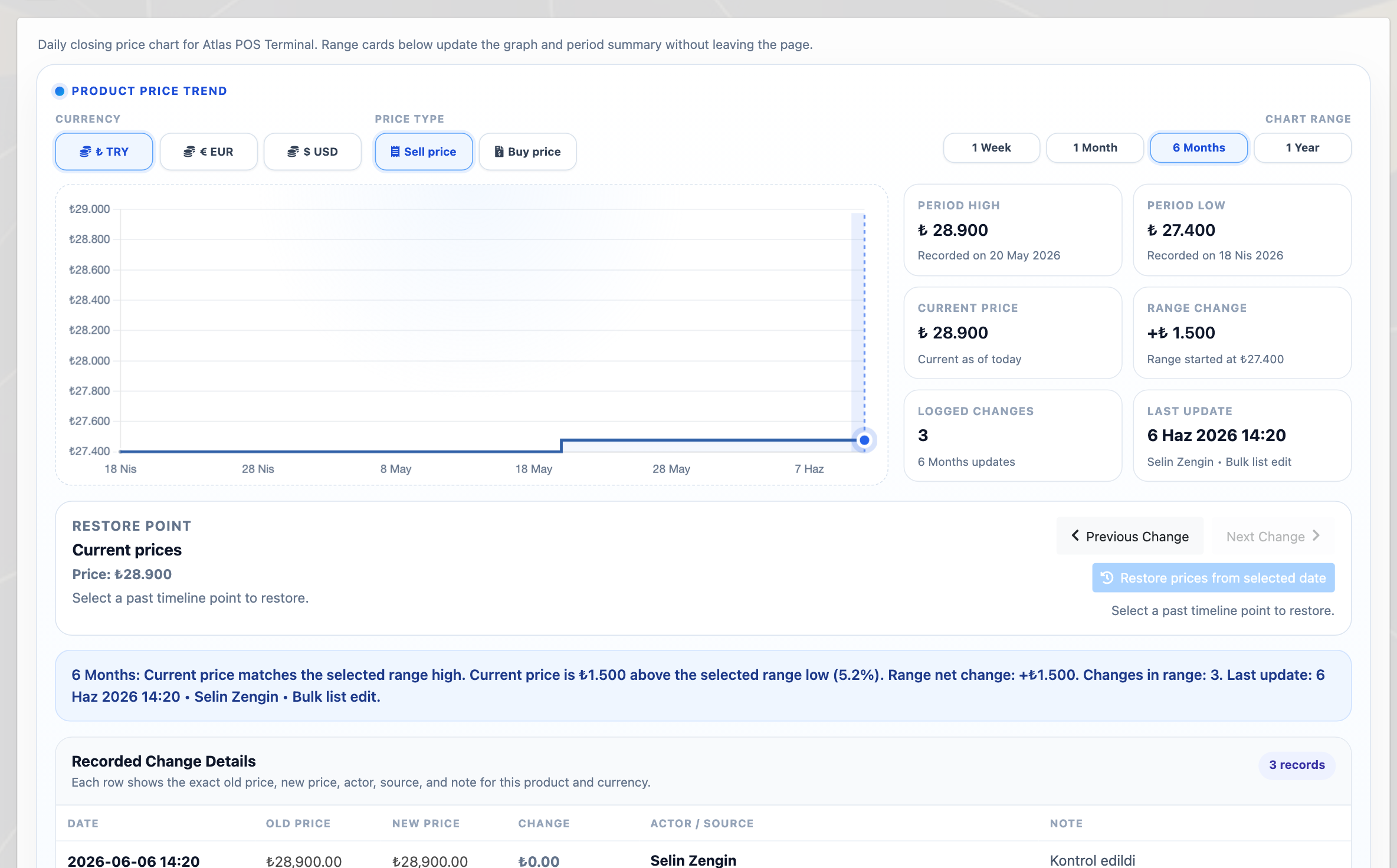
Fiyat güncellemesi yapıldıktan sonra “bu ürün geçen ay kaç liraydı?”, “kim değiştirdi?”, “hangi kaynaktan güncellendi?” gibi sorular önem kazanır. Delbig ürün fiyat geçmişi ekranı, satış fiyatı trendini, dönem değişimini, güncel fiyatı ve kayıtlı değişiklikleri ürün bazında izlemeyi kolaylaştırır.
Bu özellikle sezon başında, kur değişiminde, tedarik maliyeti arttığında veya bayi listeleri güncellenirken yöneticinin kontrol ihtiyacını karşılar. Eski fiyatlar yalnızca geçmiş dosyalarda kalmaz; ürün kaydı üzerinde izlenebilir.
PDF ve Excel çıktısı fiyat listesini paylaşılabilir hale getirir
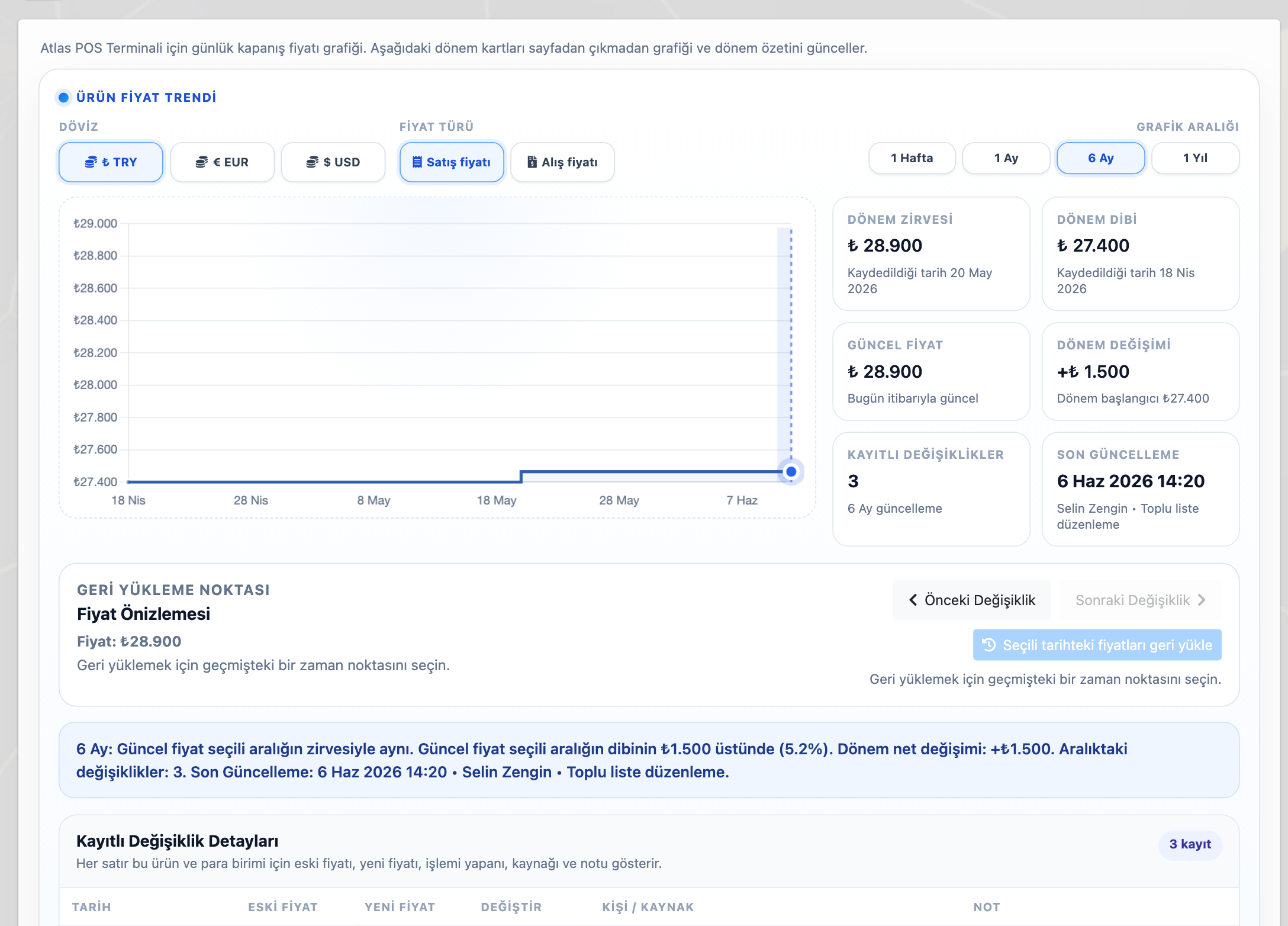
Fiyat listesi yalnızca sistem içinde durmak zorunda değildir. Hazırlanan liste PDF/A4 formatında alınabilir, kapak ve yazdırma ayarları düzenlenebilir, ürün görselleri ve açıklamaları gösterilebilir veya sade liste formatı tercih edilebilir. Excel çıktısı ise fiyat çalışmasını dışarıda kontrol etmek, satın alma veya yönetim ekibiyle paylaşmak için kullanılabilir.
Bu sayede firma hem içerideki kullanıcılarına kontrollü liste sunar hem de müşteriye veya bayiye daha profesyonel bir fiyat dokümanı verebilir. Listeyi değiştirmek gerektiğinde yeni bir dosya düzeni kurmak yerine aynı fiyat listesi kaydı güncellenir.
| Need | How Delbig handles it | Sonuç |
|---|---|---|
| Tekil ürün fiyatı | Ürün kartındaki fiyat alanları ve döviz bazlı ürün fiyatları kullanılır. | Satış ekibi güncel ürün fiyatıyla teklif hazırlar. |
| Toplu fiyat revizyonu | Filtreli toplu düzenleme, yüzde/tutar değişimi ve Excel içe/dışa aktarma kullanılır. | Çok ürünlü fiyat güncellemeleri daha hızlı tamamlanır. |
| Fiyat listesi | Müşteri, kullanıcı, ürün, kategori, koleksiyon veya tüm ürünlere uygulanabilen listeler hazırlanır. | Farklı müşteri ve ekip grupları ayrı fiyat yapısıyla çalışır. |
| Dövizli çalışma | Aynı listede farklı para birimleri ve kurallar yönetilebilir. | İhracat, bayi veya proje fiyatları daha kontrollü ilerler. |
| Geçmiş kontrolü | Fiyat geçmişi ekranı eski/yeni fiyatı, tarihleri ve değişim bilgisini gösterir. | Yönetici fiyat değişiminin izini kaybetmez. |
Related solution pages
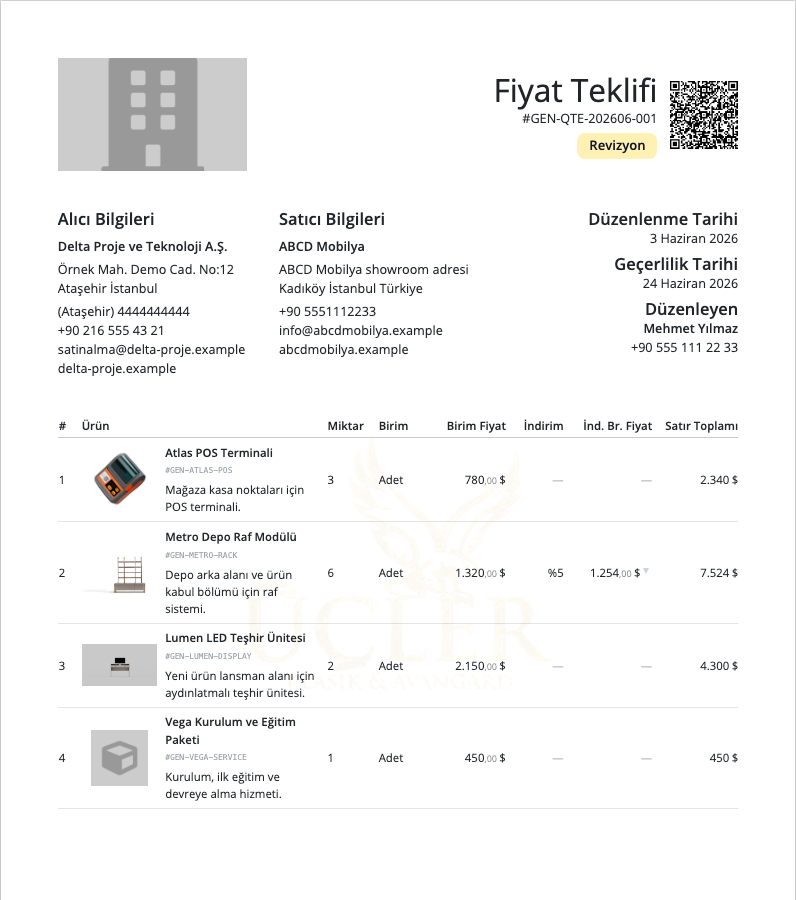
Quote and Proforma Management
Ürün, fiyat, indirim, PDF, WhatsApp paylaşımı ve teklif ziyaret takibini aynı satış kaydında yönetin.
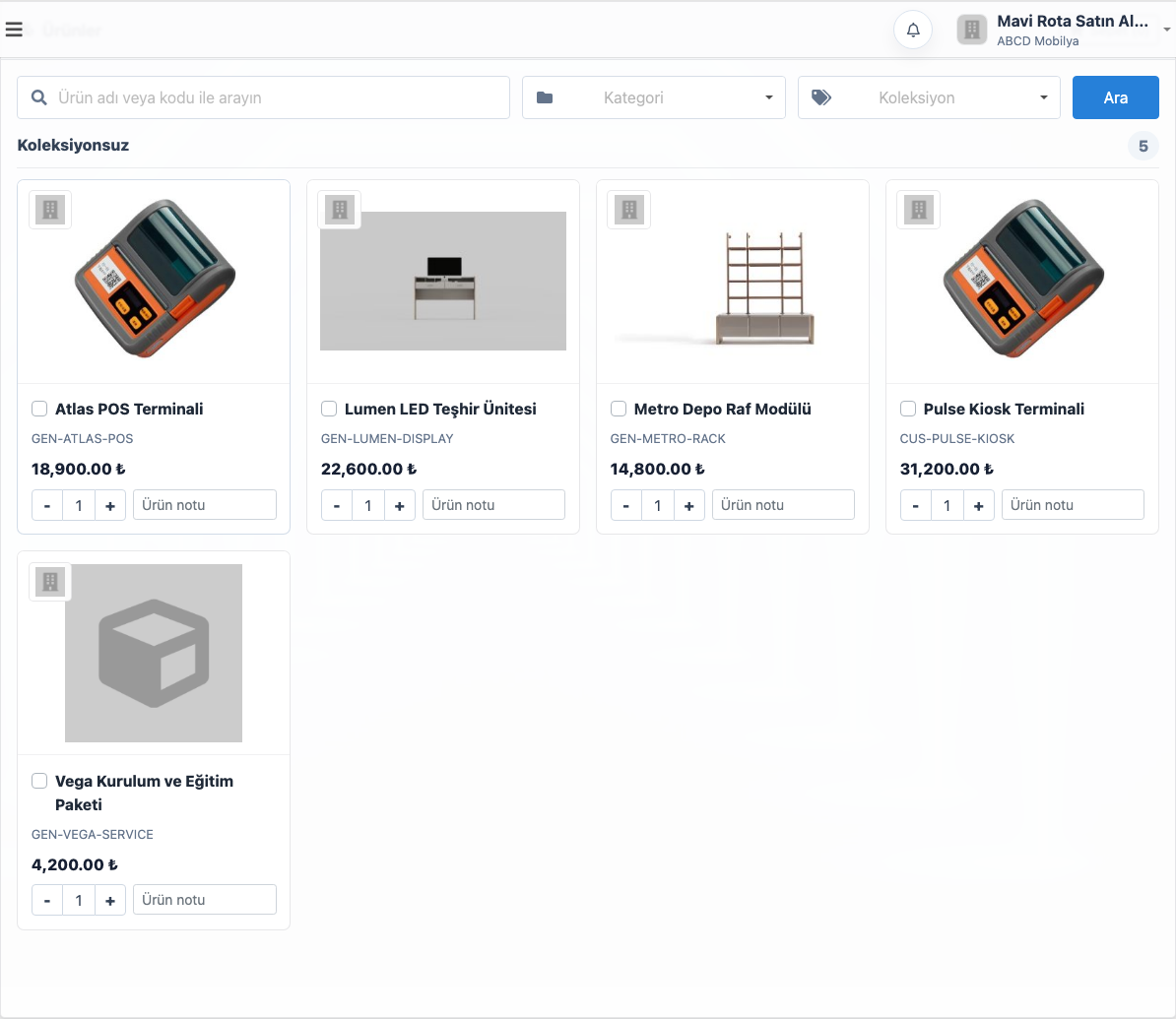
B2B Dealer / Customer Portal
Bayilere katalog, fiyat listesi, sepet, sipariş geçmişi ve içeride kontrollü onay kuyruğu sunun.
Frequently asked questions
Sınırsız fiyat listesi oluşturulabilir mi?
Evet. Firma ihtiyaç duyduğu kadar fiyat listesi oluşturabilir; her liste farklı müşteri, kullanıcı, ürün, kategori veya koleksiyon kurallarıyla çalışabilir.
Fiyat listesi PDF olarak alınabilir mi?
Evet. Fiyat listesi A4/PDF formatında alınabilir. Kapak, ürün görselleri, açıklamalar, sayfa numarası, KDV gösterimi ve yazdırma ayarları listeye göre düzenlenebilir.
Fiyatlar Excel ile düzenlenebilir mi?
Evet. Fiyat çalışmaları Excel olarak dışarı alınabilir ve uygun akışta tekrar içeri aktarılabilir. Ayrıca sistem içindeki toplu düzenleme ekranı, sık fiyat değişikliklerinde dosyaya bağlı kalmadan hızlı revizyon yapmayı kolaylaştırır.
Fiyat geçmişi hangi durumlarda işe yarar?
Sezon geçişi, kur artışı, tedarik maliyeti değişimi veya bayi listesi revizyonunda eski ve yeni fiyatı görmek gerekir. Fiyat geçmişi ekranı ürün bazında değişim zamanını ve güncel fiyat durumunu daha görünür hale getirir.
Fiyat listesi yönetimini Delbig ile hızlandırın
Ürün fiyatı, döviz, PDF, Excel, müşteri ataması ve fiyat geçmişini aynı CRM akışında yönetin.
Product and Price List Management: Keep Price Changes Under Control
Product pricing is one of the most critical parts of the promise your sales team gives to customers. In Delbig CRM, product prices can be edited individually, updated from bulk price editing screens, exported to Excel and imported back, and managed through unlimited price lists by customer, user, category, collection or product.
Price management is more than entering a price on a product card
In countries where prices change frequently, product pricing becomes a serious operational workload. Announcing the current price to the sales team, showing the right list to a dealer or customer, finding when an old price changed and recalculating the same product in different currencies all become risky when the process depends on scattered spreadsheets.
In Delbig CRM, the product card is the shared record for sales, quotes, the B2B portal, price lists and reporting. A product can have its own individual price; the same product can appear in different price lists with different currencies and rules; and previous changes can be reviewed later.
Price lists can be separated by customer and team
You do not have to show the same price list to every customer. In Delbig, separate price lists can be prepared for dealers, corporate customers, showroom teams, field sales teams or internal users. A price list can be assigned to specific customers or specific users, so each team or customer works only with the price set defined for them.
This becomes especially important for companies using the B2B portal. A customer signing in to the dealer portal works with the assigned price list and product currency. The internal team can also use the same price list in PDF, Excel or quote workflows in a controlled way.
What a price list manages
- Unlimited price lists can be created.
- Lists can be assigned to customers, dealer accounts or internal users.
- Price sets can be prepared in TRY, USD, EUR and other currencies.
- PDF/A4 price list and Excel output can be generated from the same record.
Application scope
- A fixed price can be applied to a specific product.
- Percentage or fixed rules can be applied by category.
- Special pricing can be prepared by collection.
- A general price rule can be applied to all products.
Bulk price editing reduces spreadsheet sprawl
As the number of products grows, editing prices one by one stops being practical. In the Delbig bulk price edit screen, products can be filtered by status, store visibility, category, collection and search terms. Prices for multiple currencies such as TRY, USD and EUR can be updated in the same workspace.
Excel is still supported where it makes sense: prices can be exported, worked on externally and imported back. But the daily pricing workflow does not have to depend only on file management. The sales team and managers can work directly with product records inside the system.
Price history keeps old and new prices visible
After a price update, questions such as “what was this product last month?”, “who changed it?” and “which source updated it?” become important. The Delbig product price history screen helps track sales price trend, period change, current price and recorded changes by product.
This is useful during seasonal updates, currency changes, supplier cost increases or dealer price list revisions. Old prices do not remain only in past files; they can be reviewed from the product record.
PDF and Excel outputs make price lists shareable
A price list does not have to stay only inside the system. The prepared list can be exported in PDF/A4 format, cover and print settings can be adjusted, product images and descriptions can be shown, or a simpler list format can be preferred. Excel output can be used for external review with purchasing or management teams.
This lets the company provide controlled lists to internal users while also giving customers or dealers a more professional price document. When the list needs to change, the same price list record can be updated instead of rebuilding another file structure.
| Need | How Delbig handles it | Result |
|---|---|---|
| Individual product price | Product card price fields and currency-based product prices are used. | The sales team prepares quotes with current product prices. |
| Bulk price revision | Filtered bulk editing, percentage/amount change and Excel import/export are used. | Large price updates are completed faster. |
| Price list | Lists can be applied to customers, users, products, categories, collections or all products. | Different customer and team groups work with separate pricing structures. |
| Multi-currency work | Different currencies and rules can be managed in the same list. | Export, dealer and project prices move forward with more control. |
| History control | The price history screen shows old/new prices, dates and change details. | Managers do not lose the trace of price changes. |
Related solution pages
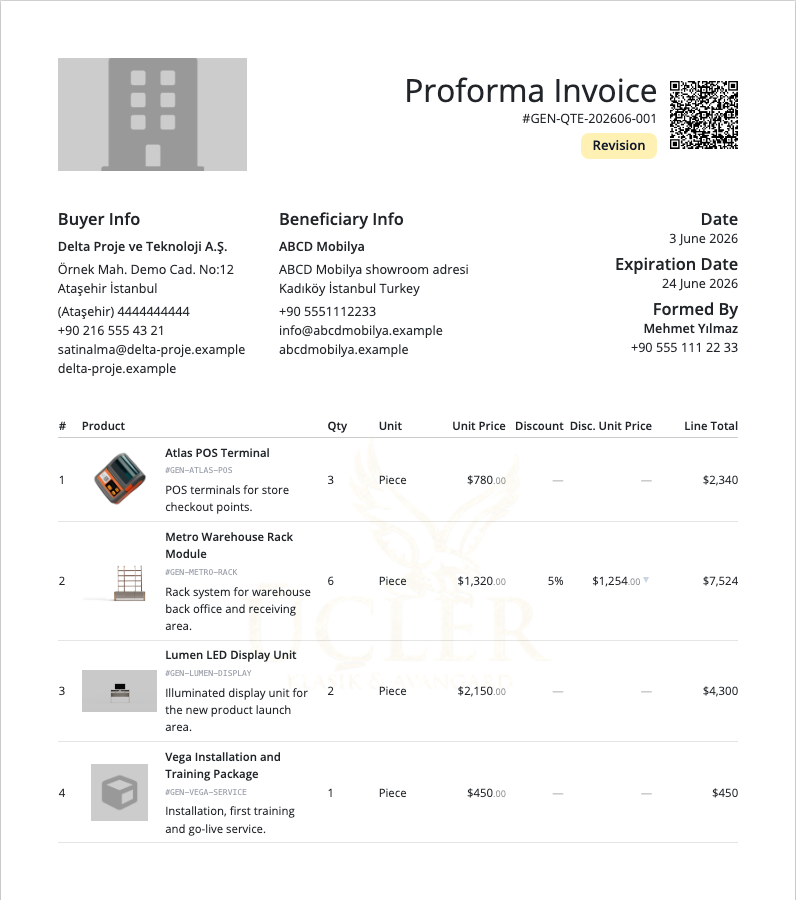
Quote and Proforma Management
Manage products, prices, discounts, PDF output, WhatsApp sharing and quote visit tracking in one sales record.
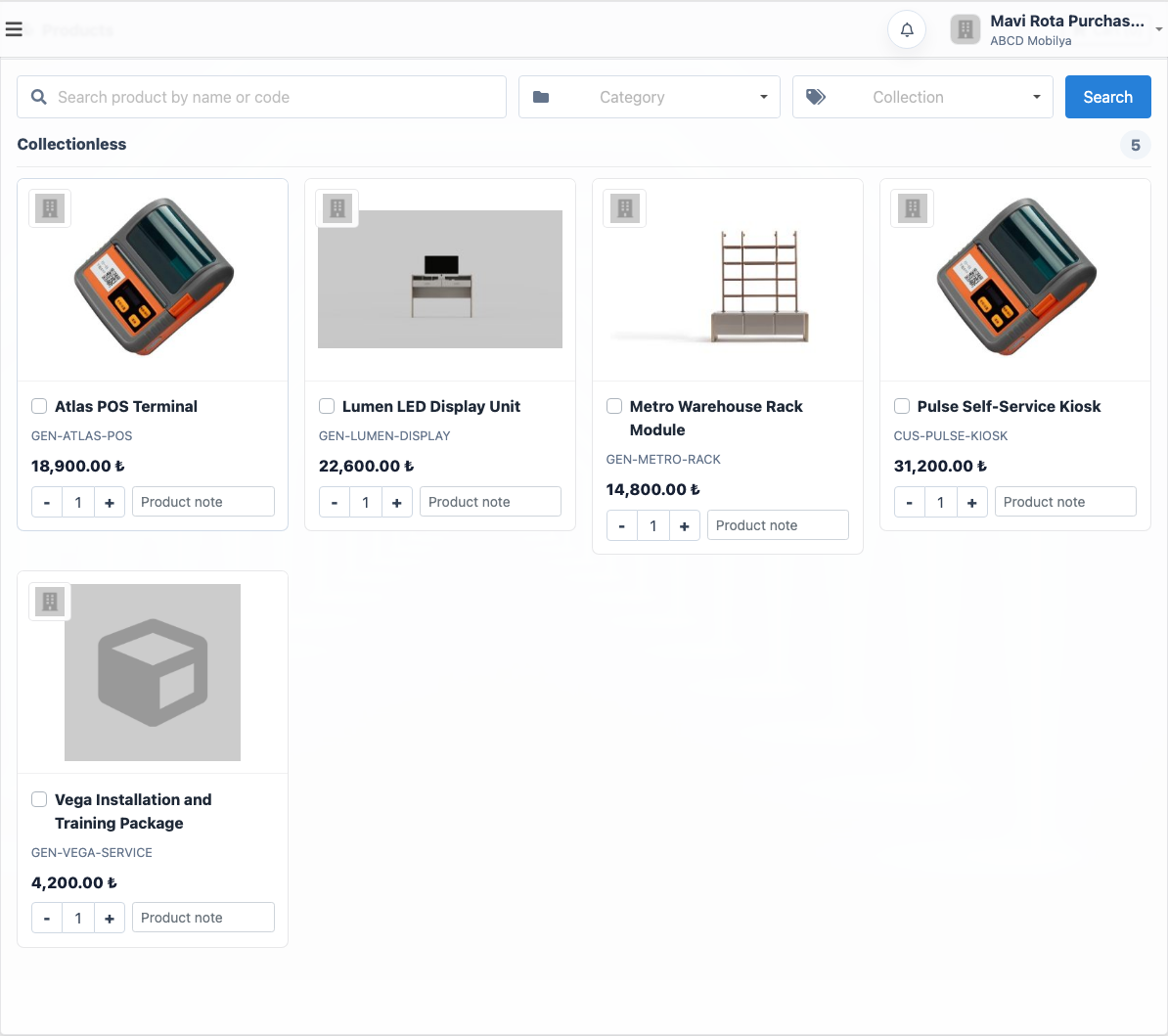
B2B Dealer / Customer Portal
Offer dealers a catalog, price list, cart, order history and controlled internal approval queue.
Frequently asked questions
Can unlimited price lists be created?
Yes. The company can create as many price lists as needed; each list can work with different customer, user, product, category or collection rules.
Can a price list be exported as PDF?
Yes. A price list can be exported in A4/PDF format. Cover, product images, descriptions, page numbers, tax display and print settings can be adjusted per list.
Can prices be edited with Excel?
Yes. Price work can be exported to Excel and imported back through the suitable workflow. The in-system bulk edit screen also helps teams make quick revisions without relying only on files when prices change often.
When is price history useful?
During seasonal updates, currency increases, supplier cost changes or dealer list revisions, teams need to see old and new prices. Price history makes product-level change timing and current price status easier to review.
Speed up price list management with Delbig
Manage product price, currency, PDF, Excel, customer assignment and price history in one CRM workflow.