
B2B Dealer / Customer Portal
B2B bayi portalı, bayi veya kurumsal müşterinin ürün kataloğunu görüp sepet oluşturduğu, sipariş talebi gönderdiği ve bu talebin Delbig CRM içinde ayrı bir onay akışına düştüğü müşteri ekranıdır. Satış ekibi telefon, WhatsApp veya e-posta ile dağınık sipariş toplamak yerine bayinin kendi ekranından gelen talepleri kontrollü şekilde yönetir.
B2B portal iki taraflı bir satış akışıdır
B2B portalı yalnızca müşteriye açılan bir katalog sayfası gibi düşünmemek gerekir. İşin bir tarafında bayi veya müşteri kendi giriş ekranından ürünleri inceler, miktar seçer, not yazar, sepet oluşturur ve sipariş talebi gönderir. Diğer tarafta ise firma, bu müşteriye portal erişimini açar, hangi fiyat listesini ve ürün dövizini kullanacağını belirler, gelen siparişi içeride onay, revizyon veya iptal kararına göre yönetir.
Bu ayrım özellikle bayi ağı, kurumsal müşteri, şube siparişi veya tekrarlayan satın alma yapan firmalar için önemlidir. Bayi siparişi müşterinin kendi ekranından geldiği için ürün adı, miktar, not ve toplam tutar daha düzenli akar; içerideki ekip de bu talebi normal siparişlerden ayrı görüp satış siparişine dönüştürmeden önce kontrol edebilir.
Bayinin gördüğü taraf
- Kendi e-posta adresiyle B2B portala giriş yapar.
- Kendisine açılan ürünleri, fiyatları, sepeti, siparişlerini ve cari özetini görür.
- Aynı portal hesabıyla birden fazla Delbig kullanan üreticiyle çalışıyorsa firma seçimi yapabilir.
Firmanın yönettiği taraf
- Müşteri kartından portal erişimi, fiyat listesi, ürün dövizi ve mağaza erişimi tanımlanır.
- Portal siparişleri ayrı B2B sipariş kuyruğunda bekler.
- Ekip siparişi onaylayabilir, revizyon isteyebilir, revizyon önerisi gönderebilir veya iptal edebilir.
İlk adım: müşteriye portal erişimi vermek
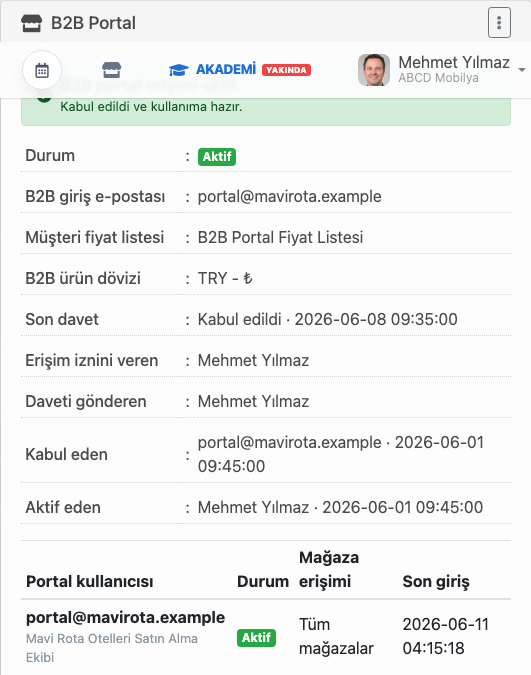
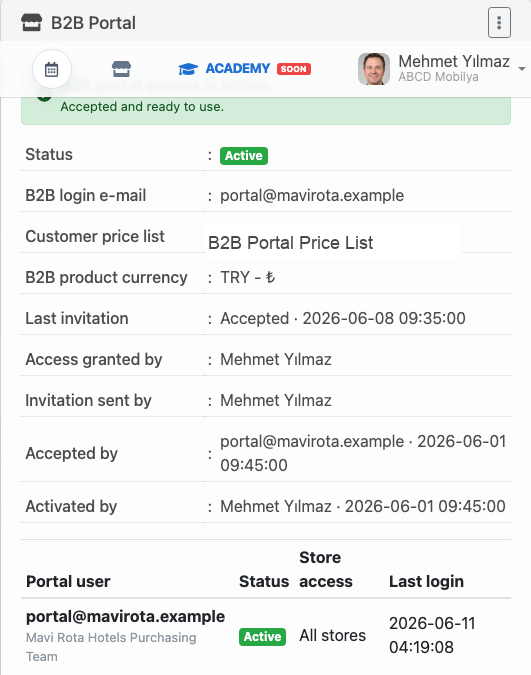
B2B sipariş akışı bayinin portala girmesinden önce, firmanın müşteri kartında yaptığı erişim tanımıyla başlar. Bu adımda müşteriye kullanılacak B2B giriş e-postası, fiyat listesi, ürün dövizi, mağaza erişimi ve davet durumu belirlenir. Böylece portalda görünen fiyat ve ürün akışı rastgele değil, müşteriyle yapılan anlaşmaya göre çalışır.
Bu ekran satış ve yönetim ekibi için de önemlidir. Hangi müşterinin portala aktif erişimi olduğu, daveti kimin gönderdiği, kabul tarihinin ne olduğu ve son giriş bilgisi müşteri kartı üzerinde izlenir. Bayi portalı sadece dışarıdaki kullanıcıya açılan bir kapı değil, içeride de yönetilen bir müşteri yetkisidir.
- B2B giriş e-postası, portala hangi kullanıcının gireceğini netleştirir.
- Müşteri fiyat listesi ve ürün dövizi, bayinin gördüğü fiyat yapısını kontrol eder.
- Mağaza erişimi, bayinin hangi mağaza veya şube kapsamıyla çalışacağını belirler.
- Davet ve kabul bilgisi, erişimin gerçekten aktif hale gelip gelmediğini gösterir.
Bayinin gördüğü ekran: katalog, sepet ve siparişler
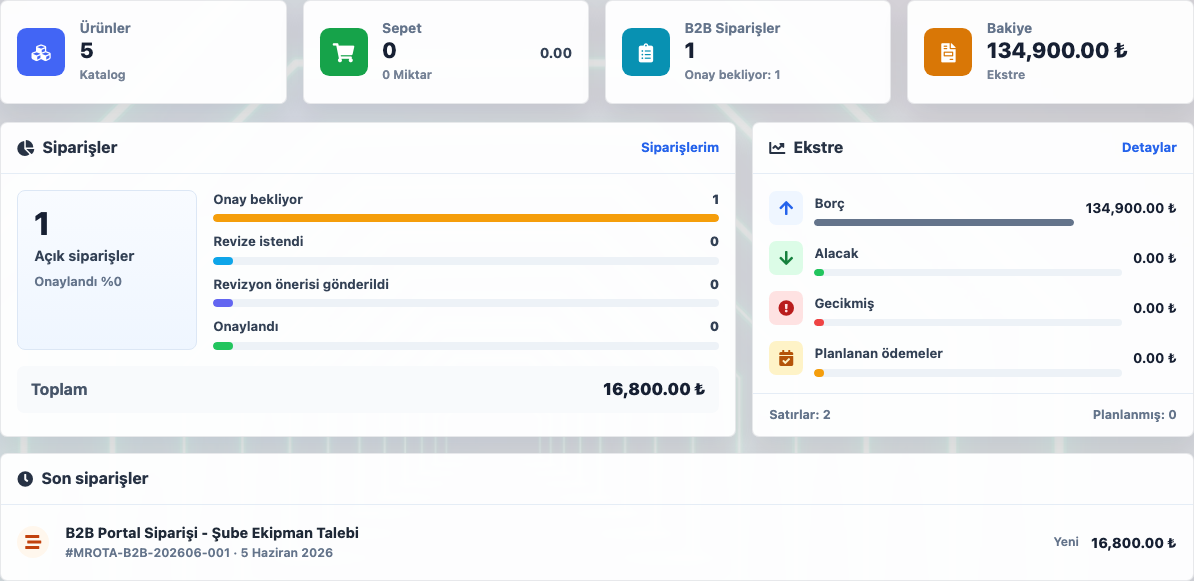
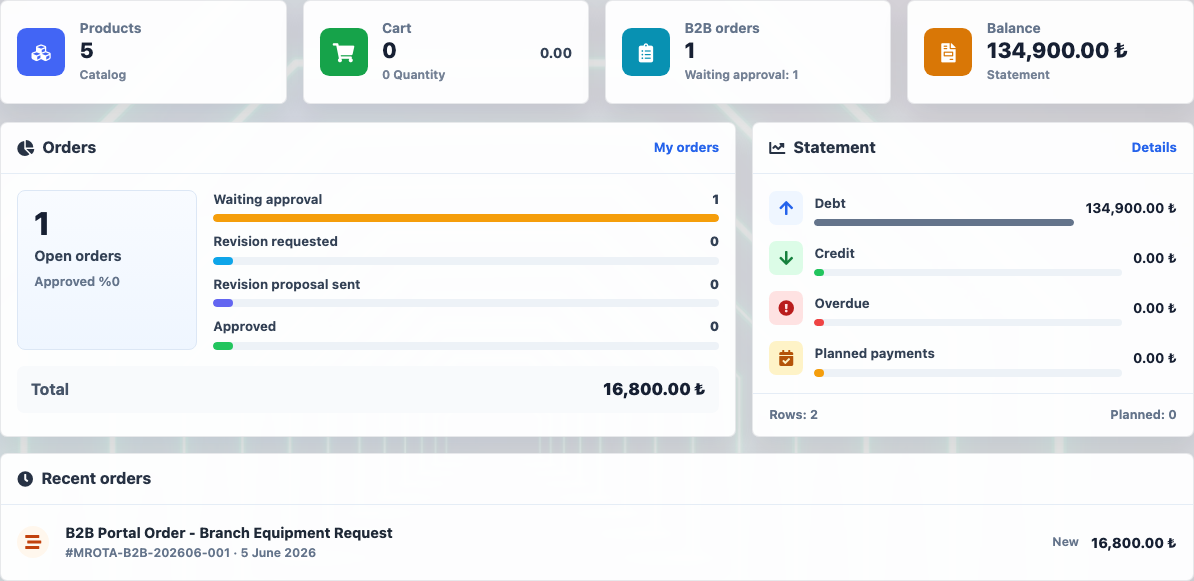
Bayi portala girdiğinde kendi çalışma alanını görür. Ana ekranda ürün sayısı, sepet durumu, B2B siparişleri, cari bakiye, açık sipariş özeti ve son siparişler birlikte yer alır. Bu yapı, bayinin yalnızca yeni sipariş vermesini değil, önceki taleplerini ve bekleyen onaylarını da takip etmesini sağlar.
Ürün kataloğu bayiye hazır bir sipariş ekranı verir
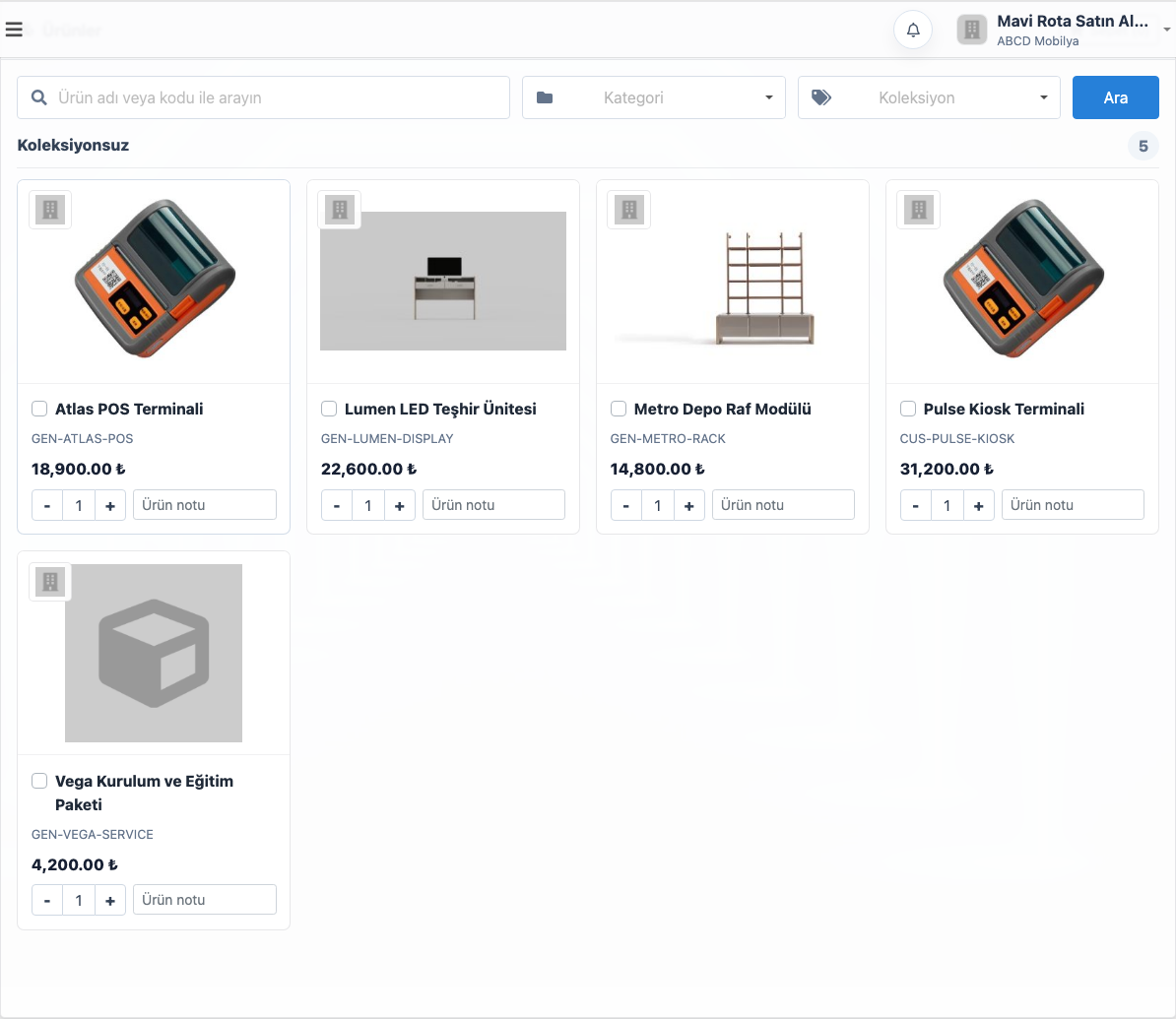
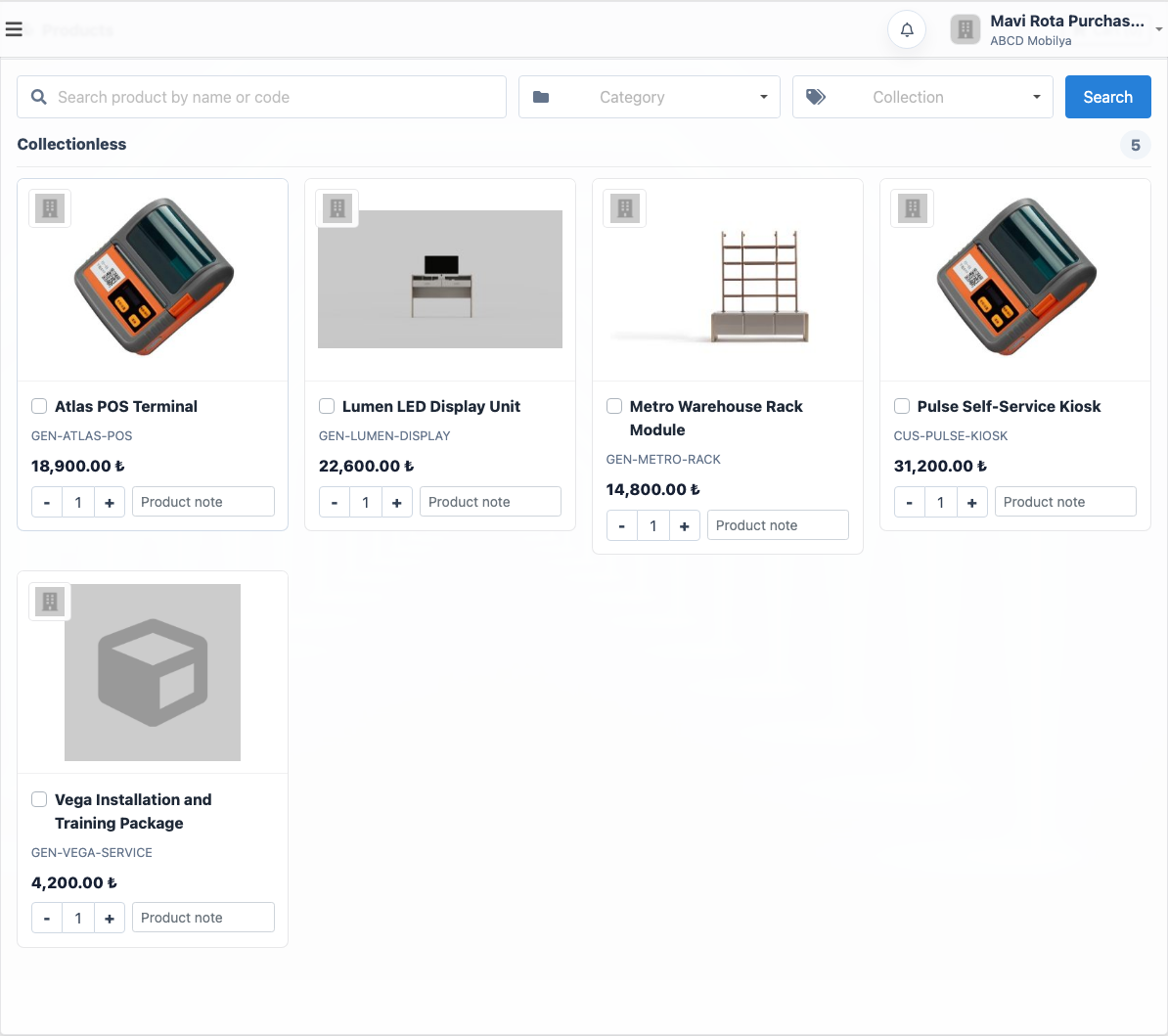
Portal kataloğunda bayi ürün adına veya koda göre arama yapabilir; kategori, koleksiyon ve ürün kartları üzerinden miktar seçebilir. Ürün notu alanı sayesinde özel renk, ölçü, şube açıklaması veya teslimatla ilgili kısa bilgi sipariş satırına eklenebilir.
Bu ekran telefonla ürün kodu okutma, WhatsApp üzerinden ekran görüntüsü gönderme veya e-posta ile liste dolaştırma ihtiyacını azaltır. Bayi hangi ürünleri hangi fiyatla gördüğünü aynı ekranda netleştirir ve sepetini oluşturarak talebi firmaya gönderir.
- Arama ve filtreler bayinin doğru ürünü hızlı bulmasını sağlar.
- Miktar seçimi ve ürün notu sipariş satırına daha temiz veri taşır.
- Portal fiyatı, müşteriye atanmış fiyat listesi ve döviz yapısıyla uyumlu çalışır.
Portal siparişi bayinin kendi geçmişinde izlenir
Bayi sipariş talebini gönderdikten sonra portal içinde kendi sipariş geçmişini görebilir. Bekleyen onay, revizyon istenen, revizyon önerisi gönderilen, onaylanan veya iptal edilen talepler aynı listede ayrılır. Bu sayede bayi “siparişim size ulaştı mı?” diye tekrar aramak yerine kendi ekranından durumunu takip edebilir.
Gelen B2B siparişler içeride ayrı yönetilir
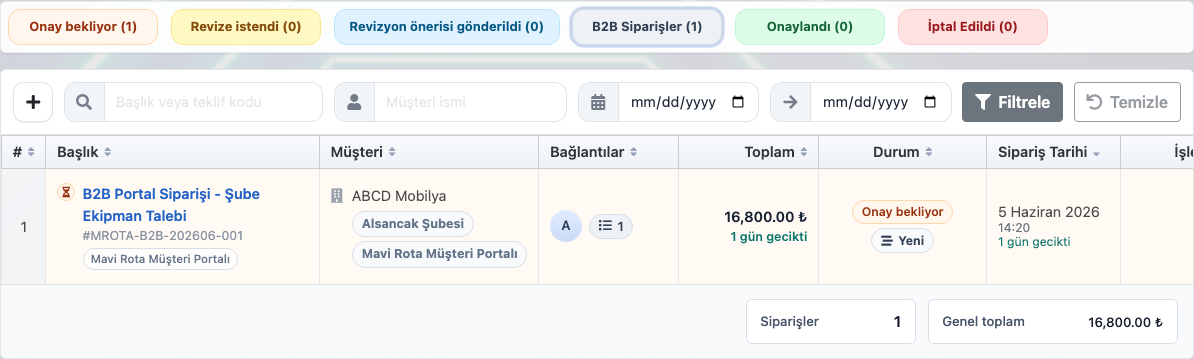
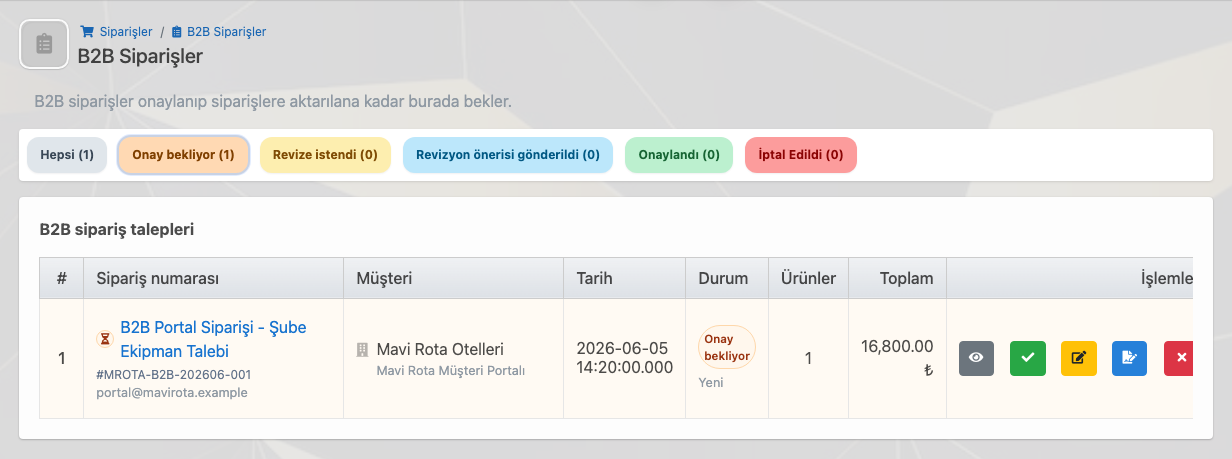
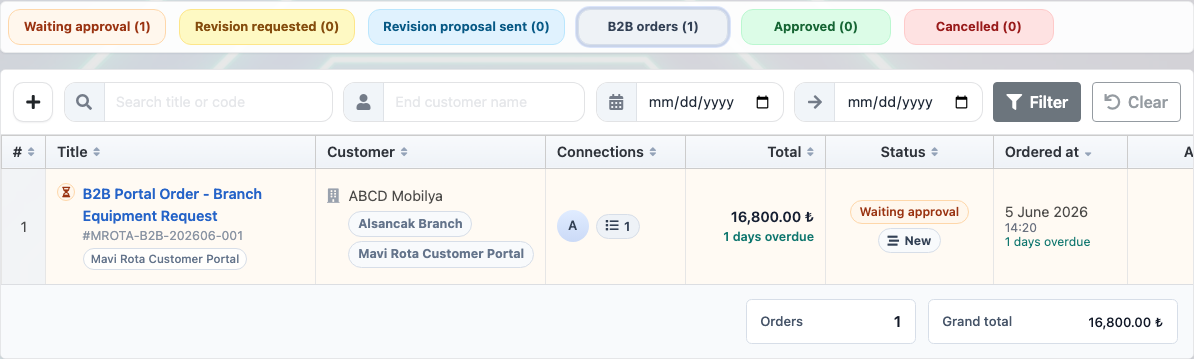
Portalın firma tarafındaki en kritik değeri, bayiden gelen talebin normal sipariş listesine doğrudan karışmamasıdır. B2B siparişler ayrı bir bekleme alanına düşer. Ekip sipariş numarasını, müşteriyi, tarihi, durumunu, ürün sayısını ve toplam tutarı görür; ardından siparişi onaylama, revizyon isteme, revizyon önerisi gönderme veya iptal etme kararını verir.
Bu kontrol, özellikle bayinin yanlış ürün seçtiği, özel iskonto veya termin teyidi gerektiği, stok uygunluğu kontrol edileceği veya satış temsilcisinin müşteriye dönüş yapacağı durumlarda önemlidir. Onaylanan talep daha sonra satış sipariş akışına alınır; böylece portal hız sağlar ama içerideki operasyon kontrolünü ortadan kaldırmaz.
Bir bayi birden fazla üreticiyle çalışabilir
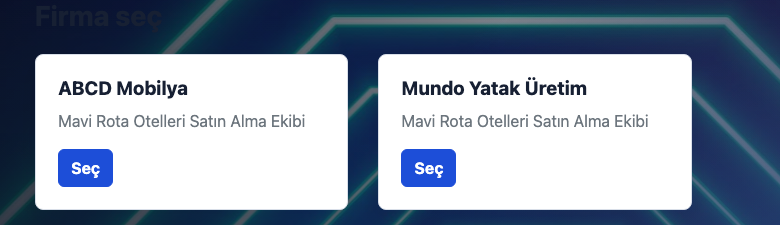
B2B portalın değerli taraflarından biri, bayinin farklı Delbig kullanan üreticilerle çalışırken ayrı ayrı hesap ve bağlantı karmaşasına girmemesidir. Aynı portal kullanıcısı birden fazla üreticiyle eşleştirildiyse girişten sonra firma seçimi yapabilir ve hangi üreticiyle işlem yapmak istiyorsa o hesaba geçebilir.
Bu yapı, özellikle aynı bayi ağı içinde farklı marka, üretici veya tedarikçiyle çalışan müşteriler için güçlüdür. Bayi tek kullanıcı alışkanlığını korur; üretici tarafında ise her firma kendi ürünlerini, fiyat listesini, siparişlerini ve onay akışını ayrı yönetmeye devam eder.
B2B portal hangi işleri sadeleştirir?
| Need | Portal tarafında karşılığı | Firma tarafındaki etkisi |
|---|---|---|
| Bayiye ürün ve fiyat göstermek | Bayi kendisine açılan katalog, fiyat listesi ve ürün döviziyle çalışır. | Yanlış fiyat paylaşımı ve güncel olmayan ürün listesi riski azalır. |
| Sipariş talebi almak | Bayi ürünleri sepete ekler, miktar ve ürün notunu girerek talep gönderir. | Sipariş verisi daha düzenli gelir; ekip tekrar ürün kodu veya miktar sormaz. |
| İçeride kontrol etmek | Talep bayinin geçmişinde bekleyen onay olarak görünür. | Firma B2B sipariş kuyruğunda onay, revizyon veya iptal kararı verebilir. |
| Birden fazla firma ile çalışma | Bayi aynı portal hesabından üretici firma seçimi yapabilir. | Her üretici kendi katalog, fiyat ve sipariş akışını ayrı yönetir. |
| Tekrarlayan siparişleri azaltmak | Bayi önceki siparişlerini ve açık taleplerini portalda izler. | Telefon, WhatsApp ve e-posta üzerinden gelen tekrar takip trafiği azalır. |
Hangi firmalar için uygundur?
Bayi ağıyla çalışan üreticiler
- Bayilerin katalog ve fiyat listesini kendi ekranlarından görmesini sağlar.
- Bayi siparişlerini içeride ayrı onay kuyruğunda toplar.
- Aynı bayi kullanıcısının birden fazla üretici hesabı arasında geçiş yapabilmesini destekler.
Kurumsal müşteri ve şube siparişi alan firmalar
- Tekrarlayan ürün taleplerini telefon veya WhatsApp yerine portal üzerinden alır.
- Müşterinin açık siparişlerini, onay bekleyen taleplerini ve cari özetini görünür kılar.
- İçeride onaylanmadan satış siparişine dönüşmeyen kontrollü bir akış kurar.
Related solution pages
Product and Price List Management
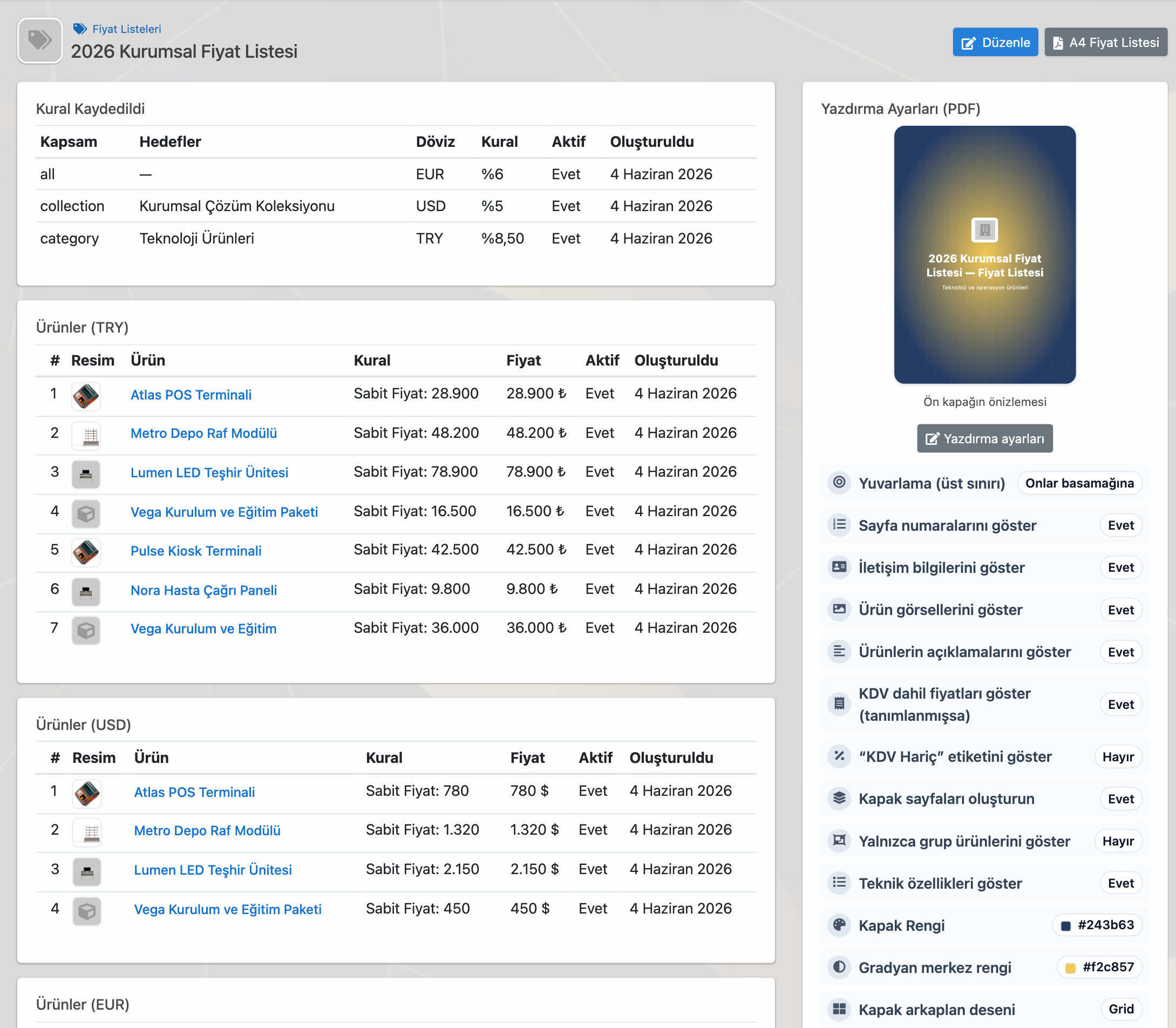
Tekil fiyat, toplu düzenleme, Excel, PDF, dövizli liste, müşteri ataması ve fiyat geçmişini yönetin.
Order Tracking
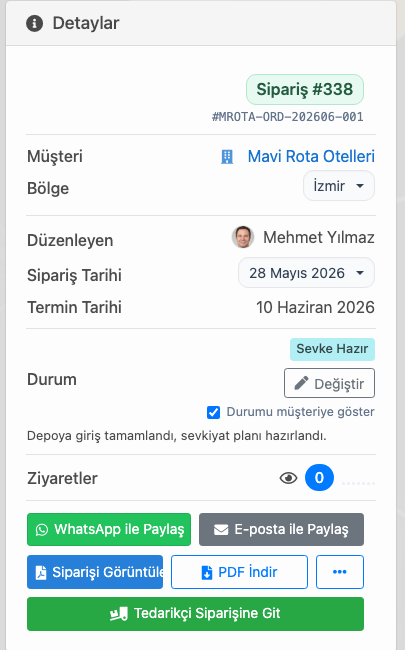
Tekliften, doğrudan satıştan veya B2B portaldan gelen siparişi stok, tedarikçi, depo ve sevkiyata bağlayın.
Frequently asked questions
B2B bayi portalına kimler erişebilir?
Firma müşteri kartından portal erişimi verdiği bayi, kurumsal müşteri, şube veya satın alma kullanıcısına erişim açabilir. Giriş e-postası, fiyat listesi, ürün dövizi ve mağaza erişimi firma tarafından belirlenir.
Bayi portal siparişi doğrudan siparişe dönüşür mü?
Portal siparişi önce içeride B2B sipariş talebi olarak görünür. Ekip talebi inceleyip onaylayabilir, revizyon isteyebilir, revizyon önerisi gönderebilir veya iptal edebilir. Onaylanan talep satış sipariş akışına alınır.
Bayi birden fazla Delbig kullanan firmayla çalışabilir mi?
Evet. Aynı portal kullanıcısı birden fazla üretici veya tedarikçi firmayla eşleştirildiyse girişten sonra firma seçimi yapabilir ve ilgili firmanın portalına geçebilir.
Portal fiyatları nasıl belirlenir?
Portal fiyatları müşteriye atanan fiyat listesi ve ürün döviziyle yönetilir. Böylece bayinin gördüğü katalog ve fiyat yapısı firma tarafından kontrol edilen müşteri anlaşmasına göre çalışır.
Bayi ve müşteri siparişlerini portala taşıyın
Katalog, fiyat listesi, sepet, portal siparişi ve içeride onay akışını Delbig CRM üzerinde birlikte yönetin.
B2B Dealer / Customer Portal
The B2B dealer portal is the customer-facing screen where dealers or corporate customers view the product catalog, build a cart, submit an order request and let that request enter a separate approval workflow inside Delbig CRM. Instead of collecting orders through phone calls, WhatsApp or scattered emails, the sales team manages structured requests coming from the dealer’s own portal.
The B2B portal is a two-sided sales workflow
The B2B portal should not be treated as only a catalog page opened to the customer. On one side, the dealer or customer signs in, browses products, chooses quantities, writes product notes, builds a cart and submits an order request. On the other side, the company grants portal access, defines the price list and product currency, and manages incoming requests with approval, revision or cancellation decisions.
This distinction is especially important for dealer networks, corporate customers, branch orders and repeat purchasing workflows. Because the order comes from the customer’s own screen, product names, quantities, notes and totals arrive in a cleaner structure; the internal team can review the request separately before moving it into the sales order workflow.
What the dealer sees
- Signs in to the B2B portal with their own e-mail address.
- Views assigned products, prices, cart, orders and account balance summary.
- Can switch company accounts if the same portal user works with multiple producers that use Delbig.
What the company manages
- Defines portal access, price list, product currency and store scope from the customer card.
- Receives portal orders in a separate B2B order queue.
- Can approve the order, request a revision, send a revision proposal or cancel it.
First step: grant portal access to the customer
The B2B order workflow starts before the dealer signs in, with the access definition made on the customer card. In this step, the company defines the B2B login e-mail, price list, product currency, store access and invitation status. The prices and products shown in the portal therefore follow the customer agreement instead of appearing randomly.
This screen also matters for the sales and management team. The customer card shows which customer has active portal access, who sent the invitation, when it was accepted and when the user last signed in. The dealer portal is not only an external doorway; it is also a managed customer permission inside the CRM.
- The B2B login e-mail clarifies which user can access the portal.
- The customer price list and product currency control the price structure seen by the dealer.
- Store access defines which store or branch scope the dealer works with.
- Invitation and acceptance details show whether access is actually active.
What the dealer sees: catalog, cart and orders
After signing in, the dealer sees their own workspace. The dashboard shows product count, cart status, B2B orders, account balance, open order summary and recent orders together. This helps the dealer not only submit a new order, but also follow previous requests and pending approvals.
The product catalog gives the dealer a ready ordering screen
In the portal catalog, the dealer can search by product name or code, filter by category or collection, and select quantities from product cards. The product note field can carry color, size, branch note or delivery details into the order line.
This reduces the need to read product codes on the phone, send screenshots through WhatsApp or circulate lists by e-mail. The dealer sees which products and prices are available on the same screen, builds a cart and sends the request to the company.
- Search and filters help the dealer find the right product quickly.
- Quantity selection and product notes move cleaner data into the order line.
- Portal pricing follows the assigned customer price list and currency setup.
The portal order stays visible in the dealer’s own history
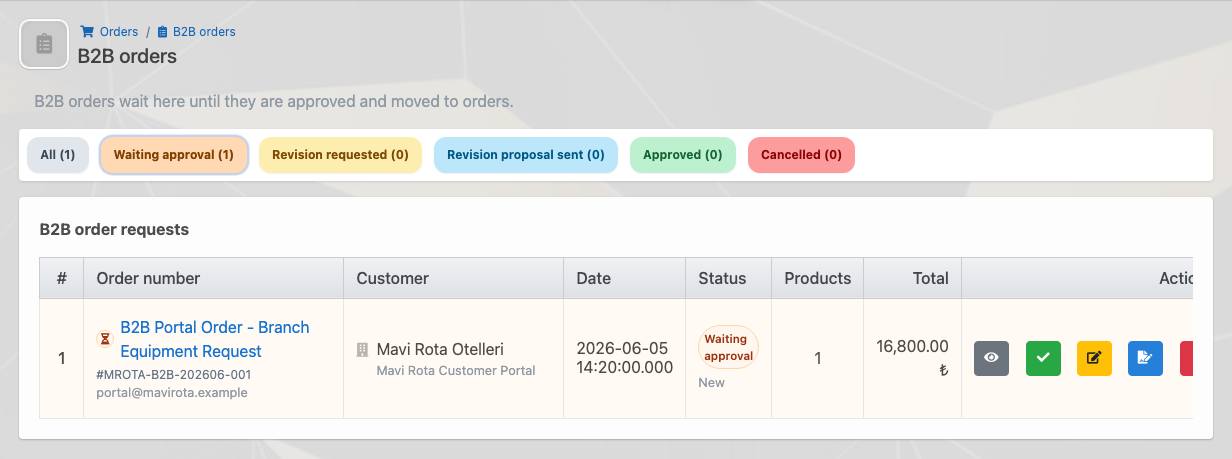
After submitting the order request, the dealer can follow the order history inside the portal. Waiting approval, revision requested, revision proposal sent, approved and cancelled requests are separated in the same list. Instead of calling again to ask whether the order arrived, the dealer can track the current status from their own screen.
Incoming B2B orders are managed separately inside CRM
The most critical internal value of the portal is that dealer requests do not immediately mix into the normal order list. B2B orders enter a separate waiting area. The team sees order number, customer, date, status, product count and total, then decides whether to approve the request, ask for a revision, send a revision proposal or cancel it.
This control is important when the dealer chooses the wrong product, a special discount or delivery date needs confirmation, stock availability must be checked, or the sales representative needs to follow up with the customer. Once approved, the request can move into the sales order workflow; the portal adds speed without removing internal control.
One dealer can work with multiple producers
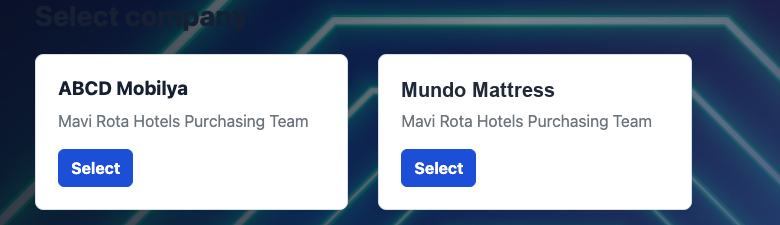
One valuable part of the B2B portal is that a dealer working with different Delbig-powered producers does not need separate links and separate account habits for each one. If the same portal user is connected to multiple producers, the user can select the company after login and switch to the account they want to work with.
This is especially strong for customers working with different brands, producers or suppliers within the same dealer network. The dealer keeps a single user habit, while each producer continues to manage its own products, price list, orders and approval workflow separately.
Which work does the B2B portal simplify?
| Need | Portal side | Company-side impact |
|---|---|---|
| Show products and prices to dealers | The dealer works with the assigned catalog, price list and product currency. | The risk of sharing wrong prices or outdated product lists is reduced. |
| Receive order requests | The dealer adds products to the cart, enters quantity and product notes, then submits the request. | Order data arrives in a cleaner structure; the team does not need to ask again for product codes or quantities. |
| Control internally | The request appears as waiting approval in the dealer’s history. | The company can approve, revise or cancel the request in the B2B order queue. |
| Work with multiple companies | The dealer can select a producer company from the same portal account. | Each producer manages its own catalog, pricing and order workflow separately. |
| Reduce repeat follow-ups | The dealer follows previous orders and open requests in the portal. | Repeat phone, WhatsApp and e-mail follow-up traffic decreases. |
Which companies is it suitable for?
Producers working with dealer networks
- Let dealers view catalog and price list from their own portal screen.
- Collect dealer orders in a separate internal approval queue.
- Support one dealer user switching between multiple producer accounts.
Companies receiving corporate or branch orders
- Move repeat product requests from phone or WhatsApp into the portal.
- Make open orders, pending requests and account balance visible to the customer.
- Create a controlled workflow where portal requests do not become sales orders before internal approval.
Related solution pages
Product and Price List Management
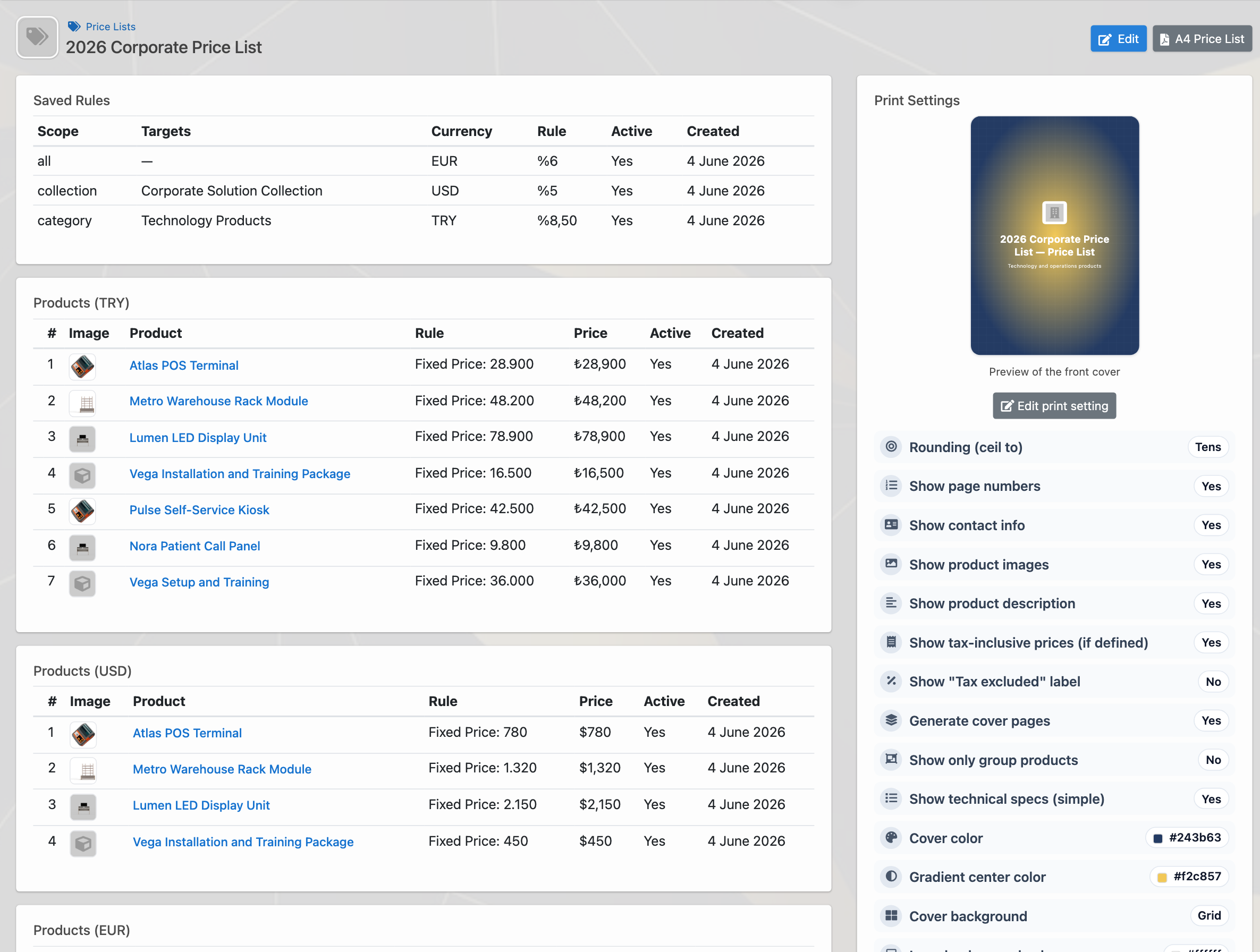
Manage individual prices, bulk edits, Excel, PDF, multi-currency lists, customer assignments and price history.
Order Tracking
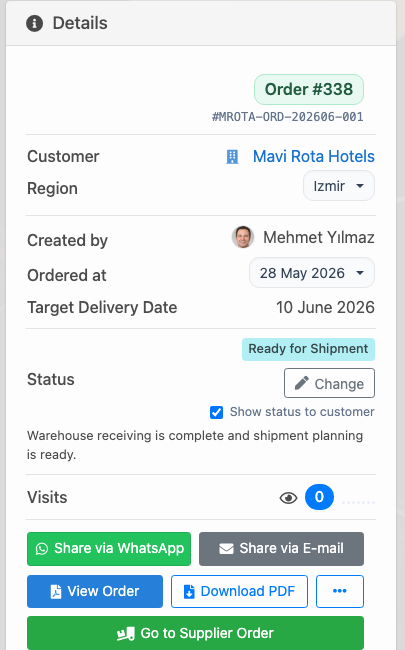
Connect orders from quotes, direct sales or the B2B portal with inventory, suppliers, warehouses and shipment.
Frequently asked questions
Who can access the B2B dealer portal?
The company can grant access to a dealer, corporate customer, branch or purchasing user from the customer card. Login e-mail, price list, product currency and store access are defined by the company.
Does a portal order become a sales order immediately?
The portal order first appears internally as a B2B order request. The team can review it, approve it, request a revision, send a revision proposal or cancel it. Approved requests move into the sales order workflow.
Can one dealer work with multiple companies that use Delbig?
Yes. If the same portal user is connected to multiple producer or supplier companies, the user can select the company after login and switch to the relevant portal.
How are portal prices determined?
Portal prices are managed through the price list and product currency assigned to the customer. This lets the catalog and pricing seen by the dealer follow the customer agreement controlled by the company.
Move dealer and customer orders into the portal
Manage catalog, price list, cart, portal order and internal approval workflow together in Delbig CRM.